Review: Asus RT-BE86U WiFi 7 Router
What if I told you that I have come across a WiFi 7 router that is both fast and fully customizable? By fast I mean that it is capable of above gigabit speeds over WiFi. And by fully customizable I mean that you can tweak it to match your use case. You’d likely say that I am crazy. But I am not. Meet the ASUS RT-BE86U WiFi 7 Router:

Compared to some routers that ASUS makes, this router is pretty understated. There’s no RGB and only a handful of LEDs which you can turn off if you need to, and the styling isn’t over the top. That means that the wife approval factor will be high if you put this in your house. In fact, my wife saw it and said that “it doesn’t look nearly as gamerish as their other routers.” I should note that the antennas are removable and have a standard connector. Which is handy if you need to replace them.

ASUS has cleverly added the words “WiFi 7” to the venting on the back. Which by the way, there’s a lot of venting on this router. In terms of connections, you get three 2.5 Gbps ports, a 2.5 Gbps and 10 Gbps which depending on the situation can be used for WAN access. A tip of the hat to ASUS for providing such fast ports as that’s a form of future proofing this router. A USB 3.0 port and a USB 2.0 are present for things with external hard drives and printers on the right, on the left is the reset button, power connector, and on/off switch.

On the left is a WPS button.

On the right is the button that turns the front LEDs on and off.
In terms of bands, here’s what you get:
- 2.4GHz: up to 1032 Mbps
- 5GHz: up to 5764 Mbps
Now some of you are likely saying “where’s the 6 GHz band?” The fact is, you don’t need that band to do WiFi 7 as the WiFi 7 standard can take multiple bands and put them together to get crazy speeds. That functionality is called MLO and you can read about it here. Also, omitting that band likely helps to keep the costs down. Another thing to point out is that a router with Wi-Fi 7 generally improves speeds across all bands. Finally, there’s only a handful of WiFi 7 devices out there at the moment. So for most people, having no 6 GHz band is a non issue.
Setup is easy. You can use the ASUS app to set things up. Or if you’re like me, you can use the web interface which gives you way more options to play with. Most people should go the app route as that’s the easiest path to getting this working for most people. If you own another ASUS router, you can also back up the configuration from that router, and load it into this one and be up and running in minutes. For my testing, I set it up as a new router with the default settings.
In terms of speed, well let’s say I was impressed. Let’s start with its ability to deal with a PPPoE connection. Which is what ISPs like Bell or Distributel offer its customers. This is important to yours truly as most consumer routers have huge problems dealing with PPPoE traffic, resulting in speed being left on the table because the router can’t handle it. That’s not the case here. My connection is apparently 1 Gbps downstream/750 Mbps upstream via a fibre link and this is what I get over my Asus ZenWiFi XT8:

Now this is what I get with the ASUS RT-BE86U:
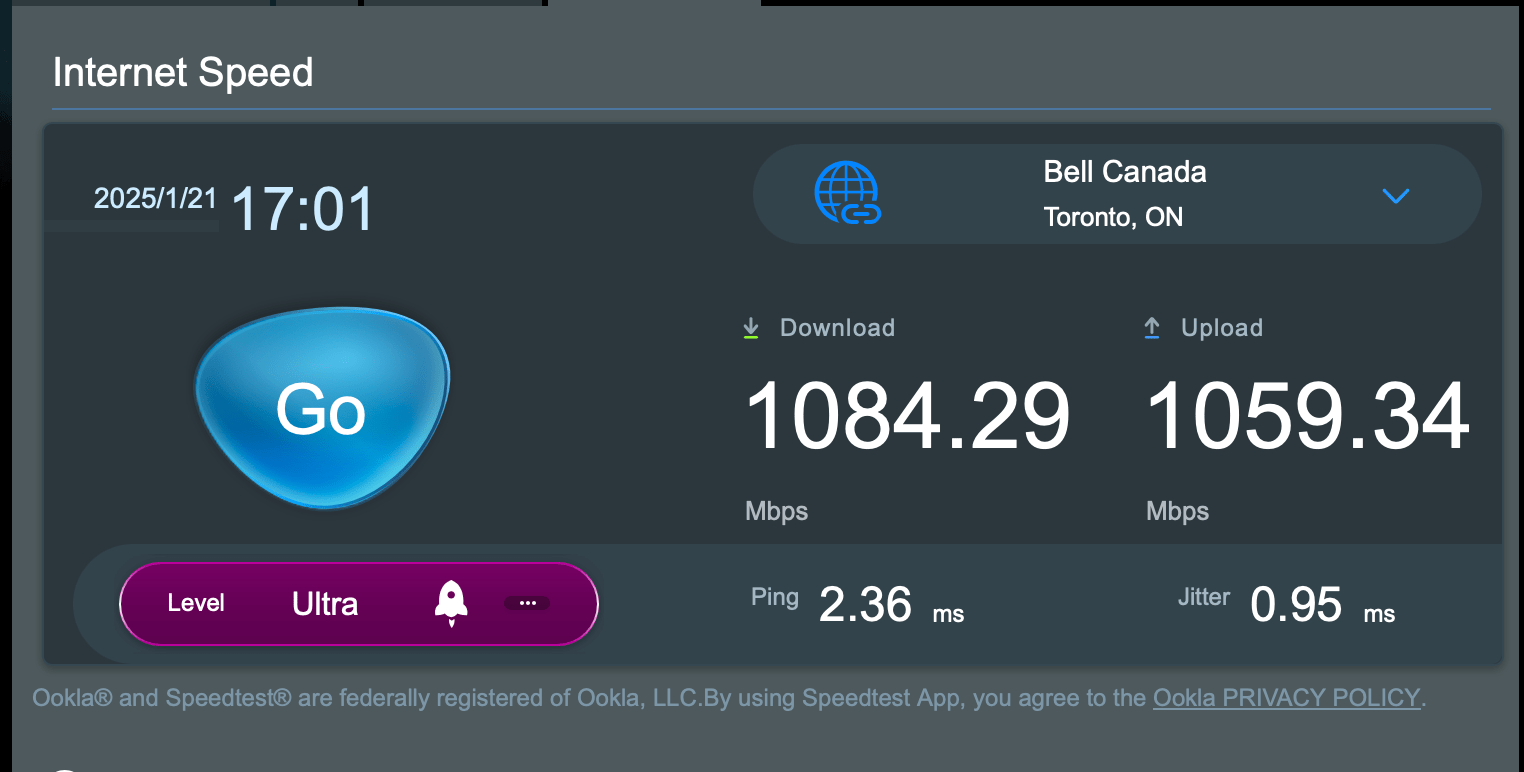
In short, ASUS has clearly built a router that is built to handle the most demanding connections. And a PPPoE connection would qualify as demanding because of the overhead that PPPoE has.
But the speed doesn’t stop there. I did a speed test from my iPhone 14 Pro standing about 10 meters away. Yes, this is a WiFi 6 device. But it will illustrate something that I said earlier, which is WiFi 7 improves speed on all bands. In this case the 5 GHz band. Once again I will start with a speed test from the ASUS ZenWiFi XT8:

Now let’s look at the speed test from the ASUS RT-BE86U:

What this means that even if you don’t have a single WiFi 7 device in your home, you will get better performance on WiFi. I’ll go one step further. I have a Mac mini with the M2 Pro processor. And that Mac has WiFi 6E. Let’s see what speed you get from the XT8 for starters:

And now from the RT-BE86U

The Mac mini on WiFi 6E came close to maxing out my connection. Thus I believe you can call this router fast on all fronts. And if I had a faster Internet connection, I would see faster numbers from all my tests.
Now ASUS could have stopped there. But there’s a number of things that I would like to point out that add even more value to this router beyond speed:
- You can use the 10Gbps as the WAN port, or switch the WAN port to the 2.5Gbps port. Whatever port that is the non-WAN port will function as a LAN port.
- You can use the router in a dual-WAN setup so that you have access to more than one Internet connection. Either to combine the links or have a backup Internet connection on standby.
- You can use the USB port as a third WAN source to host a tethered smartphone or cellular modem for emergency situations.
- It supports AI Mesh which allows you to create a mesh network with one or more supported ASUS routers.
- It has built-in Parental Controls and online protection as part of their AiProtection suite that is supplied by Trend Micro. This suite is free forever which is a significant difference between this router (or any ASUS router for that matter) and other brands of router which make you pay extra for this functionality as part of a subscription of some sort.
- For a limited time you can get a complementary twelve month or six month NordVPN subscription when you buy an ASUS router. More info here.
- Though it’s not advertised as a gaming router, it does have a broad amount of gaming specific features that will make gamers happy.
There’s one other thing that I’d like to point out. ASUS routers are very customizable. If I need to tweak a setting, I have the ability to do so. That’s something a lot of consumer routers do not let you do because they hide so much of what you can do. This level of customization is great for advanced users like me as there have been times I have had to use a really obscure setting to fix an issue with a unique WiFi device. Or using a router like this with Distributel fibre internet service which requires the router to be set up to use VLAN 40 to connect to the Internet. All of that means that you can use this, or any other ASUS router in more unique use cases where other brands of routers would fail in.
MSRP is $409.99 CAD. Now that I will admit is more expensive than its competition. But here’s my argument on that. If you combine the performance that this router has, the extra value that I outlined in the bullet points above that doesn’t cost you anything extra, and the fact that you can customize it six ways from Sunday for whatever unique use case that you have, this router is a winner. Take a good look at it if you want to dip your toe into the world of WiFi 7.
January 30, 2025 at 9:04 am
[…] I reviewed the ASUS RT-BE86U and discovered how fast it was at routing traffic to and from the Internet, it made me think that I […]
February 15, 2025 at 12:55 pm
[…] people who wonder if I am on Team ASUS again so to speak given that I gave a positive review of the RT-BE86U router and I now use it as the main router in my network with good results. Well, here’s the short […]
June 20, 2025 at 8:53 am
[…] with Distributel who is my current ISP. By putting in a better performing router, specifically the ASUS RT-BE86U, I was able to get my speeds to 1 Gbps up and down from roughly 1 Gbps down and roughly 600 Mbps […]