I Upgraded To The New HomeKit Architecture Yesterday…. What Could Go Wrong?
One of the things that Apple promised when iOS 16 was released was a new architecture for HomeKit. Apple really didn’t go into much detail when they announced it. But it was supposed to improve the reliability of HomeKit setups. This was eventually rolled out just before Christmas, and was promptly pulled when people had issues. Apple did promise that it would return, and it did yesterday with the release of iOS 16.4. So as usual, I decided to update to the new architecture to see what would happen. Before I tell you about how that went, let’s go into the weeds for a bit to explain what this new architecture is and why it matters.
With previous versions of HomeKit, your HomeKit “controller” (the Home app on an iPhone, iPad, or Mac, for example) talked directly to each device in your home. What that means is that when you look at any device, your iPhone, Mac or whatever has to go across your network and ask the device, say a smart switch for example, what its status was. Then it would have to wait until the device replied. This is why you would see “Updating….” in the Home app before the status of the device was received by the Home app. If it didn’t get a response at all or in a timely manner, you would see the dreaded “no response” message. Now this is horribly inefficient as a large HomeKit setup might take minutes to have devices respond as the Home app is literally asking every device what its status is.
In the New HomeKit architecture, ALL HomeKit requests are serviced by the HomeKit Hub. Meaning your Apple TV or your HomePod. Your Home app no longer need to query each device individually. The HomeKit Hub is continually maintaining an up-to-date status of each device and simply passes that information to the Home app which is far more efficient. In theory this should make every device instantly available and should result in better performance, even in large HomeKit setups.
There is one side effect to this new architecture for HomeKit. iPads which could be used as HomeKit hubs prior to the release of the new architecture can no longer be used for that purpose. You are now “forced” to use an Apple TV or HomePod as a HomeKit hub. That I can see being an issue for some. But honestly, having a HomePod or an Apple TV which is purpose built to act as a HomeKit hub is a much better idea.
Another thing to point out is that this is a one way trip. Once you pull this trigger, there’s no going back.
So with that out of the way, let me talk about my upgrade experience by starting with my HomeKit setup. It’s not all that big and I described it here. But I will point out that I have swapped this door alarm for this one recently. My wife and I have the ability to administer anything in the HomeKit setup. And that’s important to note as inviting someone to administer your HomeKit setup was one of the issues. The other thing was your entire HomeKit setup would become unresponsive among other issues. So my plan was to watch out for those issues as I did the upgrade.
Now the first thing that I did was upgrade every Apple device to the latest software version. So that meant that my wife and I had to be running the following on our respective devices:
- Both our Macs needed to be updated to macOS 13.3
- Both our iPhones needed to be updated to iOS 16.4
- Both our Apple Watches needed to be updated to watchOS 9.4
- All the HomePod minis needed to be updated to HomePod software 16.4
This is because if you don’t upgrade all your devices to the latest software, any device that is not on the latest software can lose access to your HomeKit setup. And I suspect that a device that isn’t on the latest software version can cause other problems as Apple warns you if someone that has access to the HomeKit software has a device that isn’t on the latest software. Thus I would recommend that for best results, you upgrade all your devices first before you do anything else.
Once I did that all of that, I went to the Home app on my iPhone, clicked what I call the “hamburger menu” in the top right of the Home app to get this menu:
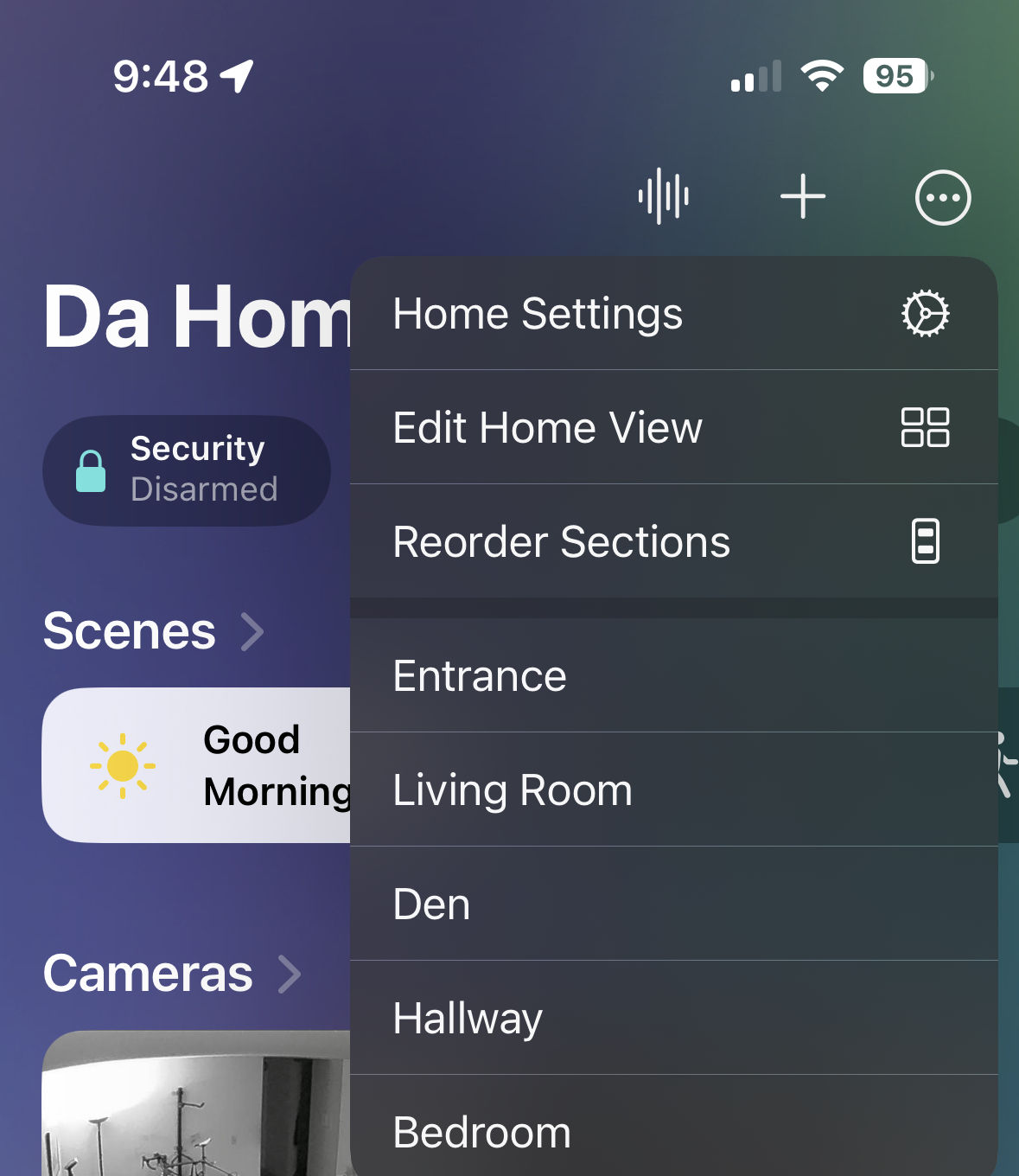
I then chose “Home Settings” and “Software Update” and was greeted with this:

After clicking “Learn More”, I got this screen:

I then chose the upgrade option and watched a pinwheel spin on the bottom part of my iPhone for about three minutes. Then it was done. When I went back to the the main screen of the Home app, I noted that all devices went unresponsive for just over a minute. Then they came back and in my testing of individual devices and scenes, everything worked fine.
Now some people with larger HomeKit setups are noticing that everything is much faster now. But I haven’t seen that as I don’t have a huge amount of devices in my setup. However I did notice that accessing my HomeKit setup from my Apple Watch went from practically unusable to being fairly quick and responsive. Thus validating that this architecture was a success. Though I will need to do some additional testing on some of my location based scenes to make sure. Once I do that, I will update this story accordingly. But in short, I can say that nothing went wrong in terms of upgrading to the new HomeKit architecture.
So should you upgrade to the new HomeKit architecture? It’s early days yet, but my own experience combined with what I am seeing on places like Reddit suggest to me that Apple has largely sorted out whatever issues that they had with the new architecture. Though I am still seeing the odd person reporting that their entire HomeKit setup go unresponsive after the upgrade. But those seem to the the minority rather than every second post on Reddit which was the case last year. Thus my suggestion would be to wait a few days to see if any negative reports pop up in the HomeKit subreddit. If they don’t, then you might want to dive in.
If I could give Apple one piece of advice, there needs to be a way for users to backup their HomeKit setups along with any scenes and automations that they might have created. I say this because this would give people the confidence to do an upgrade like this as they would have the ability to revert back easily if something went wrong. At present there isn’t anything natively that backs up a HomeKit setup. Though I am aware of a couple of third party tools that do this. But I have not tested them. As a result, if something does go wrong, the only thing a user can do at present is to delete the HomeKit setup and do it over again from scratch. Which if you have a large HomeKit setup with a lot of automations and/or scenes would be very painful.
Have you done the HomeKit architecture upgrade? If so, what was your experience like? Please leave a comment below and share your experience with us.
April 19, 2023 at 9:45 am
[…] be on the new home architecture. So if you haven’t done that yet, you might want to visit this page to get an overview and instructions on how to set that up. But assuming that you’ve done […]
May 10, 2023 at 8:59 am
[…] the end of March, I dove head first into upgrading to Apple’s new HomeKit Architecture. This originally rolled out before Christmas. And when it did it, it created so many issues for […]