New Research Exposes FUNNULL CDN Renting IPs from Big Tech Like AWS & MSFT for Laundering

Posted in Commentary with tags on January 30, 2025 by itnerd

Today, Silent Push announced that its threat analysts have discovered threat actors enabled by mainstream cloud providers, including Amazon Web Services (AWS) and Microsoft Azure. 

New details uncovered in the course of this reporting indicate that FUNNULL is likely using fraudulent or stolen accounts to acquire these IPs to map to their CNAMEs, and providers we have spoken to claim this wasn’t caught in real time due to visibility holes from the technical complexity of their DNS architecture.

Additional key findings include:

  • FUNNULL has rented over 1,200 IPs from Amazon and nearly 200 from Microsoft. Although most IPs have been taken down, new ones are acquired every few weeks.
  • There are indications of FUNNULL illicitly acquiring the IPs using stolen or fraudulent accounts. However, external visibility into this process is limited.
  • Money laundering is directly associated with a service hosted on shell websites, retail phishing schemes, and pig-butchering scams being kept online via infrastructure laundering.

This is now live at https://www.silentpush.com/blog/infrastructure-laundering/

INKY Introduces New Generative AI Capabilities

Posted in Commentary with tags on January 30, 2025 by itnerd

 INKY, the leader in modern email security for Managed Service Providers, announced today the integration of groundbreaking Generative AI capabilities into its platform, redefining the standards of email security. INKY GenAI is now available to analyze emails in real-time for all eligible customers, at no additional cost.

Building on its legacy of innovation, INKY’s Generative AI marks a major leap forward, akin to its groundbreaking deployment of Computer Vision in late 2018. Now in its sixth generation, INKY Computer Vision recognizes hundreds of brands with human-level accuracy, and its Generative AI sets a new standard for language understanding and email threat detection.

Key Benefits of INKY Generative AI:

  1. Human-Level Language Understanding: INKY’s Generative AI processes email content much like advanced chatbots, interpreting meaning and intent regardless of phrasing. This enables superior detection of zero-day attacks, thwarting even the most cleverly worded attempts to evade pattern-based detection systems.
  2. Explainable Results: The INKY Dashboard highlights specific sections of an email that contribute to its assessment, giving administrators actionable insights and confidence in the AI’s decision-making process.
  3. Integrated Obfuscation Countermeasures: Combining Generative AI with INKY’s existing countermeasures for cloaked text (e.g., zero font, Unicode, and homograph techniques), the platform transforms obfuscated email content into clean text for precise analysis.
  4. Broad System Integration: Generative AI is infused into all aspects of INKY’s platform, including the analysis of website content linked in emails and third-party cloud services.
  5. Enhanced Graymail Detection: INKY’s popular graymail filter is now even more accurate and effective, providing greater productivity and inbox organization for users.
  6. Privacy-First Approach: INKY’s Generative AI operates entirely within the company’s infrastructure, ensuring that no company data or personally identifiable information (PII) is exposed to third parties.

INKY’s Generative AI technology fundamentally changes the email security landscape. By applying advanced AI capabilities, INKY provides comprehensive protection against threats while delivering practical tools to enhance user confidence. Administrators can see the system’s value immediately by examining real-world detections, which demonstrate INKY’s ability to truly “read” and interpret emails with unmatched depth.

For more information on INKY’s Generative AI capabilities and how they provide transformative language understanding and detection capabilities for email security, visit INKY GenAI.

Microsoft 365 Services Had A Bit Of A Problem Yesterday

Posted in Commentary with tags on January 30, 2025 by itnerd

Bleeping Computer is reporting that Microsoft had an issue that was preventing users and admins from accessing some Microsoft 365 services and the admin centre. There was a big spike yesterday afternoon in reports of trouble. But that seems to have reduced since then. Though I am still hearing of scattered issues today despite the fact that Microsoft’s status page listing everything as being fine. Thus I have to assume that these are just isolated incidents.

Jim Routh, Chief Trust Officer at cybersecurity company Saviynt, commented:

“When you’re a cybersecurity professional reading this update, you generally offer a sigh of relief since the outage is not related to a cyber security incident. The root cause is more of a rather mundane type of configuration change that caused the outage. There is always an opportunity to learn from these types of issues and the quick acknowledgement by Microsoft, along with their commitment to applying the lessons learned, is admirable for Microsoft customers.” 

This outage appears to have been short in duration. But it highlights how dependant organizations are on Microsoft services. Hopefully Microsoft does all it can to make sure that whatever happened yesterday doesn’t happen again.

Significant Vulnerability In Zyxel CPE Series Devices Is Being Actively Exploited

Posted in Commentary with tags on January 30, 2025 by itnerd

Hackers are exploiting a critical command injection vulnerability in Zyxel CPE Series devices that has remained unpatched since last July.

GreyNoise is observing active exploitation attempts targeting a zero-day critical command injection vulnerability in Zyxel CPE Series devices tracked as CVE-2024-40891. At this time, the vulnerability is not patched, nor has it been publicly disclosed. Attackers can leverage this vulnerability to execute arbitrary commands on affected devices, leading to complete system compromise, data exfiltration, or network infiltration. At publication, Censys is reporting over 1,500 vulnerable devices online.

CVE-2024-40891 is very similar to CVE-2024-40890 (observed authentication attemptsobserved command injection attempts), with the main difference being that the former is telnet-based while the latter is HTTP-based. Both vulnerabilities allow unauthenticated attackers to execute arbitrary commands using service accounts (supervisor and/or zyuser).

Martin Jartelius, CISO at Outpost24 had this to say:

“This is a case where the CVE system has not been efficient. As vendors withhold publishing information and CVEs until they have a solution, organizations are unable to proactively take action and remove critically vulnerable devices.”

“The vulnerability was put in a reserved state in July 2024 and has since remained undisclosed by the vendor, meaning that currently it is also not indexed by sources such as NVD. Many organizations source their vulnerability information from NVD, and even though security researchers and the vendor are aware, customers remain uninformed.”

“If we turn to the vendor and review the available drivers, they have a range of release dates, some dating as old as 2016, others released in spring 2024.”

“It should be noted that the devices are not present on either of the vendors lists of End-Of-Life devices, and the lack of updates addressing the issue is very concerning. Zyxel already prior to this constitutes several of the vulnerabilities listed in the CISA KEVs list, and if the latest two are added, Zyxel will on their own constitute 1% of the total list of Known Exploited Vulnerabilities.”

To say that this isn’t good is an understatement. Hopefully Zyxel decides to address this issue ASAP as the fact that this is being actively exploited isn’t going to end well for anyone using the Zyxel devices. Nor will it end well for Zyxel.

Guest Post: Ransomware 2024 report: the number of ransomware victims increased by 26%

Posted in Commentary with tags on January 30, 2025 by itnerd

According to Cybernews tool Ransomlooker’s data, nearly 5,300 ransomware victims were reported last year, a whopping 26% increase from the previous year. Ransomware operators continue to prove their uncanny versatility, even though 2024 was marked by significant and far-reaching attempts from law enforcement to curb attacker activity.

Ransomlooker’s top attackers

Interestingly, LockBit, pronounced dead after the highly publicized operation Cronos in early 2024, still secured the top spot among cybercrooks. This made it the gang’s third consecutive year on the throne.

Worth noting, however, that LockBit’s position severely weakened last year as the number of the gangs’ victims fell to around 530, a 50% decrease. Given the whole ransomware scene widened by a quarter, the gang’s actual fall is even more spectacular. 

Emerging in 2024, RansomHub sprinted straight to the top, victimizing nearly 500 organizations and showing a startling ability to scale operations apace.

Meanwhile, the Play ransomware gang has entrenched itself in third place, holding the title for a second year in a row with nearly 350 victims. The gang focused its efforts on targeting sectors like manufacturing/industrial, real estate/construction, and technology.

At the same time, LockBit mostly targeted manufacturing/industrial, technology, and retail industries, while RansomHub put the most effort into victimizing real estate/construction, manufacturing/industrial, and retail sectors.

Malicious actors were most active in spring and autumn

Ransomlooker helped to spot a worrying trend last year: the proliferation of new ransomware gangs. According to the team, the number of active ransomware gangs almost reached 89, a significant hike from 67 in the previous year.

“Among the tsunami of newcomers, 43 were newly formed or rebranded groups, highlighting the dynamic and decentralized nature of the ransomware ecosystem. Newbies alone accounted for more than one-third of all claimed victims in 2024, illustrating their aggressive start,” researchers said.

Apart from RansomHub, two other groups strongly entered the fray: KillSec and Funksec, with 136 and 91 victims, respectively. New and, unfortunately, successful entries point to the challenges of reducing ransomware activity – the barriers for entry remain low and the decentralized model of operation allows new groups to fill the void left by dismantled ones.

Another interesting trend the team noticed was the seasonal pattern of ransomware group activity. For example, spring and autumn were the most active periods for malicious actors, with nearly 1,600 victimized organizations in fall and another 1,500 in spring.

Top industries under attack: manufacturing, technology, and real estate 

The top three sectors under siege closely mirrored trends we saw in 2023, with manufacturing and industry sectors bearing the brunt of attackers’ punches.

Ransomware gangs victimized over 300 sector companies, an unsurprising outcome given how sensitive manufacturing is to downtime, making them profitable targets for extortion.

With 150 victims, businesses in the technology sector were the second most targeted. Real estate ranked third, showcasing attackers’ love to aim for organizations with interconnected systems and valuable data.

“Healthcare services also remained a key target, raising concerns about the security of critical infrastructure. This is particularly alarming, as each year brings more reports emphasizing that ransomware attacks on healthcare institutions can lead to severe consequences, including the loss of patient lives,” the team said.

America’s onslaught

The United States holds the unfortunate crown as the most targeted country in the world. Ransomlooker data shows that over 1,700 organizations were victimized in the States, far surpassing others.

For example, the second and third-place holders, Canada and the UK, had more than ten times fewer victims.

India, the fourth-place holder, should take note of that. The world’s largest democracy was absent from the top targeted country list from 2021 through 2023 but emerged as the hottest target in 2024.

Other countries such as Italy, Germany, France, and Spain also experienced steady ransomware activity, illustrating how attackers focus on nations with strong economies and extensive digital reliance.

Image
Image

Red Canary Posts Analysis On “Tangerine Turkey” Worm

Posted in Commentary with tags on January 30, 2025 by itnerd

Tangerine Turkey is a new VBS worm spread via USBs with a cryptomining payload. Tangerine Turkey first appeared in November, but infections rose sharply last month to launch it into Red Canary’s top 10 threats at #8. More interestingly though, when Red Canary’s analysts started digging, they discovered the new worm appears to be connected to a much bigger global cryptomining operation, which has so far largely gone under the radar.

There is more background in the blog here – which is being updated later today with new information about GitHub repositories that Red Canary’s analysts discovered were being used to store configuration files for Tangerine Turkey.

Stef Rand, Senior Intelligence Analyst, Red Canary leading the investigation had this comment:

“External USB drives delivering malicious payloads–like worms and cryptominers–are still a surprisingly common problem in information security. What’s interesting here is that what initially looked like a new cryptomining worm bears strong similarity to a larger global operation uncovered by Azerbaijan’s CERT in October 2024. That investigation has so far traced 270,000 infections across 135 countries, attributed to what the Azerbaijan CERT has dubbed the “Universal Mining Operation”. That suggests that Tangerine Turkey could be much more widespread than we first thought.

“When we started digging into Tangerine Turkey, we found a report from February last year from someone who used their USB to make copies in a print shop in Turkey. When they put it back into their own machine, they detected activity that looked similar to Tangerine Turkey. This indicates a strong possibility the operation could be linked to physical shops or internet cafes where adversaries can take advantage of unsuspecting users plugging USBs into and out of public machines. While that’s a slower and lower-volume way of distributing malware than a phishing campaign, it makes it self-distributing and more difficult to trace – which makes it lower risk from the adversary’s perspective.

“Cryptomining can consume significant amounts of CPU, so those infected by Tangerine Turkey could see the performance of their systems impacted, as well as their costs increasing. The biggest risk they face, however, is the unauthorized access that adversaries gain to their endpoints. While the payload we’re seeing for now is for cryptomining, adversaries could theoretically switch it for something more nefarious in the future when Tangerine Turkey reaches out to retrieve code from remote resources.”

I would take the time to read this blog post as the fact that this uses USB drives to spread should underscore that some of the best ways to protect yourself from threats are often pretty simple. Such as not trusting USB drives that aren’t under your control. And perhaps not trusting the ones that are.

SuperOps raises $25M in Series C Funding

Posted in Commentary with tags on January 30, 2025 by itnerd

SuperOps, the groundbreaking AI-driven IT platform transforming operations for IT service providers and internal IT teams, today announced it has raised $25 million in Series C funding, led by March Capital with participation from existing investors Addition and Z47. This brings SuperOps’ total funding to $54.4 million, a testament to the company’s exceptional growth and market disruption. Over the past year, SuperOps has tripled its customers and expanded its footprint to 104 countries, cementing its status as a global leader.

SuperOps is now taking its proven expertise in Managed Service Provider (MSP) technology into the broader IT market with the launch of its revolutionary Endpoint Management tool. Designed to supercharge IT team productivity, the tool enables IT teams to achieve more with fewer resources.

Over the last four years, SuperOps has become a trusted partner for MSPs worldwide, helping thousands of such service providers optimize operations through its unified AI-powered platform. Now, internal IT teams—already comprising 20% of SuperOps’ customer base—stand to benefit from the same transformative technology.

The foundation of SuperOps’ success lies in its relentless focus on AI innovation. In 2024, the company unveiled Monica, a hyper-contextual AI guide that analyzes the MSP’s dataset to deliver personalized insights, automate routine workflows, and accelerate decision-making. With Monica, MSPs and IT teams have seen up to a 30% improvement in operational efficiency.

SuperOps plans to use the new funding to expand its AI research and development, scale its offerings for mid-market and enterprise MSPs, and further extend its global reach. With IT spending projected to hit $5.74 trillion in 2025 (Gartner), the stakes have never been higher.

The Series C round, entirely backed by existing investors, highlights the continued confidence in SuperOps’ vision and execution.

Upgrading My Home Network To Fully Leverage My Fibre Internet Connection

Posted in Products with tags on January 30, 2025 by itnerd

Since I reviewed the ASUS RT-BE86U and discovered how fast it was at routing traffic to and from the Internet, it made me think that I could use it improve my connection to the Internet. You see, back when my ISP of the moment was Bell and more recently with Distributel, I’ve had issues maximizing the speed that I was getting from my Internet connection. With Bell I had to bypass their hardware using some really complicated methods to do so. And when I moved to Distributel, I suffered from the PPPoE speed limitations of the hardware that I was using, which was the ASUS ZenWiFi XT8.

I started to research how I could do this in a cost effective manner because after all, networking gear is expensive. After some research, I soon came up with a way to leverage my existing ZenWiFi XT8 gear while using the RT-BE86U at the same time. Let me lay it out graphically for you and then go down the rabbit hole in terms of my logic:

My plan was to use the RT-BE86U as a pure router. As in turn off its WiFi 7 capabilities. Because that would give me 1 Gbps downstream and upstream from the Internet which is something that I do value. Then use the existing Zen WiFi XT8’s with their routing functions turned off to deliver WiFi in my condo. Now you’re likely wondering why I would use a pair of WiFi 6 mesh routers to deliver WiFi. The fact is that the fastest device that I have in my home from a WiFi perspective is a M2 Pro Mac mini that does WiFi 6E. And while it is capable of maxing out my Internet connection on WiFi 7, only having one device that is capable of doing that doesn’t justify making the switch to WiFi 7. Also, while WiFi 6 devices would see a speed boost if I made the switch to WiFi 7, I also value stability above all else. And I knew that this setup works with everything that I own. The final point that I would like to make is that this sort of setup is what I do my business and enterprise clients all the time and is proven to work. Which is to have a fast router connect to the Internet. Then install access points wherever they are needed with an Ethernet backhaul to the router. Though I am deviating from that in my use case. While I have one XT8 connected via an Ethernet cable. That XT8 is communicating to the second XT8 via a wireless backhaul. I’m doing that because I have never been able to run Ethernet cable in the walls of my condo as they are solid concrete. Thus a wireless backhaul setup from the point where my connection to the Internet terminates to the far end of my condo is the only option that is available to me.

Another factor in my decision to go this route is that it leaves open the option of using the RT-BE86U as the base for a mesh setup in the future as it supports the Ai Mesh feature. For example if I wanted to switch to WiFi 7 in the future, I just have to buy a second ASUS WiFi access point or router and add it via a few clicks to the RT-BE86U to create a mesh network. But at the same time I also have the option of doing the WiFi 7 version of what I am about to describe which is to have a pair of mesh nodes set up as access points only. Finally, the fact that I can repurpose the networking gear that I already own to make my network better means that something that I spent a lot of money on doesn’t sit in a box unused while you try to sell it on Craigslist, or worse it ending up as eWaste is a big win for me.

The first thing that I had to do is to configure the router to connect to Distributel via PPPoE. That was easy enough as I had already figured that part out with the XT8’s. Thus I carried that configuration over to the RT-BE86U router. The one issue that I ran into is that I could not get this working on the RT-BE86U’s 10 Gbps Ethernet port when I plugged it into the Nokia ONT (Optical Networking Terminal) that was supplied by Distributel to in layman’s terms convert fibre to Ethernet. But it worked perfectly fine on the 2.5 Gbps port. I found that unusual because the Nokia ONT is at least on paper capable of doing 10 Gbps via Ethernet. I really didn’t go too far down the rabbit hole on this as I have a 1 Gbps downstream Internet connection which meant connecting the ONT to the RT-BE86U’s 2.5 Gbps port is fine. But it was clear that the Nokia ONT and the RT-BE86U couldn’t negotiate a stable 10 Gbps Ethernet connection for reasons that I could not discern. Thus it’s a good thing that the RT-BE86U gave me another option to make this work via having a separate 2.5 Gbps port. And on top of that, I now have a 10 Gbps for the LAN should I need it in the future.

Once I confirmed that I had stable Internet access, I went about locking down the router. Which means doing the following:

  • I disabled UPnP for the reasons I outlined here.
  • I also disable WPS for the reasons outlined here.
  • I never use any sort of cloud management for the router nor do I expose the admin page to the outside world as those are great ways to get pwned by hackers. 
  • I make sure that the firmware of the router is up to date. 
  • I use a third party DNS service rather than my ISP’s DNS service. At the moment, I am using Quad9 as that blocks threats at the DNS level. And my ISP doesn’t get to monitor my browsing habits and sell that data to third parties.
  • I disabled PING, Telnet, SSH, and HNAP to make sure that the router isn’t accessible or seen from the Internet.

I then penetration tested it and declared it to be secure. Or at least as secure as I can make it as nothing is ever truly secure these days.

I also turned on the Trend Micro AiProtection feature as I have found over the years that it is effective in terms of keeping my network secure with no noticeable impact to the speed of my network. Now for full disclosure, it does send data to Trend Micro, but I wrote an article as to why that’s a total non issue if that is a concern.

So with that out of the way, I moved onto reconfiguring the XT8 nodes. Prior to this project I had the XT8 nodes set up with one being the router and primary mesh WiFi node, and the other one as a secondary WiFi node connected via using the second 5 GHz band as a dedicated wireless backhaul. Meaning that this 5 GHz connection does nothing other than provide bi-directional communication between the nodes. The first task was that I had to turn off the routing functions as there was no need for these to do any routing, and turn on what’s called access point mode. Meaning that these units are simply access points. To do that, I followed these steps outlined by ASUS which are mostly clear and require you to first factory reset your router. But one thing that I would like to point out is that when you put the nodes in access point mode, the 2.5 Gbps ports on each of the XT8 nodes become uplink ports rather than being WAN only ports. That’s something that this documentation doesn’t make clear and I only found that out when I was doing some testing with this configuration. Thus I used the 2.5 Gbps port on the first XT8 to connect to one of the 2.5 Gbps ports on the RT-BE86U to make sure that I was getting the highest possible speed from the router to the first XT8 node. The other thing that I found is that even though the first XT8 unit got an IP address from the RT-BE86U, I couldn’t access it over the network to do the initial setup. Instead I had to connect to it directly via WiFi to do that. Which didn’t match what the instructions from ASUS had online. Regardless, I was able to get them set up in access point mode. And what was interesting is that both nodes automatically configured themselves. Which is another deviation from the instructions that ASUS provided. I am assuming that this is due to the fact that the XT8’s come pre paired from the factory. Now to be fair to ASUS, the instructions used a scenario that involved a different product and not the XT8. But if I could offer ASUS a piece of advice, they should consider rewriting their instructions to cover a wider variety of use cases.

Pro Tip: When you get to the part about selecting an automatic IP address or manual IP address, always choose manual and pick an IP address that you can remember and document. That way you know what IP address the unit has so that you can log in and do firmware updates or tweak something.

Once I confirmed that everything was working with the XT8 nodes with their factory configuration, I next had to enable the wireless backhaul. That required me to turn on a feature called “Smart Connect” which combines all the bands into a single network that you can see rather than having a distinct 2.4 GHz network and 5 GHz network. But at the same time it turns on the wireless backhaul feature. One I turned it on I had to let the XT8’s reboot, and then turn “Smart Connect” off again which leaves the wireless backhaul feature enabled. ASUS could have made life easier if they split out the wireless backhaul feature from “Smart Connect” as turning on an unrelated feature and then turning it off again to turn on the feature that you want is a bit “janky” as the kids say, but this was only five minutes of time spent to do this so I am not complaining.

Sidebar: The reason why I don’t run “Smart Connect” is that I find that routers that combine the bands into a single network sometimes have issues with devices connecting. By separating them out, I completely avoid that problem. But I will admit that I will have the rethink that when I eventually move to WiFi 7 as part of the reason why you get the crazy speeds that WiFi 7 offers is by having this feature turned on.

I then put in all the tweaks that I have done over the years to make everything from HomeKit devices to specific devices like my wife’s ChefSteps Joule work properly over WiFi. That was a trivial exercise as I had documented all of that up front. Which by the way is something that you should do before embarking on an exercise like this. After that, I turned off the ability for all this hardware (meaning both the XT8’s and the RT-BE86U) to automatically receive firmware updates. To be clear, I do update the firmware on all my gear as firmware updates often bring security fixes and improvements that should be rolled out a soon as possible. But I do it on my schedule so that I don’t wake up one morning to no Internet access or some other weird network issue such as this situation from a few years back.

The second to last step was to shut down WiFi on the RT-BE86U as I would have no use for it. At least not today. This document from ASUS will help you to do that. And the final step is to save the configurations of both XT8’s and the RT-BE86U. This document from ASUS will walk you through doing that. That way if I needed to swap out hardware or I needed to put something back to a known good configuration, I could do that without a problem.

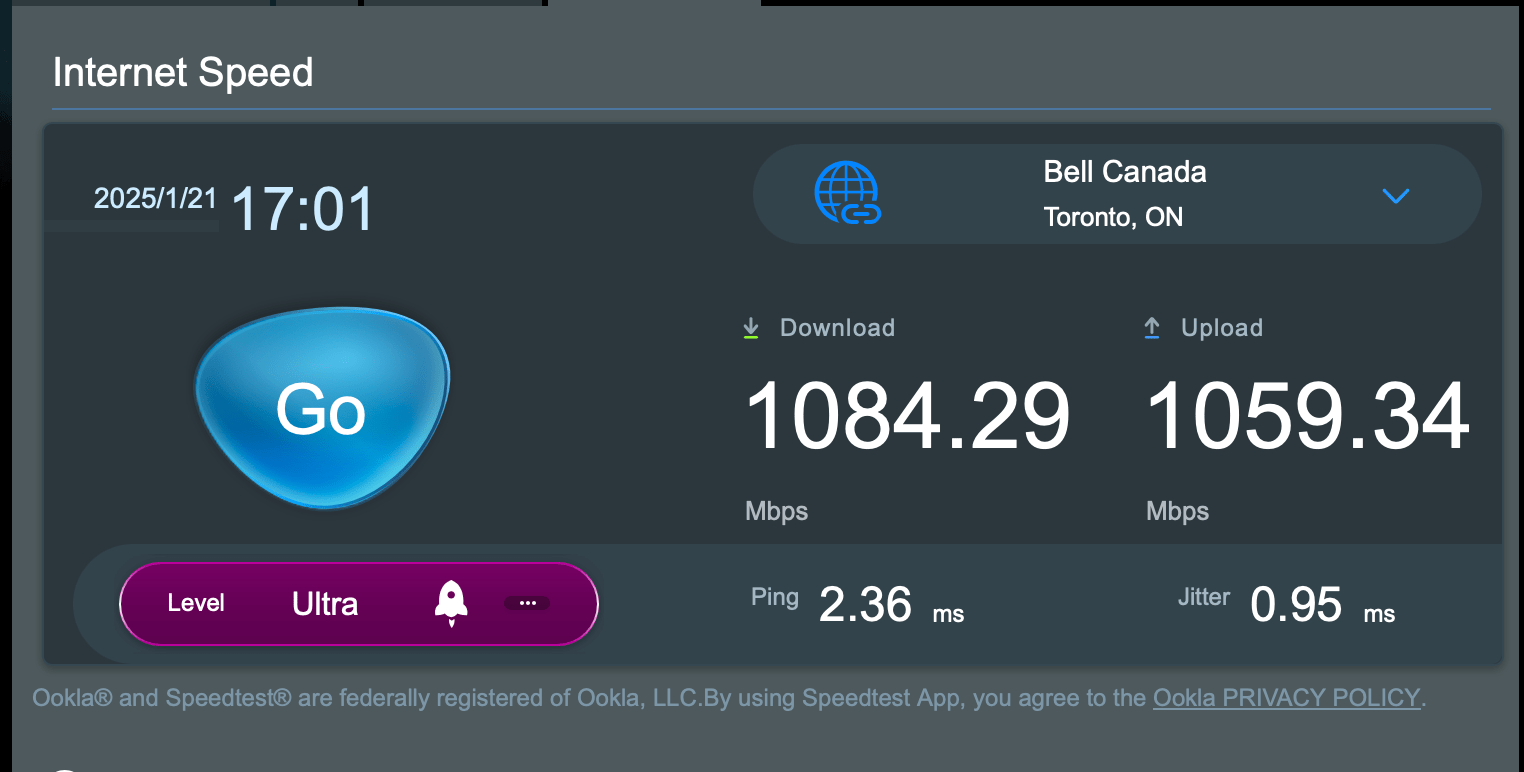
I’ve been running this for a number of days, and while I have not noted any dramatic differences, I can say that there are some “marginal gains” to borrow a phrase from Dave Brailsford (backstory on “marginal gains” here). I do notice that when I do VPN sessions to clients, that those sessions are consistently more fluid. I also notice that MS Teams and Zoom meetings are also a bit more fluid and natural feeling. As for why, one possibility is that my upstream bandwidth went from this:

To this:

It is also possible that the fact that the RT-BE86U is much better than routing versus the ZenWiFi XT8 was could also be playing a role as well. Or it is both at the same time. Or perhaps it’s something else that I am not able to discern. Without going into the weeds to figure it out, it’s hard to say. But I will take any improvements that I can get, no matter how marginal. One thing that I have to say is that I am paying to have 1 Gbps downstream and 750 Mbps upstream from Distributel, and I am getting more than I am paying for by making this change which is great.

Do you have any questions about what I’ve done here? If you do, leave a comment and I will be happy to answer them as doing this was a win for me, and it might be a win for you as well.

CIRA unveils new Internet Performance Test to help Canadians better understand broadband speeds

Posted in Commentary with tags on January 30, 2025 by itnerd

Today, CIRA is proud to unveil a completely redesigned version of its popular Internet Performance Test (IPT) as part of its Net Good program. First launched in 2015, CIRA’s Internet Performance Test enables Canadians to test their mobile and home broadband performance across dozens of data points while gathering comprehensive and accurate data on broadband coverage and quality nationwide. The latest version of IPT provides users with an enhanced test-results dashboard, to ensure users understand critical aspects of their internet performance including how their connection supports common online activities like streaming services or video calls.

While Canada has made great strides to bridge the digital divide in the past few years, there is still work to be done to ensure the speeds that are being promised are actually attained. The new IPT will allow Canadians to verify whether they are receiving the speeds and quality of service advertised. CIRA will then leverage Canadians’ anonymous broadband data and real-world daily experience to help municipalities, local and federal governments and consumers create a heat map of where connectivity upgrades are most urgently needed.

Key features

  • The new user interface guides participants intuitively through the testing process, improving accessibility for users of all technical backgrounds.
  • Enhanced user interface makes running a test faster and easier on smartphones, tablets and desktops.
  • Through a new, interactive dashboard, users can now explore trends and performance data from previous tests, gaining a deeper understanding of internet performance changes. These insights empower individuals, researchers and policymakers to track progress and identify gaps.
  • More accurate user location estimation improves the quality of location-specific internet performance data, which is vital in analyzing broadband access across regions or within a community or neighbourhood.

To run a test and learn more about CIRA’s Internet Performance Test, visit: https://www.cira.ca/en/net-good/internet-performance-test/


KnowBe4 Launches Threat Labs Research and Analysis Initiative to Mitigate Human-Targeted Cybersecurity Attacks

Posted in Commentary with tags on January 29, 2025 by itnerd

KnowBe4, the world-renowned cybersecurity platform that comprehensively addresses human risk management, today announced its new Threat Labs to mitigate human-targeted cybersecurity attacks. 

This initiative specializes in researching and mitigating email threats and phishing attacks, using a combination of expert analysis and crowdsourced intelligence. The cybersecurity researchers and analysts behind KnowBe4 Threat Labs discover and investigate the latest phishing techniques and develop strategies to preemptively combat these threats.

The first publication from KnowBe4 Threat Labs, Using Genuine Business Domains and Legitimate Services to Harvest Credentials, analyzes a sophisticated phishing campaign targeting multiple organizations to harvest Microsoft credentials. During this campaign, threat actors utilized a compromised domain, its subdomains, bulk email services, and open redirect vulnerability to evade detection and increase click success rates.

Research conducted by KnowBe4 Threat Labs will be published on the KnowBe4 Blog. For more information on KnowBe4, visit www.knowbe4.com.