Archive for Asus

ASUS Launches V400 AiO Series in Canada

Posted in Commentary with tags on August 13, 2025 by itnerd

 ASUS today announced the availability of the ASUS V400 AiO, a new series of slim, sleek and powerful all-in-one PCs designed for modern families and workspaces. Available in both 24-inch and 27-inch models with a variety of configurations, the series offers exceptional versatility, starting at just C$899.

V400 AiO PCs combine advanced technology, superior performance and a minimalist aesthetic, offering users an enhanced computing experience.

Space-saving design: Slim and lightweight with a sleek NanoEdge display

ASUS V400 AiO series benefits from a remarkably slim, light and space-saving design. The vibrant NanoEdge display offers expansive 178° viewing angles with a thin bezel for near-seamless edge-to-edge viewing, achieving an impressive up to 93% screen-to-body ratio. The Full HD (FHD) 24-inch (V440) or 27-inch (V470) boasts 1920×1080 resolution and features an anti-glare coating and certified by TÜV Rheinland for eye comfort and low blue-light emissions — ensuring eyes stay fresh during long viewing sessions.

The NanoEdge display also boasts 100% sRGB color gamut and 72% NTSC for vivid and realistic-looking colors. Exclusive ASUS Splendid technology is included with V400 AiO series to ensure true-to-life colors — whether it’s an image of a sunset, a clear blue sky or subtle skin tones. There’s even a special Vivid mode for those moments of creation, enabling users to achieve an overall level of color saturation that enhances the hues to make images look stunning.

Compact, streamlined beauty

ASUS V400 AiO series projects a minimalist aesthetic, with a slim, stylish design that’s perfect for modern homes and workspaces. Even the internals are tidy, creating a smaller package that empowers greater expandability.

Compared to previous-generation designs, V400 AiO benefits from a bezel height that’s been reduced by 38%, while the overall profile is 25% thinner – creating a sleek and sophisticated profile that blends performance with beauty. The rearranged layout of internal components also contributes to its overall reduction in size, elevating V400 AiO’s visual appeal while maximizing its use of space.

Packed with performance and storage

ASUS V400 series is powered by up to an Intel Core i7-13620H processor, delivering superb performance with a balance of power and efficiency cores to tackle even the most demanding workloads. Supported by up to 32GB of lightning-fast DDR5 memory, it ensures seamless multitasking and smooth operation.

The system also packs up to 1TB SSD storage. This delivers ultra-fast data read and write speeds to empower seamless creativity and productivity, and ensures lightning-quick response times and faster loading to power through every task.

Comprehensive connectivity

ASUS V400 AiO series is equipped with a diverse array of connectivity options, including HDMI-in, HDMI-out, USB 3.2 Gen 1 Type-A, USB-C, SD and microSD card slots, ensuring versatility for all your peripherals. The inclusion of HDMI-in means that it’s easy to connect external devices like smartphones or games consoles, empowering the use of V400 AiO’s expansive display for immersive big-screen experiences.

Immersive audio

For intensely immersive multimedia experiences, ASUS V400 AiO series has a hugely powerful audio system. The integrated high-quality stereo speakers can deliver pure and rich sound, and benefit from an advanced bass-reflex design — a design typically only available in hi-fi speaker systems — to deliver smooth, powerful bass and clear, full-range sound that must be heard to be believed. The sound mixed in Dolby® Atmos stereo goes beyond left and right channels. Instead, sound is precisely placed all around, creating an enveloping effect that fully immerses the listener in the audio experience.

AI-powered noise cancellation and smart camera

With AI-powered noise cancellation, ASUS V400 AiO series elevates video conferencing and media consumption. The two-way noise-canceling feature filters out background noise for clearer audio during calls, while eliminating disruptions for both ends of the conversation.

V400 AiO also benefits from an ASUS AI camera. This ensures top-quality video calls with automatic background blur, lighting correction, gaze tracking and even an appearance filter – ensuring users always looks their best. Additionally, ASUS 3D Noise Reduction (3DNR) technology sharpens video clarity for a professional, polished look in virtual meetings.

Secure by design

ASUS V400 AiO is equipped with first-class security to keep crucial data safe and ease the accelerating need for remote working. The retractable camera can be hidden manually for instant privacy, whenever it’s needed. On the hardware side, a Trusted Platform Module (TPM) 2.0 chip securely stores authentication information, so personal details remain encrypted. This virtually eliminates the risk of leaks through hacking. V400 AiO also has a Kensington Nano lock slot that provides a way to physically safeguard the machine, preventing theft of the PC from unsupervised locations.

AVAILABILITY & PRICING

The new ASUS V400 AiO Series is now available across Canada in both 24-inch and 27-inch models, offered in multiple configurations to suit a range of needs. The ASUS V470VA AiO starts at C$1,099, while the ASUS V440VA AiO starts at C$899. Both models are available now through the ASUS Store and select retailers nationwide including AmazonBest Buy or CDW

How To Check To See If Your ASUS Router Has Been Pwned

Posted in Security with tags on June 2, 2025 by itnerd

Shortly after this story dropped about ASUS routers being pwned right, left and centre, I got a number of emails asking me to detail how one can check their routers to see if they’e been pwned. To that end, I am going to put forward two options for you to make sure you’re not affected by this.

Option 1: Factory reset your router.

If you’re really paranoid about this, taking the nuclear approach and resetting your router may not be a bad idea. While this vulnerability can survive reboots and firmware updates, it cannot survive a factory reset. ASUS has a document that tells you how to do that. And after you do that, you should set it up again from scratch. Meaning that you should not use a backup to set it up. That way you don’t import the vulnerability back into the router. That means that you should make a note of your settings before you factory reset it.

Option 2: Checking to see if you have been pwned.

Given that about 10,000 routers have been affected by this worldwide, your odds of being affected by this are low. But it’s not zero so checking to if you have been pwned is a good idea. Here’s how you do it. I am using the RT-BE86U in this example so your ASUS router may have this in a different location:

  1. Log into your router
  2. Click on Administration on the left.
  3. Click on System on the top. That will take you to this screen:

See if Enable SSH is enabled. If it isn’t, you’re likely not affected. But it never hurts to dig deeper. Choose LAN and WAN to get to this screen:

If you see anything in the SSH Port section and the Authorized Keys section that you did not put there, chances are that you’ve been pwned. Specifically, you’ve been pwned if you see these values:

SSH Port: 53282

Authorized Keys: AAAAB3NzaC1yc2EAAAABIwAAAQEAo41nBoVFfj4HlVMGV+YPsxMDrMlbdDZ

I’ve only put in part of the key to stop people from self pwning their router. But if you see both of these, you’ve been pwned and you should immediately reset your router as per option 1 and ensure that the firmware in the router is up to date.

4. Do not save any of the settings and simply log out of your router if you find nothing there.

Now the threat actors have been exploiting a number of vulnerabilities that ASUS has either patched or will patch. Thus even if you are clear when you have a look at these settings, I would strongly recommend watching the ASUS website for other firmware updates and install them when they become available. Or use the ASUS Router app to check for firmware updates. As an aside, you should always ensure that your router always has the latest firmware installed on it.

Finally, there is no practical reason why anyone needs remote access to their router via any means. Be it a vendor supplied method, or via SSH or anything like that. I say that because all it does is give threat actors a means to pwn you. Thus if you value your security, never, ever enable remote access in any way shape or form on your router and be happy. It won’t make you 100% safe, but it will make you a whole lot safer.

ASUS Routers Are Being Pwned By The Thousands… Here’s What You Need To Know

Posted in Commentary with tags on May 29, 2025 by itnerd

 Security firm GreyNoise has reported that thousands of ASUS routers are being hit with a stealthy backdoor that can survive reboots and firmware updates. Making it really, really dangerous.

Here’s what you need to know via GreyNoise:

  • Thousands of ASUS routers are confirmed compromised, with the number steadily increasing. 
  • Attackers gain access using brute-force login attempts and authentication bypasses, including techniques not assigned CVEs. 
  • Attackers exploit CVE-2023-39780, a command injection flaw, to execute system commands.
  • They use legitimate ASUS features to:
    • Enable SSH access on a custom port (TCP/53282).
    • Insert attacker-controlled public key for remote access.
  • The backdoor is stored in non-volatile memory (NVRAM) and is therefore not removed during firmware upgrades or reboots. 
  • No malware is installed, and router logging is disabled to evade detection. 
  • The techniques used reflect long-term access planning and a high level of system knowledge. 

Besides all of that, there’s this little tidbit from GreyNoise:

Disclosure deferred as we coordinated the findings with government and industry partners.   

That implies but does not confirm that this is a nation state behind this attack. That isn’t good.

So how do you protect yourself? You need to check to see if you’re infected if you’re an ASUS user. GreyNoise recommends the following:

  • Check ASUS routers for SSH access on TCP/53282. 
  • Review the authorized_keys file for unauthorized entries.
  • Block access to these four IP addresses: 101.99.91.151, 101.99.94.173, 79.141.163.179, 111.90.146.237
  • If compromise is suspected, perform a full factory reset and reconfigure manually.

Personally, if you’re the least bit paranoid, or you discover that you’ve been pwned, I would just factory reset the router and reconfigure it manually. Also, I will note that ASUS has patched a lot of the vulnerabilities that these threat actors are using. Thus if you haven’t applied the latest firmware updates to your ASUS router, you should. But my advice would be to do that AFTER you confirm that you haven’t been pwned.

UPDATE: Wade Ellery, Field CTO, Radiant Logic had this comment:

“This is a textbook example of why identity observability and infrastructure hygiene need to converge. Even something as mundane as a router becomes a strategic asset once it gains long-term identity in a threat actor’s infrastructure. Organizations must treat devices as identities—tracked, verified, and assessed for risk just like users. Observability tools that focus solely on app layers or human actors will miss campaigns like this. Real-time identity-aware telemetry across all assets, including IoT and edge devices, is essential for reducing dwell time and ensuring true Zero Trust enforcement.”

Debbie Gordon, CEO and Founder, Cloud Range adds this:

“This campaign highlights a dangerous shift in attacker strategy—from quick hits to long-haul persistence. AyySSHush’s ability to survive factory resets and firmware updates is a wake-up call: edge devices like routers are no longer low-value targets. In our cyber training environments, we stress layered response—not just patching, but validating assumptions about device integrity and persistence. Too often, routers are treated as ‘set-and-forget’ systems. That mindset is outdated and risky. These devices are now prime footholds for stealthy, scalable attacks.”

ASUS Discloses AiCloud Vulnerability And Says To Patch Your ASUS Routers NOW

Posted in Commentary with tags on April 22, 2025 by itnerd

People have often asked me why I am such an opponent of routers having the functionality of remote access. Well, this is why:

So basically, ASUS had an issue where if you had AICloud enabled on your ASUS router, someone could pwn you. But ASUS has released new firmware for a lot of their routers and fixed this. So all is fine now. Right?

Well, no it’s not. The thing is that when you open anything up to remote access via the Internet, you can get pwned. And a router is about the worst thing that you can open up remote access to. The reality is that nobody needs to remote access to their router. And I truly mean nobody. I for one have never utilized the on board remote access features of a router. And I have no plans on ever doing so as I would have to really trust the company that makes the gear that I am using. Which to be clear I do not have that level of trust in any company.

Next is the fact that while ASUS has fixed this, you know that threat actors will be figuring out if they can exploit this somehow. Whether it is via going after people who haven’t updating their firmware, or via finding an exploit that ASUS knows nothing about. Or both.

Finally, I have to give every consumer router company a free piece of advice. There zero need to include this functionality on your routers. It adds zero value and makes your products less secure. You would do yourself and the planet a favor by removing this functionality from your products.

In the meantime, ASUS router users should get about updating their firmware whether they use AICloud or not as there’s no harm in being as secure as you can be.

So, Am I An ASUS Fanboy Again?

Posted in Commentary with tags on February 15, 2025 by itnerd

I’ve got a couple of emails from people who wonder if I am on Team ASUS again so to speak given that I gave a positive review of the RT-BE86U router and I now use it as the main router in my network with good results. Well, here’s the short answer. No, I have not become an ASUS fanboy again.

The long answer goes something like this.

First of all, the RT-BE86U is a very good router. With this router, ASUS has a router that does WiFi 7, and delivers excellent performance at a half decent price. By performance, I mean that it handles PPPoE traffic better than most routers that I have tested lately, and a WiFi 6E client based on my testing can mostly take full advantage of the bandwidth on offer. From that perspective, this router is a winner.

Now is it perfect? No, the price in my opinion could be a bit lower as most of its competition with a similar feature set (which to be clear is dual band WiFi 7) is priced lower. But the flip side of that argument is that it comes with a lot more in the box so to speak as opposed to the competition in question. AI Protection and parental controls which are subscription free. So while ASUS could make an argument that its price is justified, people don’t go into the weeds when they walk into Best Buy to buy a router. Thus a price drop to bring it in line with its competition would be something that I would advise.

Here’s why I haven’t jumped onto the ASUS bandwagon. While the hardware is solid, I question whether ASUS has improved their ability to support customers. For example I had this experience when I needed assistance with my ZenWiFi XT8 mesh router. At the time, I said this:

Now I would like to comment on the tech support that ASUS provides. It’s horrifically bad. I spent over two weeks with them running around in circles trying to help them understand what my problem was, which was that this router performs poorly via a PPPoE bypass setup, but performs just fine in the setup that I describe above. Then I ended up sending them endless sets of logs and exchanging endless emails with them to see if they could debug what was going on. The case ended up going to the “next level of support” (their words not mine) at ASUS. And the best that they could come up with is that I had a bad cable between the HH4000 and the XT8. Which is illogical as the PPPoE bypass setup created the slow upstream issue, and a DHCP setup like the one that I had outlined above does not create this issue. Which following that logic chain eliminates the cable as a possibility for the slow upstream issue, and points to a problem with the XT8 router. An organization the size of ASUS should have tech support people who can follow that logic and come to that conclusion. But clearly they don’t and out of frustration, I asked them to close the case. 

What is worse is that all this troubleshooting was done via email which is the absolute worst way to provide tech support. Especially with complex issues like this. Getting onto a Zoom session or a phone call would have likely resulted in some sort of positive progress, and maybe even a solution. But they didn’t go that route and the net result of this rather negative experience is that it drove me to look at other options that avoided the use of PPPoE to get better performance from the XT8. It also made me decide that I won’t be recommending ASUS gear to my home and prosumer clients anymore. And chances are, my next router at home won’t be an ASUS product. While ASUS has great hardware, their support doesn’t meet the mark. Having competent tech support adds to the value of the gear that a vendor like ASUS makes. Or in this case, not having competent support detracts from the value of the gear that ASUS makes. So if the people at ASUS are reading this, they might want to look at this negative situation and make changes internally to make sure that they’re not on the wrong side of a public post like this as this sort of #Fail reflects poorly on ASUS as a brand. And will likely affect their future sales.

So while the RT-BE86U has become my “next router”, I have not recommended ASUS gear to my clients since that post. And that’s due to not only my experience with them, but also its due to browsing around places like Reddit where it becomes clear very quickly that the the quality of their support has not changed for the better. Add to that the accusations by YouTubers like Gamers Nexus among others who highlighted how “shady” ASUS has been when it comes to warranty issues. Now I have no direct experience with that, but again, plenty of people on Reddit do. And I am still finding examples of people who have had issues with ASUS on this front.

That’s honestly not a good place to be if you are ASUS.

So where does that leave me? Well, for starters the setup that I have with the RT-BE86U being my router with the XT8’s being purely WiFi access points is in my mind a stopgap while I continue to do research on what gear that I need to replace it. I have narrowed things down to a couple of brands and I need to confirm that those brands will have gear that will work for me while being secure at the same time. And not to mention provide competent technical support and warranty support as well. Now ASUS corporate (not a PR firm, but the folks directly from ASUS) are free to reach out to me and convince me why I should believe that the issues that I have highlighted here are no longer issues. Because I am always willing to re-evaluate my position on an issue if empirical evidence is presented to support a given argument. But in the here and now, while ASUS does seem to have some well performing hardware, there’s no evidence that their technical support and warranty support have changed for the better. And until that does, if it ever does, I’m not going to be an ASUS fanboy.

Upgrading My Home Network To Fully Leverage My Fibre Internet Connection

Posted in Products with tags on January 30, 2025 by itnerd

Since I reviewed the ASUS RT-BE86U and discovered how fast it was at routing traffic to and from the Internet, it made me think that I could use it improve my connection to the Internet. You see, back when my ISP of the moment was Bell and more recently with Distributel, I’ve had issues maximizing the speed that I was getting from my Internet connection. With Bell I had to bypass their hardware using some really complicated methods to do so. And when I moved to Distributel, I suffered from the PPPoE speed limitations of the hardware that I was using, which was the ASUS ZenWiFi XT8.

I started to research how I could do this in a cost effective manner because after all, networking gear is expensive. After some research, I soon came up with a way to leverage my existing ZenWiFi XT8 gear while using the RT-BE86U at the same time. Let me lay it out graphically for you and then go down the rabbit hole in terms of my logic:

My plan was to use the RT-BE86U as a pure router. As in turn off its WiFi 7 capabilities. Because that would give me 1 Gbps downstream and upstream from the Internet which is something that I do value. Then use the existing Zen WiFi XT8’s with their routing functions turned off to deliver WiFi in my condo. Now you’re likely wondering why I would use a pair of WiFi 6 mesh routers to deliver WiFi. The fact is that the fastest device that I have in my home from a WiFi perspective is a M2 Pro Mac mini that does WiFi 6E. And while it is capable of maxing out my Internet connection on WiFi 7, only having one device that is capable of doing that doesn’t justify making the switch to WiFi 7. Also, while WiFi 6 devices would see a speed boost if I made the switch to WiFi 7, I also value stability above all else. And I knew that this setup works with everything that I own. The final point that I would like to make is that this sort of setup is what I do my business and enterprise clients all the time and is proven to work. Which is to have a fast router connect to the Internet. Then install access points wherever they are needed with an Ethernet backhaul to the router. Though I am deviating from that in my use case. While I have one XT8 connected via an Ethernet cable. That XT8 is communicating to the second XT8 via a wireless backhaul. I’m doing that because I have never been able to run Ethernet cable in the walls of my condo as they are solid concrete. Thus a wireless backhaul setup from the point where my connection to the Internet terminates to the far end of my condo is the only option that is available to me.

Another factor in my decision to go this route is that it leaves open the option of using the RT-BE86U as the base for a mesh setup in the future as it supports the Ai Mesh feature. For example if I wanted to switch to WiFi 7 in the future, I just have to buy a second ASUS WiFi access point or router and add it via a few clicks to the RT-BE86U to create a mesh network. But at the same time I also have the option of doing the WiFi 7 version of what I am about to describe which is to have a pair of mesh nodes set up as access points only. Finally, the fact that I can repurpose the networking gear that I already own to make my network better means that something that I spent a lot of money on doesn’t sit in a box unused while you try to sell it on Craigslist, or worse it ending up as eWaste is a big win for me.

The first thing that I had to do is to configure the router to connect to Distributel via PPPoE. That was easy enough as I had already figured that part out with the XT8’s. Thus I carried that configuration over to the RT-BE86U router. The one issue that I ran into is that I could not get this working on the RT-BE86U’s 10 Gbps Ethernet port when I plugged it into the Nokia ONT (Optical Networking Terminal) that was supplied by Distributel to in layman’s terms convert fibre to Ethernet. But it worked perfectly fine on the 2.5 Gbps port. I found that unusual because the Nokia ONT is at least on paper capable of doing 10 Gbps via Ethernet. I really didn’t go too far down the rabbit hole on this as I have a 1 Gbps downstream Internet connection which meant connecting the ONT to the RT-BE86U’s 2.5 Gbps port is fine. But it was clear that the Nokia ONT and the RT-BE86U couldn’t negotiate a stable 10 Gbps Ethernet connection for reasons that I could not discern. Thus it’s a good thing that the RT-BE86U gave me another option to make this work via having a separate 2.5 Gbps port. And on top of that, I now have a 10 Gbps for the LAN should I need it in the future.

Once I confirmed that I had stable Internet access, I went about locking down the router. Which means doing the following:

  • I disabled UPnP for the reasons I outlined here.
  • I also disable WPS for the reasons outlined here.
  • I never use any sort of cloud management for the router nor do I expose the admin page to the outside world as those are great ways to get pwned by hackers. 
  • I make sure that the firmware of the router is up to date. 
  • I use a third party DNS service rather than my ISP’s DNS service. At the moment, I am using Quad9 as that blocks threats at the DNS level. And my ISP doesn’t get to monitor my browsing habits and sell that data to third parties.
  • I disabled PING, Telnet, SSH, and HNAP to make sure that the router isn’t accessible or seen from the Internet.

I then penetration tested it and declared it to be secure. Or at least as secure as I can make it as nothing is ever truly secure these days.

I also turned on the Trend Micro AiProtection feature as I have found over the years that it is effective in terms of keeping my network secure with no noticeable impact to the speed of my network. Now for full disclosure, it does send data to Trend Micro, but I wrote an article as to why that’s a total non issue if that is a concern.

So with that out of the way, I moved onto reconfiguring the XT8 nodes. Prior to this project I had the XT8 nodes set up with one being the router and primary mesh WiFi node, and the other one as a secondary WiFi node connected via using the second 5 GHz band as a dedicated wireless backhaul. Meaning that this 5 GHz connection does nothing other than provide bi-directional communication between the nodes. The first task was that I had to turn off the routing functions as there was no need for these to do any routing, and turn on what’s called access point mode. Meaning that these units are simply access points. To do that, I followed these steps outlined by ASUS which are mostly clear and require you to first factory reset your router. But one thing that I would like to point out is that when you put the nodes in access point mode, the 2.5 Gbps ports on each of the XT8 nodes become uplink ports rather than being WAN only ports. That’s something that this documentation doesn’t make clear and I only found that out when I was doing some testing with this configuration. Thus I used the 2.5 Gbps port on the first XT8 to connect to one of the 2.5 Gbps ports on the RT-BE86U to make sure that I was getting the highest possible speed from the router to the first XT8 node. The other thing that I found is that even though the first XT8 unit got an IP address from the RT-BE86U, I couldn’t access it over the network to do the initial setup. Instead I had to connect to it directly via WiFi to do that. Which didn’t match what the instructions from ASUS had online. Regardless, I was able to get them set up in access point mode. And what was interesting is that both nodes automatically configured themselves. Which is another deviation from the instructions that ASUS provided. I am assuming that this is due to the fact that the XT8’s come pre paired from the factory. Now to be fair to ASUS, the instructions used a scenario that involved a different product and not the XT8. But if I could offer ASUS a piece of advice, they should consider rewriting their instructions to cover a wider variety of use cases.

Pro Tip: When you get to the part about selecting an automatic IP address or manual IP address, always choose manual and pick an IP address that you can remember and document. That way you know what IP address the unit has so that you can log in and do firmware updates or tweak something.

Once I confirmed that everything was working with the XT8 nodes with their factory configuration, I next had to enable the wireless backhaul. That required me to turn on a feature called “Smart Connect” which combines all the bands into a single network that you can see rather than having a distinct 2.4 GHz network and 5 GHz network. But at the same time it turns on the wireless backhaul feature. One I turned it on I had to let the XT8’s reboot, and then turn “Smart Connect” off again which leaves the wireless backhaul feature enabled. ASUS could have made life easier if they split out the wireless backhaul feature from “Smart Connect” as turning on an unrelated feature and then turning it off again to turn on the feature that you want is a bit “janky” as the kids say, but this was only five minutes of time spent to do this so I am not complaining.

Sidebar: The reason why I don’t run “Smart Connect” is that I find that routers that combine the bands into a single network sometimes have issues with devices connecting. By separating them out, I completely avoid that problem. But I will admit that I will have the rethink that when I eventually move to WiFi 7 as part of the reason why you get the crazy speeds that WiFi 7 offers is by having this feature turned on.

I then put in all the tweaks that I have done over the years to make everything from HomeKit devices to specific devices like my wife’s ChefSteps Joule work properly over WiFi. That was a trivial exercise as I had documented all of that up front. Which by the way is something that you should do before embarking on an exercise like this. After that, I turned off the ability for all this hardware (meaning both the XT8’s and the RT-BE86U) to automatically receive firmware updates. To be clear, I do update the firmware on all my gear as firmware updates often bring security fixes and improvements that should be rolled out a soon as possible. But I do it on my schedule so that I don’t wake up one morning to no Internet access or some other weird network issue such as this situation from a few years back.

The second to last step was to shut down WiFi on the RT-BE86U as I would have no use for it. At least not today. This document from ASUS will help you to do that. And the final step is to save the configurations of both XT8’s and the RT-BE86U. This document from ASUS will walk you through doing that. That way if I needed to swap out hardware or I needed to put something back to a known good configuration, I could do that without a problem.

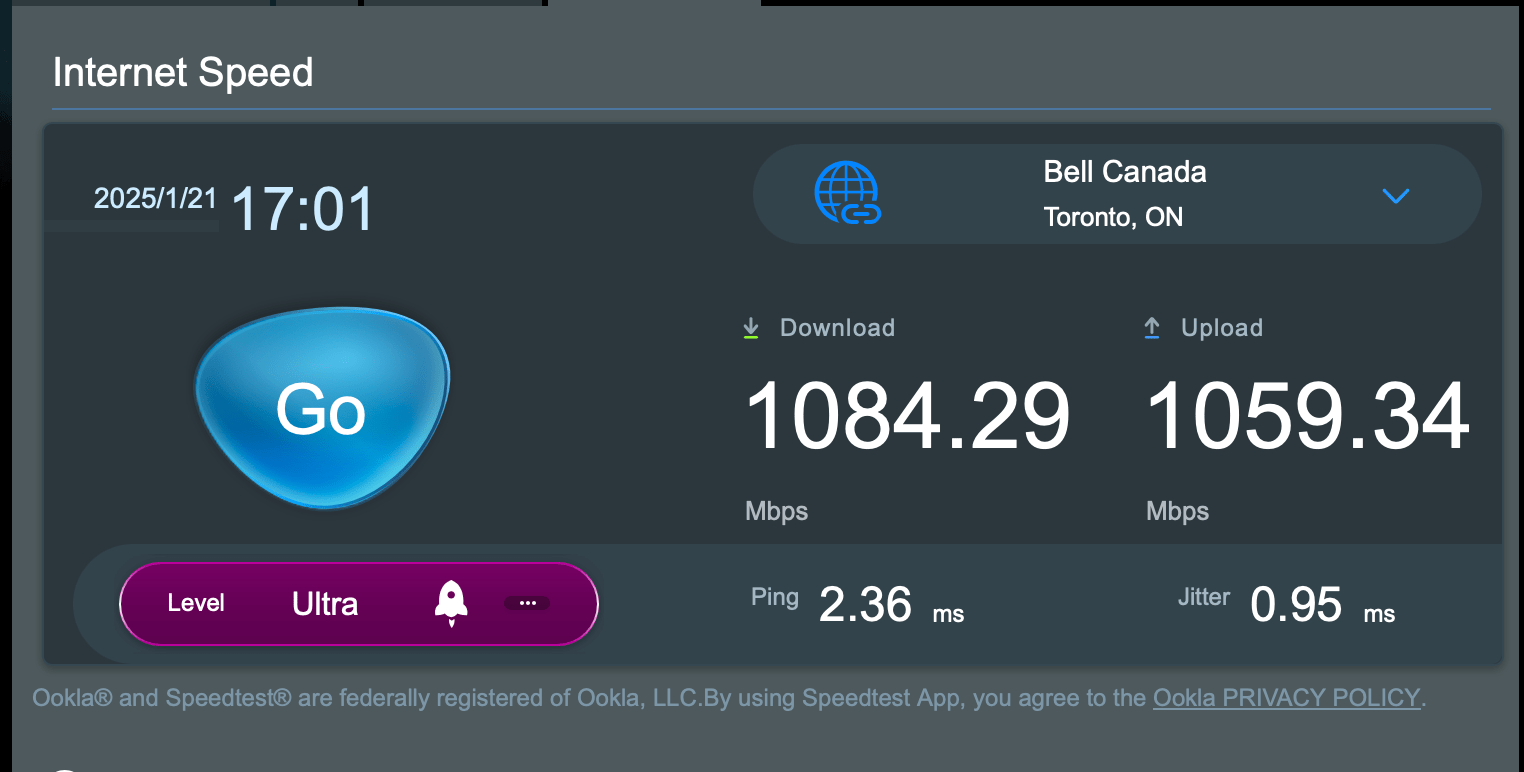
I’ve been running this for a number of days, and while I have not noted any dramatic differences, I can say that there are some “marginal gains” to borrow a phrase from Dave Brailsford (backstory on “marginal gains” here). I do notice that when I do VPN sessions to clients, that those sessions are consistently more fluid. I also notice that MS Teams and Zoom meetings are also a bit more fluid and natural feeling. As for why, one possibility is that my upstream bandwidth went from this:

To this:

It is also possible that the fact that the RT-BE86U is much better than routing versus the ZenWiFi XT8 was could also be playing a role as well. Or it is both at the same time. Or perhaps it’s something else that I am not able to discern. Without going into the weeds to figure it out, it’s hard to say. But I will take any improvements that I can get, no matter how marginal. One thing that I have to say is that I am paying to have 1 Gbps downstream and 750 Mbps upstream from Distributel, and I am getting more than I am paying for by making this change which is great.

Do you have any questions about what I’ve done here? If you do, leave a comment and I will be happy to answer them as doing this was a win for me, and it might be a win for you as well.

Review: Asus RT-BE86U WiFi 7 Router

Posted in Products with tags on January 23, 2025 by itnerd

What if I told you that I have come across a WiFi 7 router that is both fast and fully customizable? By fast I mean that it is capable of above gigabit speeds over WiFi. And by fully customizable I mean that you can tweak it to match your use case. You’d likely say that I am crazy. But I am not. Meet the ASUS RT-BE86U WiFi 7 Router:

Compared to some routers that ASUS makes, this router is pretty understated. There’s no RGB and only a handful of LEDs which you can turn off if you need to, and the styling isn’t over the top. That means that the wife approval factor will be high if you put this in your house. In fact, my wife saw it and said that “it doesn’t look nearly as gamerish as their other routers.” I should note that the antennas are removable and have a standard connector. Which is handy if you need to replace them.

ASUS has cleverly added the words “WiFi 7” to the venting on the back. Which by the way, there’s a lot of venting on this router. In terms of connections, you get three 2.5 Gbps ports, a 2.5 Gbps and 10 Gbps which depending on the situation can be used for WAN access. A tip of the hat to ASUS for providing such fast ports as that’s a form of future proofing this router. A USB 3.0 port and a USB 2.0 are present for things with external hard drives and printers on the right, on the left is the reset button, power connector, and on/off switch.

On the left is a WPS button.

On the right is the button that turns the front LEDs on and off.

In terms of bands, here’s what you get:

  • 2.4GHz: up to 1032 Mbps
  • 5GHz: up to 5764 Mbps

Now some of you are likely saying “where’s the 6 GHz band?” The fact is, you don’t need that band to do WiFi 7 as the WiFi 7 standard can take multiple bands and put them together to get crazy speeds. That functionality is called MLO and you can read about it here. Also, omitting that band likely helps to keep the costs down. Another thing to point out is that a router with Wi-Fi 7 generally improves speeds across all bands. Finally, there’s only a handful of WiFi 7 devices out there at the moment. So for most people, having no 6 GHz band is a non issue.

Setup is easy. You can use the ASUS app to set things up. Or if you’re like me, you can use the web interface which gives you way more options to play with. Most people should go the app route as that’s the easiest path to getting this working for most people. If you own another ASUS router, you can also back up the configuration from that router, and load it into this one and be up and running in minutes. For my testing, I set it up as a new router with the default settings.

In terms of speed, well let’s say I was impressed. Let’s start with its ability to deal with a PPPoE connection. Which is what ISPs like Bell or Distributel offer its customers. This is important to yours truly as most consumer routers have huge problems dealing with PPPoE traffic, resulting in speed being left on the table because the router can’t handle it. That’s not the case here. My connection is apparently 1 Gbps downstream/750 Mbps upstream via a fibre link and this is what I get over my Asus ZenWiFi XT8:

Now this is what I get with the ASUS RT-BE86U:

In short, ASUS has clearly built a router that is built to handle the most demanding connections. And a PPPoE connection would qualify as demanding because of the overhead that PPPoE has.

But the speed doesn’t stop there. I did a speed test from my iPhone 14 Pro standing about 10 meters away. Yes, this is a WiFi 6 device. But it will illustrate something that I said earlier, which is WiFi 7 improves speed on all bands. In this case the 5 GHz band. Once again I will start with a speed test from the ASUS ZenWiFi XT8:

Now let’s look at the speed test from the ASUS RT-BE86U:

What this means that even if you don’t have a single WiFi 7 device in your home, you will get better performance on WiFi. I’ll go one step further. I have a Mac mini with the M2 Pro processor. And that Mac has WiFi 6E. Let’s see what speed you get from the XT8 for starters:

And now from the RT-BE86U

The Mac mini on WiFi 6E came close to maxing out my connection. Thus I believe you can call this router fast on all fronts. And if I had a faster Internet connection, I would see faster numbers from all my tests.

Now ASUS could have stopped there. But there’s a number of things that I would like to point out that add even more value to this router beyond speed:

  • You can use the 10Gbps as the WAN port, or switch the WAN port to the 2.5Gbps port. Whatever port that is the non-WAN port will function as a LAN port.
  • You can use the router in a dual-WAN setup so that you have access to more than one Internet connection. Either to combine the links or have a backup Internet connection on standby.
  • You can use the USB port as a third WAN source to host a tethered smartphone or cellular modem for emergency situations.
  • It supports AI Mesh which allows you to create a mesh network with one or more supported ASUS routers.
  • It has built-in Parental Controls and online protection as part of their AiProtection suite that is supplied by Trend Micro. This suite is free forever which is a significant difference between this router (or any ASUS router for that matter) and other brands of router which make you pay extra for this functionality as part of a subscription of some sort.
  • For a limited time you can get a complementary twelve month or six month NordVPN subscription when you buy an ASUS router. More info here.
  • Though it’s not advertised as a gaming router, it does have a broad amount of gaming specific features that will make gamers happy.

There’s one other thing that I’d like to point out. ASUS routers are very customizable. If I need to tweak a setting, I have the ability to do so. That’s something a lot of consumer routers do not let you do because they hide so much of what you can do. This level of customization is great for advanced users like me as there have been times I have had to use a really obscure setting to fix an issue with a unique WiFi device. Or using a router like this with Distributel fibre internet service which requires the router to be set up to use VLAN 40 to connect to the Internet. All of that means that you can use this, or any other ASUS router in more unique use cases where other brands of routers would fail in.

MSRP is $409.99 CAD. Now that I will admit is more expensive than its competition. But here’s my argument on that. If you combine the performance that this router has, the extra value that I outlined in the bullet points above that doesn’t cost you anything extra, and the fact that you can customize it six ways from Sunday for whatever unique use case that you have, this router is a winner. Take a good look at it if you want to dip your toe into the world of WiFi 7.

ASUS Showcases Comprehensive AI-Driven, Secure and Sustainable PC Lineup for Enterprise, SMB and Education at CES 2025

Posted in Commentary with tags on January 7, 2025 by itnerd

ASUS today at CES 2025 unveiled its latest commercial PC lineup, designed to meet diverse business and education needs with advanced performance, security and sustainability features. The lineup includes ExpertBook B5 (B5405CCA/B5605CCA), ExpertBook B3 (B3405CAA/B3605CAA) and ExpertCenter B900(B900MF/B900SF) series for large enterprises, with the ExpertCenter B900 being the first commercial AI desktop from ASUS equipped with Intel® Core Ultra processors and AI-driven functionality for high customization and demanding workloads.

Small- and medium-sized businesses are supported by ExpertBook P3 (P3405CVA/P3605CVA), ExpertCenter P400 AiO (P440VA/P470VA), and ExpertCenter P500 Mini Tower (P500MV), each providing reliable performance and flexible solutions for cost-conscious businesses. For the education sector, Chromebook CX14 (CX1405CKA) combines durability with seamless manageability, ensuring efficient IT oversight and engagement in learning environments. Together, these models showcase the ASUS commitment to sustainable innovation and exceptional business performance across industries.

Expert B series: AI productivity and sustainable innovation for modern business

ExpertBook B5 and B3 series empower on-the-go professionals with robust performance, featuring Intel Core Ultra mobile processors (Series 2) and WiFi 7 for fast, reliable connectivity. Designed for durability, both models meet MIL-STD-810H military-grade standards, passing 24 military-grade procedures and over 150 ASUS Superior Durability tests to ensure resilience. They also support dual SO-DIMM and SSD slots for adaptable configurations that accommodate evolving business needs. Both ExpertBook B5 and B3 include dual BIOS for added reliability, while B5 also features Intel vPro® for enhanced manageability and security in enterprise environments. Data protection is prioritized across both models with biometric login, discrete TPM technology, and optional smart card readers. Both models come with Windows 11 Pro, providing a secure and versatile operating system for professional requirements.

With ASUS PC Lifecycle Services, the Expert B series offers a complete IT solution, delivering seamless management through tools like MyASUS and ASUS Control Center to enhance productivity and security. With a 16:10 display and an AI-powered camera with noise-canceling features, these devices optimize virtual meetings, making them ideal for hybrid work settings.

As the first ASUS products to introduce the Digital Product Passport (DPP), ExpertBook B5 and B3 series reflect the ASUS commitment to sustainability, offering transparent and eco-conscious lifecycle management.

ExpertCenter B900 is engineered for demanding enterprise environments, featuring Intel Core Ultra desktop processors (Series 2) – the first Intel desktop-processor series with a dedicated NPU for efficient AI tasks. With Intel vPro platform support, it provides secure manageability and high performance for data-intensive applications. Designed with robust security, including discrete TPM 2.0 and dual BIOS, ExpertCenter B900 ensures data integrity for critical tasks. Equipped with Windows 11 Pro, the B900 ensures a secure and optimized environment for enterprise-level applications. Its military-grade durability and tool-free design allow for easy upgrades, while management tools like MyASUS, ASUS Control Center and ASUS Business Manager streamline IT support and enhance operational efficiency, making ExpertCenter B900 a scalable, AI-enhanced solution for enterprises.

Expert P series: Intelligent collaboration and reliable performance for SMB growth

The Expert P-series lineup — featuring ExpertBook P3ExpertCenter P400 AiO and ExpertCenter P500 Mini Tower — delivers robust, AI-enhanced tools and dependable performance for small- and medium-sized businesses. Designed for dynamic work environments, these devices combine AI-enhanced features, simplified IT management, and robust security to help SMBs thrive.

ExpertBook P3 integrates AI-powered ExpertMeet for seamless collaboration, featuring tools such as meeting transcription with speaker ID, translation of summaries, live captions and watermarks for video and presentations. Additional features like AI-enhanced video and advanced noise cancellation ensure professional-quality calls, making it ideal for hybrid work. Available in 14- and 16-inch options, ExpertBook P3 provides solid computing power in a secure Windows 11 environment with a NIST SP800-155-compliant BIOS, making it ideal for professionals seeking a reliable work companion. With a high-performance, secure design that’s crafted for everyday ease of use, the P-series lineup provides affordable, business-level technology that supports productivity and collaboration, enabling SMBs to navigate an evolving business landscape confidently.

For businesses seeking an all-in-one solution, ExpertCenter P400 AiO combines performance and style in a compact design that integrates effortlessly into modern workspaces. With options of 23.8-inch or 27-inch FHD displays, a high screen-to-body ratio and immersive Dolby Atmos audio, ExpertCenter P400 AiO provides a premium experience for video calls and multimedia tasks. Its VESA-mount compatibility and sleek form factor make it versatile, while business-grade security and connectivity features ensure reliability in SMB environments.

ExpertCenter P500 Mini Tower offers a powerful and scalable desktop solution tailored to cost-conscious businesses. Powered by Intel Core i7 processors and optional NVIDIA® graphics, this high-performance mini tower can handle demanding applications and multitasking with ease. Its advanced thermal solutions ensure consistent and quiet performance, while a tool-free design simplifies maintenance and upgrades, making it easy for businesses to adapt their systems as they grow. Additionally, ExpertCenter P500 Mini Tower integrates AI ExpertMeet to enhance videoconferencing experiences, adding value for businesses that rely on virtual collaboration.

ASUS Chromebook CX14: Versatile, durable, and ready for education

Chromebook CX14 is designed for the education sector, offering a reliable, easy-to-manage solution. The device comes in a variety of stylish finishes and colors, including Quiet Blue, Fabric Blue and Misty Grey. Built for durability, it features wear-resistant paint, a 14-inch FHD display with an optional touchscreen, a screw-less battery latching system, and fewer screws on the bottom cover for simplified maintenance. These design elements facilitate easy servicing, help extend the device’s lifespan, provide lasting value, and minimize disruptions in dynamic classroom environments.

ASUS Expands its Lineup of Copilot+ PCs at CES 2025

Posted in Commentary with tags on January 7, 2025 by itnerd

ASUS today announced a significant expansion of its innovative Copilot+ PC lineup, the fastest, most intelligent Windows PCs, bringing artificial intelligence (AI) capabilities to users in every segment — empowering more people than ever to embrace the exciting and burgeoning era of AI.

As AI reshapes both how people interact with technology and their expectations of what a computer should be, our all-new Copilot+ PC lineup is designed to meet the growing demand for more affordable, more efficient, more secure and faster laptops that elevate both personal and professional workflows. Powered by the latest AI-enabled processors from Qualcomm, AMD and Intel®, and available in a diverse range of styles and form factors, ASUS is leading the charge in making AI technology universally accessible.

Through this introduction of new models and expansion of existing product lines, ASUS is asserting its commitment to pioneering AI-enabled computing without limits. With powerful performance, extended battery life, premium designs and a customizable Copilot key, the latest ASUS Vivobook and Zenbook Copilot+ PCs deliver enviable speed and power, allowing users to experience AI-enabled productivity and creativity like never before — unleashing cutting-edge AI tools that simplify tasks, boost productivity and enhance security

AI power, unleashed: ASUS Zenbook and Vivobook models with Snapdragon processors

With the introduction of the all-new ASUS Vivobook 14/16ASUS Vivobook S14/S16, and ASUS Zenbook A14 models — our first models powered by the latest Snapdragon® X processors — ASUS is opening a new frontier for Copilot+ PCs. These new ASUS laptops deliver a significant leap in performance compared to previous models — including extended battery life — to offer instant responsiveness and exceptional speed for handling multitasking workloads.

ASUS Vivobook 14/16 (X1407QA / X1607QA)

ASUS Vivobook 14 and 16 are designed for all, redefining expectations for affordable laptops and putting Copilot+ PCs and practical design within the reach of everyone. Built to be more productive, more intelligent, and more secure, these laptops deliver the power and versatility needed for today’s AI-enabled tasks. With a Snapdragon X processor that offers a 44% performance boost1 and double the battery life2ASUS Vivobook 14 and 16 ensure faster multitasking and seamless performance while staying cool and quiet even under heavy workloads.

Lightweight and tough with military-grade MIL-STD-810H durability, ASUS Vivobook 14 and 16 are impressively specified with up to 16GB of memory, 1TB of SSD storage, Dolby Atmos® sound, and immersive FHD IPS displays, all wrapped in a stylish chassis finished in Cool Silver, Quiet Blue, or Platinum Gold3.

Snapdragon Seamless technology and Windows Phone Link enable effortless cross-device integration, allowing users to manage calls, notifications, and file transfers directly from their laptops, or use their phone as a webcam. With compatibility spanning Android, Windows, and iOS, ASUS Vivobook 14 and 16 now bridge ecosystems for unmatched flexibility.

AI-enabled apps and features like StoryCube and Live Captions make organizing and communicating easier. StoryCube automatically organizes files by content, and uses facial recognition to group people and photos. Real-time Live Captions4 enhance communication by translating audio for over 40 languages into English.

Security is paramount, with the AI camera, Microsoft Pluton security processor, and Windows Hello ensuring personal data stays safe and logins are fast and secure. Adaptive Dimming and Adaptive Lock features further protect user privacy. The sleek modern design features a comfy and quiet ASUS ErgoSense keyboard, a roomy touchpad with intuitive gesture support, and a flexible 180° hinge, making workdays and playdays more efficient and enjoyable.

ASUS Vivobook S14/S16 (S3407QA/S3607QA)

Also packing the immense power of the Snapdragon X processor are the latest ASUS Vivobook S14 and S16 laptops — crafted to be ideal companions for everyday life. For work, study, or play, these lightweight and stylish Copilot+ PCs help users power through any task.

At just 1.59cm thin and starting at 1.39kg, the sleek and modern metallic straight-line design is both practical and stylish and a perfect fit for any lifestyle, while the Snapdragon X processor and up to 24 hours of battery life ensure productivity all day — and more. Users can enjoy stunning visuals on the vibrant FHD OLED or 2.5K IPS display and immersive sound for better video calls and streaming.

ASUS Zenbook A14 (UX3407)

At just under a kilogram, Zenbook A14 is the world’s lightest Copilot+ PC5. It’s born to go places — and engineered for ultimate mobility. The Snapdragon X processors with advanced on-device AI capabilities unleash the full benefits of a Copilot+ PC, and empower modern lifestyles with up to a 32-hour, multi-working-day battery life and a full array of I/O ports. The all-new tone-on-tone minimalist design features colors and materials inspired by nature — and it’s the first laptop where ASUS has used Ceraluminum for the entire chassis, including the lid, the keyboard area, and the base. Ceraluminum is our amazing anti-wear, scratch-resistant and smudge-free material that’s 30% lighter than anodized aluminum — a key factor in the laptop’s reduced weight compared to the previous generation.

ASUS Zenbook and Vivobook, now with the power of AMD Ryzen AI

The latest AMD Ryzen AI 300 series enables premium AI for everyone, offering up to 50 TOPS AI performance from the latest XDNA 2 NPU architecture, which boosts the Copilot+ experience in the 2025 ASUS Zenbook and Vivobook series.

ASUS Zenbook S16 (UM5606KA)

The 1.1cm-thin Zenbook S16 combines performance with sophistication in a chassis featuring a tough and tactile Ceraluminum lid. It harnesses the latest AMD Ryzen AI 7 350 processor with up to a 50 TOPS NPU, enhanced by quiet ambient cooling. It’s designed to enrich modern on-the-go lifestyles, with a stunning 16-inch 3K 120Hz ASUS Lumina OLED display.

ASUS Zenbook 14 (UM3406KA)

The sleek and sophisticated ASUS Zenbook 14 ultraportable elevates every experience. Its thin-and-light design houses the power of up to the latest AI-enabled AMD Ryzen AI 7 350 processor, with a 50 TOPS NPU to make AI tools fly, along with AMD Radeon graphics and a 14-inch 3K 120Hz 16:10 OLED NanoEdge display.

ASUS Vivobook S14/S16 (M5406KA / M5606KA)

The latest ASUS Vivobook S14 and S16 models transform the laptop experience with cutting-edge technology and a sleek minimalist design. Now powered by up to AMD Ryzen AI 7 350 processors with a 50 TOPS NPU, they elevate productivity to the next level and unlock brand new AI experiences. With a slim 1.39cm profile and starting at 1.3kg, Vivobook S14 and S16 are designed for on-the-go convenience, boasting a stunning up to 3.2K ASUS Lumina OLED display.

ASUS Vivobook 14/16 (M1407KA / M1607KA) 

ASUS Vivobook 14 and 16 are the perfect sidekicks for daily adventures. With an AI-enabled up to AMD Ryzen AI 7 350 processor with a 50 TOPS NPU, users can breeze through any tasks like a pro, and the customizable Copilot key makes accessing AI features so much simpler. The stunning up to 16:10 FHD IPS 60Hz 14-inch and 16-inch displays bring everything to life in crisp detail, and the sleek, modern design with its large touchpad makes workdays and playdays more efficient and enjoyable.

Supercharged AI experiences with latest Intel Core Ultra processors (Series 2)

The new Intel Core Ultra processor (Series 2) brings integrated AI, new processor cores, and next-gen Intel Arc GPUs to the 2025 lineup of slim and sleek ASUS Zenbook and Vivobook laptops. Crafted to elevate on-the-go performance and AI acceleration to new heights, it sets a new standard for gaming, creativity, and productivity. No matter the task, this processor enhances performance and graphics capabilities, supercharging computing in the AI era.

ASUS Zenbook DUO (UX8406​CA)

The revolutionary dual-screen Zenbook DUO, with its twin 14-inch 16:10 3K 120Hz OLED HDR NanoEdge touchscreens, expertly combines AI benefits with versatile multiple modes — Dual Screen, Desktop, Laptop, and Screen Sharing — and superb mobility. Measuring only 14.6mm thin and weighing just 1.35kg6, enhanced AI performance is delivered by up to the latest Intel Core Ultra 9 processor (Series 2) with integrated NPU. It also features a large-capacity 75Wh battery and includes a comprehensive array of I/O ports. The easy-to-use Zenbook DUO maximizes productivity, with zero fuss.

ASUS Zenbook 14 (UX3405​CA)

Zenbook 14 takes sophistication to a whole new level, with an environmentally-conscious thin-and-light design. It amplifies AI efficiency with its Intel Core Ultra 5 processor (Series 2) and Intel Arc graphics, and offers an immersive experience with its vivid 14-inch 3K 120Hz 16:10 ASUS Lumina OLED touchscreen and powerful super-linear speakers.

ASUS Vivobook S16 (S5606CA)

ASUS Vivobook S16 harmoniously blends advanced technology with a clean, minimalist design. It showcases the power of Intel Core Ultra Processors (Series 2) with an integrated NPU for exceptional performance, a svelte 1.5kg construction that’s just 1.39cm slim, and a captivating 3K ASUS Lumina OLED screen. It also has an ergonomic RGB-backlit keyboard, a spacious touchpad, and an AI camera for enhanced online conferencing, making it the ideal companion for modern life.

ASUS Vivobook 14 (X1407CA) & Vivobook 16 (X1607CA)

ASUS Vivobook 14 and 16 are the perfect sidekicks for daily adventures. With a speedy Intel Core Ultra 5 (Series 2) processor and integrated NPU, users can breeze through AI tasks like a pro. The stunning up to 16:10 FHD IPS 60Hz 14-inch and 16-inch displays bring everything to life in crisp detail, and the sleek, modern design with its large touchpad makes workdays and playdays more efficient and enjoyable.

ASUS ROG Unveils Their Latest Innovations At CES

Posted in Commentary with tags on January 7, 2025 by itnerd

ASUS Republic of Gamers (ROG) today unveiled a groundbreaking lineup of gaming technology at its Unlock the ROG Lab: For Those Who Dare virtual event for CES 2025. Embracing the spirit of ROG Lab, where innovation breaks new ground, this year’s collection redefines what’s possible in gaming.

Leading the charge was the 2025 ROG Strix SCAR 16/18 gaming laptops that redefine performance standards with the next-gen Intel® Core™ Ultra 9 processor 275HX and NVIDIA GeForce RTX 5090 Laptop GPU. Complementing this lineup are the ROG Strix G16/G18 models that seamlessly combine powerful specifications with a new sleek design, these laptops are ideal for AAA gaming, content creation, and more.

Powered by NVIDIA Blackwell, NVIDIA GeForce RTX™ 50 Series GPUs bring game-changing capabilities to gamers and creators. Equipped with a massive level of AI horsepower, the RTX 50 Series enables new experiences and next-level graphics fidelity. Multiply performance with NVIDIA DLSS 4, generate images at unprecedented speed, and unleash creativity with NVIDIA Studio. Plus, access NVIDIA NIM microservices – state-of-the-art AI models that let enthusiasts and developers build AI assistants, agents, and workflows with peak performance on NIM-ready systems.

The 2025 Zephyrus G14/G16 ultrathin gaming laptops push the limits of portability, delivering exceptional gaming and creative capabilities without compromise. ROG also introduced the 2025 Flow Z13, a versatile 2-in-1 gaming tablet powered by the latest AMD Ryzen AI Max+ 395 with Radeon™ 8060S Graphics, showcasing a stunning Nebula display. The ROG XG Mobile, a high-performance external GPU, adds extra graphics power for compatible laptops, allowing gamers and creators to achieve desktop-level performance for even the most demanding applications.

In the realm of desktop gaming, ROG presented the G700 series of high-performance towers featuring advanced cooling solutions and driven by Intel Core Ultra 9 processor 285K or AMD Ryzen 7 9800X3D with the NVIDIA GeForce RTX 5090 GPU.

Attendees at CES 2025 in Las Vegas can get a hands-on experience of these innovations and many more of the latest ROG products at The Venetian Expo, Meeting Room #3102, from January 6 to January 9, 2025.

ROG Strix SCAR 16/18: Unleashing Exceptional Power and Precision 

At the heart of the 2025 ROG Strix SCAR 16/18 is the Intel Core Ultra 9 processor 275HX, featuring up to 24 cores and 32 threads capable of reaching impressive TDP levels of 65W for powerhouse gaming performance. Paired with the NVIDIA GeForce RTX 5090 Laptop GPU delivering up to 175W TGP, and equipped with a MUX Switch and NVIDIA Advanced Optimus, these laptops are engineered to handle the most demanding AAA titles, high-performance applications, and intensive multitasking with ease.

Complementing this power is ROG’s Intelligent Cooling technology, which incorporates a custom vapor chamber, sandwiched heatsink, and advanced Tri-Fan Technology. Enhanced further with Conductonaut Extreme liquid metal on both the CPU and GPU, this thermal system keeps temperatures low and reduces noise levels to 45dB, allowing gamers to fully unleash their hardware’s potential in even the most extended sessions.

Visually, the ROG Nebula HDR Display on the SCAR 16/18 elevates gameplay with its 2.5K mini-LED panel, over 2,000 dimming zones, 16:10 aspect ratio, and ultra-responsive 240Hz refresh rate. With 100% DCI-P3 color coverage and a peak brightness of 1200 nits, every frame delivers an immersive experience, augmented by high Ambient Contrast Ratio (ACR) technology to reduce reflections and enhance contrast for the ultimate gaming experience.

With up to 64GB of DDR5-5600 RAM and a spacious 4TB PCIe Gen4 SSD in RAID 0, the Strix SCAR Series delivers exceptional speed, storage, and smooth multitasking. The tool-less access design makes it easy to upgrade both memory and storage, empowering users to stay at the cutting edge of technology. Additionally, the AniMe Vision array on the lid and full-surround Aura RGB light bar across the chassis allow gamers to customize their devices and create a distinctive, personal aesthetic.

ROG Strix G16/G18: Empowering Every Gamer

Designed to unite squads and elevate gaming experiences, the ROG Strix G16/G18 deliver fast AAA gaming performance and seamless content creation, powered by an Intel Core Ultra 9 processor 275HX (G615/815) in Canada. Another global version will be available with an AMD Ryzen 9 9955HX (G614), AMD Ryzen 9 9955HX3D (G814) processor. The ROG Strix G16/G18 is paired with NVIDIA GeForce RTX 5080, 5070 Ti, or 5070 Laptop GPUs, these devices offer powerful performance and stunning graphics. With up to 32GB of DDR5 5600MHz RAM, they enable smooth multitasking and efficient handling of resource-intensive applications. The advanced Tri-Fan Technology, full-width heatsink, and full-surround vents provide exceptional thermal management, allowing users to maintain peak performance during intense gaming sessions.

The breathtaking ROG Nebula Display features a 2.5K 240Hz panel with a 3ms response time, offering smooth and responsive visuals, along with 100% DCI-P3 color coverage and Ambient Contrast Ratio (ACR) technology for enhanced gameplay. The built-in 1080p FHD camera and dual speakers with Dolby Atmos make streaming and recording easy, providing high-quality audio and video for sharing gameplay experiences.

Both models are equipped with dual PCIe Gen 4.0 SSD slots and designed for future-proofing, with Intel versions supporting PCIe Gen 5 on both slots and AMD versions on one, allowing for easy storage upgrades. With customizable hotkeys for quick access to essential functions, the ROG Strix G16/G18 empower gamers to rise to victory.

The AMD-powered Strix G614/814 boast unique ROG pixel patterns along with a sleek armor cap and hinge design, enhancing durability and visual appeal. Meanwhile, the Intel-equipped G615/815 models feature full-surround Aura RGB lighting, adding a dynamic flair. Available in eye-catching Volt Green and Eclipse Gray, the 2025 ROG Strix G series is designed to reflect every gamer’s personality.

Zephyrus G14/G16: Ultra-Portable Gaming and Creating

The ROG Zephyrus G14/G16 are prime choices for gamers and creators seeking portability without sacrificing performance. Crafted from a CNC-milled aluminum chassis, these laptops balance lightweight design with structural durability. They are equipped with the latest Intel Core Ultra 9 processor 285H or AMD Ryzen AI 7 350/Ryzen AI 9 HX 370 processors, along with NVIDIA GeForce RTX 5090, 5080, 5070 Ti, or 5070 Laptop GPUs, ensuring optimal gaming and multitasking on the go. The GPUs come with professional-grade hardware to tackle the most demanding AI, video, 3D and livestreaming workflows, as well as NVIDIA Studio optimizations in 130+ apps, enabling users run cutting-edge generative AI models with powerful performance.

The Zephyrus G14 boasts a stunning ROG Nebula OLED Display with a 3K 120Hz refresh rate and 0.2ms response time, while the G16 features a 2.5K ROG Nebula OLED Display with a 240Hz refresh rate and similar response time, both offering 100% DCI-P3 color coverage for vibrant visuals. Both models support NVIDIA G-SYNC for supersmooth, tear-free gameplay. For its launch in Canada, the Zephyrus G14 will be available with the latest AMD processors, while the Zephyrus G16 will be available with the latest Intel processors.

To maintain peak performance during intense gaming sessions, the Zephyrus series incorporates an advanced cooling system that includes 2nd Gen Arc Flow Fans, with the G16 benefiting from vapor chambers and the G14 utilizing robust heat pipes. With weights of just 1.5kg for the G14 and 1.85kg for the G16, alongside maximum thicknesses of 1.59cm and 1.49cm, these ultrathin laptops excel in portability. They also feature Slash Lighting and are available in stylish Platinum White and Eclipse Gray color options, making a bold visual statement.

Moreover, the Zephyrus G14 is a Copilot+ PC, reflecting ROG’s commitment to integrating AI-powered features that enhance multitasking and gaming support. This includes tools like Microsoft Copilot for improved productivity and NVIDIA DLSS for enhanced gaming performance. With ample I/O support, including DisplayPort 2.1 and 100W power delivery via USB-C, the ROG Zephyrus G14/G16 are powerful and versatile, making them ideal companions for gamers and creators alike.

ROG Flow Z13: The Game-Changer in 2-in-1 Gaming

The 2025 ROG Flow Z13 is a versatile 2-in-1 gaming tablet that combines portability with superior performance. It is built on the brand-new, ultra-powerful AMD Ryzen AI Max+ 395 with Radeon 8060S graphics, which integrates a desktop-class CPU, RDNA 3.5 GPU, and dedicated NPU into a single die. With 50 TOPS of total NPU compute power, the Flow Z13 is also a capable AI PC, delivering an enhanced Copilot+ experience thanks to its advanced NPU cores. This innovative chiplet-based design delivers outstanding performance and power efficiency, making it ideal for the compact 13-inch tablet form factor. With support for unified memory architecture, gamers can expect high-speed access for both CPU and GPU needs, enhancing performance and responsiveness.

The Z13 features a 2.5K ROG Nebula 180Hz touchscreen display with Pantone validation and 100% DCI-P3 color coverage, bringing vibrant and accurate visuals to life. Crafted from a durable CNC aluminum unibody chassis, it weighs just over a typical tablet and includes a 170° kickstand, providing versatile usage options. With a 70 Wh battery offering up to 10 hours of usage, the Flow Z13 is designed for both gaming and productivity on the go.

Cooling is supported by a revamped stainless steel vapor chamber and 2nd Gen Arc Flow Fans™, ensuring incredibly quiet operation even under full load. Additionally, the Flow Z13 features the new ROG Command Center for quick access to frequently used system functions, along with a large touchpad and keycaps, making it an exceptional device for both work and play.

2025 ROG XG Mobile: More Than Graphics, Less to Carry

The 2025 ROG XG Mobile transcends conventional gaming accessories, featuring a next-gen NVIDIA GeForce RTX 5090 Laptop GPU and pioneering Thunderbolt™ 5 connectivity. This external graphics card is designed for peak performance and exceptional portability, surpassing all previous generations with its compact size. Its innovative design features a striking new outlook, bringing a fresh vibe to any gaming setup while making it an ideal companion for gamers on the move.

Equipped with a redesigned vapor chamber, the 2025 ROG XG Mobile offers 150% more cooling surface area than standard heatpipe designs, effectively managing heat while keeping noise levels to a minimum. Additionally, the new active bridge rectifier MOSFETs make it the smallest and lightest external GPU ROG has ever produced, enhancing its portability without sacrificing performance.

Connectivity is at the forefront with an array of options, including HDMI 2.1, DisplayPort 2.1, dual USB 3.2 Gen2 Type-A ports, and an SD card reader – all accessible through a single Thunderbolt 5 connection. The XG Mobile also features customizable operating modes and full Aura Sync support, allowing users to personalize the RGB lighting that shines through its semi-transparent case. With the 2025 ROG XG Mobile, gamers can experience flagship performance without the bulk, redefining the possibilities of portable gaming solutions.

ROG G700 Series Desktops: Built for Performance and Flexibility

The 2025 ROG Strix G700 series desktops are built from the ground up for gaming, powered by an Intel Core Ultra 9 processor 285K and paired with up to NVIDIA GeForce RTX 5090 GPUs for a top-tier gaming experience. Other configurations globally are powered with up to an AMD Ryzen 7 9800X3D. The Intel-powered G700 features the PRIME B860M-A-AX6-II motherboard, while the AMD-equipped G700 carries the ASUS PRIME B650M-A AX6 II. Both support up to 64 GB of DDR5 RAM, with speeds rising to 6000MHz, and high-speed PCIe Gen 5 storage, ensuring exceptional performance and responsiveness. In Canada for launch, the ROG G700 will be available with the Intel line of processors.

Engineered for durability, the G700 series includes both air- and water-cooling configurations, utilizing a quad-fan system to optimize airflow. Tool-less access from the side and front panels allows for painless upgrades, while standard-sized components prolong the lifespan of the chassis and simplify maintenance.

The G700 series aesthetic includes a large, seamless glass front panel to minimize gaps and joints for a sleek, sophisticated look. ROG’s signature “slash” design accents the front panel, while strategically placed RGB lighting adds a dimensional effect. Aura Sync support further enhances the visual impact, allowing for a cohesive gaming setup with other ROG peripherals. Dust filters on the top and bottom panels help maintain internal cleanliness, ensuring consistent peak performance.

With a focus on high-quality components designed by ROG, the G700 series delivers an exceptional gaming experience, providing gamers with both performance and flexibility in a beautifully designed chassis.