I recently had the opportunity to drive the 2013 Dodge Dart Limited and one of the thing that really impressed me was the Chrysler Uconnect system that was in the car. In fact, during part 5 of the review, I had this to say:
I’m going to stick my neck out a bit and make a very bold statement. It’s the best and easiest system of this type that I have used. Period.
Now that’s is a bit of a bold statement, but it is true based on the fact that I’ve tried other systems and found this to be quick to learn and easy to use. I’d like to go into why that is.
Chrysler has spent a lot of time making sure every aspect of the system, which is fronted by a massive 8.4 inch touchscreen, is easy to use. They have a Human Machine Interface group that does nothing but look at how users interact with UConnect and what they want from the system. That led to creating a simple to use interface for users to interact with. Here’s an example.

Take the phone interface for example. You have clear controls for redialing and ending calls for example. Plus other functions are clear and easy to understand. Also, what is actually usable has brighter words than what is not. That way you don’t waste a button press to find out that you can’t use that function. Let me give you another example:

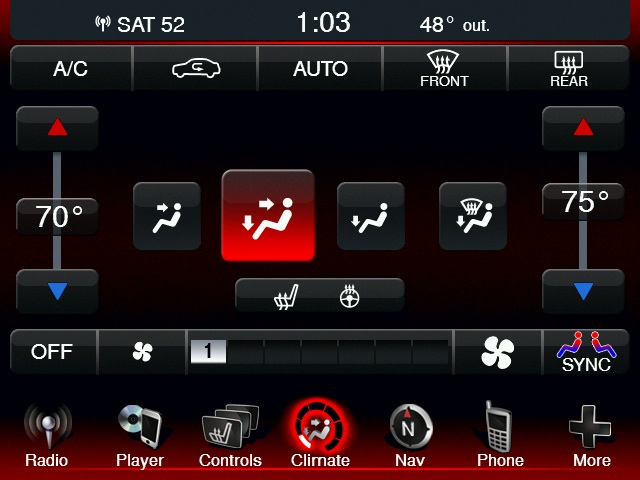
The climate controls are also clear and easy to use. One thing to note are the sliders for the temperature controls. The key thing is that they are sliders. In other words, you can slide your finger up and down and set the temperature that you want. Again, the rest of the controls are easy to use and are very logical. Finally, let me show you this screen:

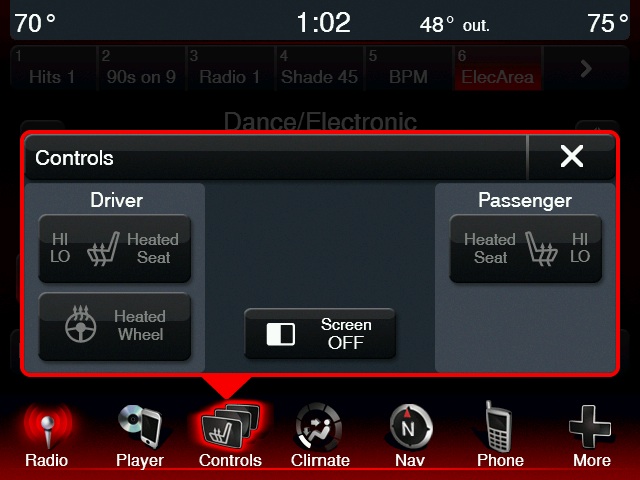
I’m going to bring your attention to the bottom row of icons. These icons are always on the screen regardless of what you might be doing. That way you can quickly switch from the radio for example to the phone and back again. That makes the system very easy to use without having to open the manual.
Now the next thing that sets this system apart from others is the fact that the navigation system is supplied by Garmin. That’s a great move because most of these systems use navigation systems that are either made in house or created by a company who’s strength isn’t navigation. That means that users of these systems don’t get the best user experience. By using Garmin, Chrysler gets a proven navigation system that people are already familiar due to the fact that many people have used stand alone Garmin systems in the past. There’s no doubt that this is the reason why Chrysler has had one of the best embedded navigation systems according to JD Power.
Next, is how UConnect interacts with smartphones. These systems need a lot of work to make sure they interact with smartphones perfectly. Thus Chrysler puts a lot of work into making sure that as many phones as possible are tested. For example, phone users can also go to uconnectphone.com and by clicking a few things, users can find out how their smartphone will work with UConnect. To come up with this takes a lot of time and effort and Chrysler needs to be applauded for that.
Finally, the system is completely upgradable. Additional functions can be added through software updates. So if there’s a demand for Slacker for example, you can expect it to show up in UConnect. Plus the usual bug fixes can easily be rolled out. All users have to do is go to driveuconnect.com and choose the vehicle that they have. A few clicks and your VIN (vehicle identification number) will get you the latest updates that are available. No need for Chrysler to wait for you to send you the update. Updating your system is also easy. Simply download an .EXE file if you’re a Windows user or a .DMG file if you’re a Mac user. Open the respective file and copy the file that is packed inside that file and copy it to a USB stick that you supply. Then plug it into the USB port of your Chrysler product and turn on your car. It will take about 15 minutes or less to update. Easy and painless. This won’t be a hard thing to do for the tech savvy. So if you don’t consider that to be you, your local dealer can do this for you. But from what I can see, you’ll be fine to do this by yourself.
UConnect is a cutting edge system that has a lot going for it as you can see from my in depth look at the system. I truly believe that this system will drive sales to Chrysler vehicles if potential customers get a chance to try this system as it’s very easy to use and it’s very feature rich. Chrysler deserves a lot of credit for putting this system in their vehicles and I look forward to seeing it in more and more Chrysler vehicles as time goes by.


Chrysler Uconnect Group Launches Industry-First Dealer-Activated Navigation System
Posted in Commentary with tags Chrysler on January 9, 2013 by itnerdHere’s a scenario: You buy a car and weeks or months later you want to add a feature. Well, you’re out of luck. Right? Perhaps not if the feature in question is a factory navigation system. Chrysler via their Uconnect group now has a feature where you can add navigation functions AFTER the time of purchase:
“Sometimes customers don’t realize what they want until they need it,” says Marios Zenios, Vice President-Uconnect Systems and Services. “That’s fine. We can help. With dealer-activated navigation, we are adopting a ‘no-customer-left-behind’ attitude.”
Because the necessary hardware is already resident in the vehicle, dealer-activated navigation affords a major convenience over portable devices, which create clutter and require charging or smartphone data plans – or both.
Dealer-activated navigation boasts the same map data as pre-ordered systems, including:
In addition, dealer-activated navigation features turn-by-turn audio instructions to further encourage drivers to keep their focus on the task at hand – driving.
The dealer-activated navigation will be initially available on the 2013 Ram 1500 full-size pickup, SRT Viper and the 2014 Fiat 500L. I imagine that it will spread to other vehicles as well. This is an excellent move by Chrysler and gives them a key point that sets them apart from the rest.
Leave a comment »