Tonight I went to update my copy of Diskwarrior to version 4.4. That required me to download an updater from the Alsoft website and then I needed to insert my original DVD and once it copied and modified it, I needed a blank DVD to burn the updated DVD. I’ve done it before so I didn’t really think twice. That is, until it wouldn’t burn on my MacBook Pro. I tried three different brands of DVDs and got the same result. I then decided to burn straight from the Mac OS X operating system and got this error message:
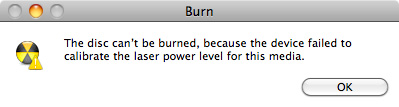
That’s an error message that sounds pretty terminal. Given that my Macbook Pro is three years old, I first assumed that it was a hardware problem such as a bad DVD drive. But I decided to take a crack at trying to fix it myself. I reasoned that because the DVD burner could read discs, it wasn’t dead. I also used it infrequently (like 4 or 5 times a year) to burn discs so I reasoned that I didn’t kill the drive from overuse. Thus It seemed reasonable to assume that perhaps the lasers that were responsible for burning were dusty or something like that. I had seen that in other computers before so it made sense. So I checked to see what DVD burner was in the MacBook Pro using System Profiler and found that it was a “MATSHITA DVD-R UJ-868” drive . I Googled the drive for some pictures and found that the lasers were about a inch inside the drive slot. Armed with that info, I tried using compressed air to clean the lasers. That’s something that worked for me on other computers, but it didn’t work this time. When I tried to burn a disc, I got the same error. So I tried something different. I took a thin microfiber cloth and made it moderately damp with alcohol. I then wrapped it around a credit card so that it was flat enough to fit into the drive slot. I slid the credit card wrapped in the damp microfiber about a inch into the drive and moved it back and forth for about 3 minutes. I then let it dry for about 5 minutes and tried burning.
The result: Success! I could burn from OS X and I could complete the update process of Diskwarrior.
I can only assume that even though there’s what looks like to be two pieces of felt covering the drive slot, dust and other contaminants must be able to sneak into the drive which affects how the drive operates. That says to me that perhaps Apple needs to redesign this slot so that it keeps dust out. I’ve seen one of the latest Macbook Pros and it’s still the same sort of design. Perhaps if Apple is reading this, they might want to consider it the next MacBook Pro they make.
Journalist Gets Hacked… Blames Apple Tech Support
Posted in Commentary with tags Apple, Hacked, Security on August 6, 2012 by itnerdHere is a perfect example of doing everything right and bad things still happen:
Former Gizmodo reporter Mat Honan is blaming an AppleCare technician for allowing his personal e-mail and Twitter accounts to be hacked, as well as the tech blog’s official feed.
The Gizmodo breach, apparently perpetrated by a person or group of people calling themselves Clan W3, was brief but resulted in racist and offensive tweets being sent to the tech blog’s 415,000 followers on Friday. Gizmodo initially blamed its former reporter for the tweets and quickly regained control of its account.
But Honan, who currently works for Wired, was not so fortunate. He described in a blog post how he had learned his iCloud account had been breached by a hacker who wiped his devices and gained access to his Gmail and Twitter accounts. Now he says an Apple technician fell victim to social engineering, a technique of manipulating people instead of computers to perform a task or divulge information:
I know how it was done now. Confirmed with both the hacker and Apple. It wasn’t password related. They got in via Apple tech support and some clever social engineering that let them bypass security questions. Apple has my Macbook and is trying to recover the data. I’m back in all my accounts that I know I was locked out of. Still trying to figure out where else they were.
Isn’t that just delightful? Here’s what’s really bad about this:
Honan says the hacks occurred Friday evening when someone gained access to his iCloud account and reset his password. That led to the remote wipe of his iPhone, iPad, and MacBook Air and hijack of the Twitter accounts. The blog also describes the challenges he faced in regaining control of his devices and accounts.
He said he initially suspected the hacker used brute force to learn his seven-digit alphanumeric password, but Honan said in a blog update that someone claiming to be the hacker contacted him, saying he “didnt guess ur password or use bruteforce. i have my own guide on how to secure emails.”
Suddlenly, I don’t feel so paranoid because I change all my passwords every 60 days. Though that wouldn’t have helped in this case. Apple really needs to explain what happened here and assure their users that this cannot happen again.
Leave a comment »