Archive for May, 2014

Citrix Announces Citrix Workspace Services

Posted in Commentary with tags on May 8, 2014 by itnerd

Citrix has announced a new cloud-based service which enables faster time-to-value for partners and customers and increases simplicity of building mobile workspaces on a choice of clouds. The cloud-based platform allows both partners and customers to rapidly build and offer desktops-as-a-service (DaaS), virtual application delivery and mobility services from any cloud.

Called Citrix Workspace Services, this cloud environment gives partners and customers new levels of choice, versatility, extensibility and experience: the choice to use multiple public clouds, private clouds or enterprise datacenter infrastructure; the versatility to deliver a wide range of workspace services; the extensibility of a cloud-based platform for partners to build differentiated solutions; and the high-definition user experience Citrix customers have come to expect. Workspace Services provides the following functionality:

  • A Platform for Citrix Partners – Workspace Services is designed as an extensible, multi-tenant platform for partners, including Citrix Service Providers, system integrators and channel partners, to deliver customer value by providing cloud-based orchestration and delivery for Citrix technology so partners can focus on addressing end-users’ complete workspace needs.
  • Ability to Deliver a Complete Mobile Workspace – Mobile workspaces require more than just a hosted desktop or app. Users need a complete portfolio of services, including desktops, apps, mobility solutions and data sharing, to do their jobs. These services become the platform for enterprises to deliver a complete mobile workspace and for service providers to build a differentiated offering.
  • Workspace Delivery on the Best Clouds – Workspace Services integrates with the best clouds for any number of workspace needs. It includes provisioning into the leading public clouds, private cloud providers, and the unique ability to integrate with enterprise datacenter infrastructure.
  • Delivery with Citrix HDX Technologies – Mobile workspaces require the best user experience across a wide range of devices and network conditions. Only Citrix HDX technologies deliver an optimized experience for any device for use across changing network conditions.
  • Unified Experience Across Hybrid Environments – By integrating Workspace Services with enterprise resources and existing deployments, customers and partners can unify the user and management experience across a hybrid cloud environment.
  • Convenient Concierge Service – One-click access to a concierge from any device or app allows subscribers to get live assistance through their mobile workspaces. Built on the world’s largest on-demand support platform – Citrix GoToAssist – the concierge service addresses the critical need for supporting a superior subscriber experience.
  • User-Focused Analytics –Workspace Services includes user-focused insights to analyze end-user experience, usage, environment and service performance across all locations and clouds. This gives partners and customers the ability to leverage cloud analytics to monitor both new cloud deployments and existing on-premises deployments and correlate issues across the environment.

Citrix Workspace Services will be available as a technology preview with cloud desktops in the second half of 2014.


Belking QODE Thin Type Keyboard For iPad Air Announced

Posted in Commentary with tags on May 8, 2014 by itnerd

Belkin announced the availability of the QODE Thin Type for iPad Air today. It is one of the thinnest keyboards on the market and the newest addition to the award-winning line of QODE tablet keyboards. Ultra-thin and lightweight, the QODE Thin Type offers unsurpassed portability for productivity on the go.
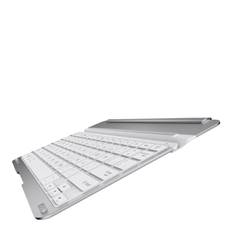
image003

At less than 4mm thick, the Thin Type is built with a solid, unibody construction that is lighter in weight than the iPad Air itself. Fast and easy to attach with secure-hold magnets, the QODE Thin Type is the perfect portable keyboard companion to toss into bags, backpacks and briefcases. The QODE Thin Type features Belkin’s exclusive TruType technology for a comfortable, natural typing experience similar to that of a full-sized laptop. With well-spaced, responsive keys, typing on the Thin Type is faster and more accurate than typing on the tablet’s touchscreen alone. Thin Type offers up to 79 hours of active battery life and pairs seamlessly with a one-touch Bluetooth key.

QODE Thin Type for iPad Air is available now at Belkin.com and select retailers worldwide.

Analyst Says BlackBerry Is The Lowest TCO Multi-Platform Enterprise Mobility Management Solution

Posted in Commentary with tags on May 8, 2014 by itnerd

According to a report from Strategy Analytics, BlackBerry was named the most cost-effective EMM provider on the market. The report evaluated six multi-platform EMM solutions and found that in both commercial and regulated environments, BES10 boasts the lowest overall total cost of ownership (TCO) over five years. The report also found:

  • BlackBerry is the lowest TCO for commercial and regulated and high-security EMM environments.
  • Respondents noted that BlackBerry is the most secure solution as competitors do not offer the same level of IT policies and compliance controls as BlackBerry.
  • BES10 offers the most comprehensive set of capabilities for the broadest range of customers, including regulated, enterprise and SMBs

This is clearly good news for BlackBerry as it continues to fight for hearts and minds. More details on this can be found in a press release that went out today.

iOS Security Issues Make The News

Posted in Commentary with tags , on May 7, 2014 by itnerd

If you have an iPad or an iPhone running iOS 7.1.1, then you should take note of a bug that allows an attacker with physical access to the phone to get access to your contacts even if the phone is locked. All they need is access to Siri on the lock screen.

Here’s a video that shows how to pull this off:

To protect yourself, disable Siri on lock screen from the Settings menu. Now that’s not going to be practical if you use Siri in your car or something, but that is the only protection from this bug that’s available at the moment.

Now, there’s a second bug that’s way more serious. Apple states publicly that it uses data encryption to protect email message attachments. However a researcher has discovered that this does not appear to be the case. Andreas Kurtz, has delivered proof that iOS 7.0.4 and later does not include this security feature. Here’s what he told ZDNet:

I verified this issue by restoring an iPhone 4 (GSM) device to the most recent iOS versions (7.1 and 7.1.1) and setting up an IMAP email account1, which provided me with some test emails and attachments. Afterwards, I shut down the device and accessed the file system using well-known techniques (DFU mode, custom ramdisk, SSH over usbmux). Finally, I mounted the iOS data partition and navigated to the actual email folder. Within this folder, I found all attachments accessible without any encryption/restriction.

He reported the bug to Apple and they claim to be working on a fix. Hopefully Apple is also working on a fix for the lock screen bug as well. But these two examples show that Apple really needs to step up their game when it comes to security if they hope to push the iPhone and other iOS devices into the enterprise as major corporations will not stand for these sorts of security failures. And for the record, neither should consumers.

New Google Maps Hits The Streets And Jumps To The Front Of The Line

Posted in Commentary with tags on May 6, 2014 by itnerd

Today, Google Maps was updated for iOS and Android and in my opinion, it’s the best mapping application out there. Here’s why:

  • This Google Maps update addresses my number one complaint about Apple Maps which is the lack of lane guidance. It tells you what lane that you should be in so that you don’t miss an interchange or exit.
  • Offline maps are now available. That way when you travel abroad you can save data charges.
  • It’s now easier to find restaurants and bars among other things and it allows you to filter them based on price and ratings.
  • If you have the Uber app installed, you can now compare your ride with transit and walking directions right from Google Maps in some cities.
  • iOS users now have the ability to get addresses from the address book on your phone or tablet.
  • You can tag places for later review.

I tried it this afternoon and and I really like this update. The fact that lane guidance is available puts Google Maps on par with my Garmin navigation system in my car and far ahead of Apple maps. Everything else can be classified as refinements and they are welcome ones. I would highly recommend downloading this update to Google Maps ASAP. You’ll thank me for it.

Citrix Announces Plenty Of News For Mobile Users

Posted in Commentary with tags on May 6, 2014 by itnerd

Today at the Citrix Synergy Conference, Citrix announced news about brand new components which will help companies provide users with a secure mobile workspace infrastructure:

  • The new Citrix Workspace Suite is a single, flexible solution that will support multiple corporate or personal devices per user, providing instant access to app, data and services, and simplifying how organizations manage and secure their end user computing environment. It combines key Citrix technologies, including application and desktop virtualization, mobile application and device management, native mobile productivity apps, enterprise file sync and share, WAN optimization and an access gateway to enable comprehensive management of application, desktop and mobile infrastructures. As a result, businesses can improve employee productivity, simplify IT and fully secure enterprise content.
  • Citrix is refining its new generation of Windows delivery products with unique features that organizations in healthcare, finance, government and education have relied on for the last 25 years – features that will be available for the first time with both app delivery and VDI. Since releasing new versions of Citrix XenApp and Citrix XenDesktop in March 2014, Citrix has continued a brisk pace of innovation to drive even higher levels of security and user experience for virtual Windows apps and desktops. At the conference, Citrix will preview refinements that enhance security capabilities, provide high-performance HTML5 browser-based access from any device, enable fast log-ons, simplify roaming apps across multiple devices and support the latest USB 3.0 peripherals, as well as many more real-world, customer-driven features. In addition, Citrix is releasing a technology preview of migration tools and utilities that will simplify the migration and upgrade process to the latest releases for existing customers.
  • NetScaler MobileStream technology dramatically improves mobile network and application performance along with network visibility, while tightening security for both the enterprise and the end user. NetScaler MobileStream improves data security and mobility support, delivering the most advanced cloud and mobile networking capabilities in the industry. Coupled with Citrix Workspace Suite, only Citrix offers the purpose-built mobile networking functionality that creates a complete end-to-end solution for truly empowering business mobility.
  • Citrix announced new Citrix ShareFile features that deliver the broadest storage access for users and the most choice for IT. The new features give users the ability to access and edit files from multiple data sources on their mobile devices, giving businesses the ability to take back control of corporate data in personal data services, resulting in increased productivity and security. Citrix is also releasing a ShareFile StorageZone Connectors SDK that allows any IT or partner organization to develop connectors to any enterprise content management (ECM) system, expanding the types of data users can access and edit on the go via ShareFile.
  • The new Citrix XenMobile release includes additional support for Windows Phone 8, operational and scalability enhancements as well as backend integrations that further automate mobile workflows for businesses and end users. The technology preview of new workflow-driven mobile productivity apps – including WorxNotes, WorxEdit and WorxDesktop – enable people to be more productive on their tablets or phones, while IT retains control.

Today’s news from Citrix highlights how the company is enhancing its mobile workspace solutions to provide ways for customers to securely manage a diverse and mobile workforce while optimizing user experience

Google Play Music Teams Up With Sonos In Canada

Posted in Commentary with tags , on May 5, 2014 by itnerd

Google Play Music launched today in Canada. That’s a really big deal. So is the fact that Sonos supports Google Play Music so that you can stream directly to Sonos from within the Google Play Music app on your Android device, or simply stream Google Play Music from your Sonos app to any Sonos player throughout your home. Here’s what the combination of the two brings to the table for Sonos users in Canada:

  • Blend your personal library – Google Play Music lets you store your personal music collection for free online (up to 20,000 songs) so you can stream all your favorite music from one place, to any room in your home
  • Discover more than 22 million tracks on demand
  • Create a custom radio station or try I’m Feeling Lucky radio and enjoy fresh music based on your listening habits with unlimited skips and no ads

Listening to the music you love just got even faster and more flexible:

  • Enjoy all the features of your Google Play Music app in Hi-Fi sound by playing directly to Sonos from Android devices
  • Use the Google Play Music app to start a song in any room and control the volume without ever leaving the app
  • For full access of all your music services and multi-room control, use the Sonos app to stream all the music you love to any room

Google Play Music is now available on Sonos in Canada. To get started, select Google Play Music from the services menu on your Sonos and log in with your Gmail. Android users can now play directly to Sonos from within the Google Play Music App on their device by selecting the cast icon.

Users can try it for 30 days for free, then $9.99/month thereafter. Sign up before June 30 and pay just $7.99/month.

OVH.com Brings Big Pipe To The Datacenter

Posted in Commentary with tags on May 5, 2014 by itnerd

Hosting provider OVH.com earlier today announced that they now offer dedicated servers with a 40 Gbps connection, a first on the worldwide market. This innovation leads to an evolution of datacenters’ networks, which are now equipped for 40 and 100 Gbps connections. This shouldn’t come as a shock as six years ago, OVH.com became the first hosting provider to supply dedicated servers connected to a 10 Gbps network in Europe. Available on the “Big Data” and “Storage” lines, the 40 Gbps connection fastens data exchanges between servers through the vRack, a private network.

The 10 Gbps connection remains a standard on our public network, designed for exchanges between the servers and the Internet. However, over the course of the past three years, needs have evolved, so the clients do not only manage one or two servers for a website, but they administer entire infrastructures of servers synched together. With the vRack, OVH.com offers a large private network allowing connectivity between dedicated servers and the Dedicated Cloud. The hosting provider stands out on the market by extending the vRack to its 15 datacenters, including across North America and Europe.

OVH.com customers have put in place Hadoop and OpenStack Swift clusters with data volumes that can go over 100 Pb and are often configured across multiple datacenters. The need for 40 Gbps comes into play at this point. These horizontal networks across datacenters are forced to work on a smart combination of the 40 and 100 Gbps connections, depending on the delay time that separates the servers.

If you need speed from your hosted solution, OVH.com is likely going to be the first call that you make.

Patent Troll Threatens Podcasters

Posted in Commentary with tags on May 5, 2014 by itnerd

Something that has been under reported in the media is the threat by a Patent Troll that goes by the name of Personal Audio who are asserting a set of patents that covers what is commonly referred to as podcasting. They’re going after prominent podcasters including Adam Carolla to make some money of these dubious patents. Now, why do I feel that they’re patent trolls? Here’s why:

  1. Their company is set up in Beaumont Texas which is ground zero for Patent Trolls.
  2. They have not actually produced a product of any description which is typical of patent trolls.
  3. The company has sent podcasters letters demanding that they pay Personal Audio to use podcasting technology or else vague things will happen. That is another typical patent troll tactic.

The company justifies their actions this way.

“We invented the technology that enables podcasting back in 1996 as part of an effort to develop a portable and personal audio system that would offer users a customized listening experience using content and data downloaded over the Internet,” said Charles Call, a co-inventor on the ‘504 patent and a member of Personal Audio, LLC. “Today, this patented technology is used by several media companies offering podcasting.”

They have won judgements against Apple and several big companies do have licenses with other big companies. But that does not mean that they invented or have the rights to the patents. Also, companies often sign license agreements because it makes the Troll go away. Plus the cash they have to spend amounts to a rounding error relative to the cost of ongoing litigation. Now the Electronic Frontier Foundation is getting involved in this fight. Here’s why:

As with so many patent troll cases, the troll is asking for money despite having contributed nothing to the industry. By its own admission, Personal Audio tried and failed at its attempt to make an audio player. Having failed at actually making something, it became a shell company that does nothing but sue on its patents. And now it wants a handout from those who worked hard to create popular podcasts.

Thus they’re not only looking for donations, but they’re looking for examples of podcasting that pre-date any of the patents that this company has. By finding these examples, it would invalidate the patents and put an end to this Patent Troll. Keep an eye on this story. It’s a very important one that will have far reaching implications.

New Serious Security Flaw Found And It Should Concern You

Posted in Commentary with tags on May 5, 2014 by itnerd

Fresh off of the Heartbleed threat comes a brand new one. Flaws have been found in OAuth and OpenID which are used by websites by Facebook LinkedIn and Google among others. Here’s why this is scary:

Wang Jing, a Ph.D. student at the Nanyang Technological University in Singapore, discovered that the serious vulnerability “Covert Redirect” flaw can masquerade as a log-in popup based on an affected site’s domain. Covert Redirect is based on a well-known exploit parameter.

For example, someone clicking on a malicious phishing link will get a popup window in Facebook, asking them to authorize the app. Instead of using a fake domain name that’s similar to trick users, the Covert Redirect flaw uses the real site address for authentication.

If a user chooses to authorize the log in, personal data (depending on what is being asked for) will be released to the attacker instead of to the legitimate website. This can range from email addresses, birth dates, contact lists, and possibly even control of the account.

Regardless of whether the victim chooses to authorize the app, he or she will then get redirected to a website of the attacker’s choice, which could potentially further compromise the victim.

And if that’s not enough, here’s what makes this worse. It’s not going to get fixed anytime soon as fixing it is an extremely complex matter. So the question is, how do you protect yourself? It’s simple. You should be careful about clicking links that immediately ask you to log in to Facebook or Google. Closing the tab immediately should prevent any redirection attacks.

Hopefully this gets fixed and companies that are affected open about the fact that they’ve fixed this.