Posted in Products with tags Ooma on November 21, 2023 by itnerd
Back in January I wrote a review about the Ooma Telo VoIP phone system. At the time I promised that I would follow up. And that took longer than I expected because to be frank, nothing much has gone wrong except for one thing that I will cover in a moment. The call quality remains excellent and she’s has had no problems. In short it’s been rock solid and she’s had no complaints.
The only thing that has gone wrong was that the client forgot to update her credit card with Ooma and that broke her phone service for a few days. On top of that Ooma’s emails warning her of this went to her spam folder. But one phone call to Ooma’s support on a Saturday afternoon sorted all of that out. I will also note that the wait time was under a minute and the problem was resolved in under 30 minutes as resolving the issue required a power cycle of the Telo device which takes 15 to 20 minutes to do.
The bottom line is that the Ooma Telo is a reliable product that I would recommend without hesitation. Their support is great, and I honestly can’t find anything negative to say. If you are looking to use a VoIP phone system to give you an affordable home phone line, the Ooma Telo is worth your time to take a look at.
Posted in Products with tags Ooma on January 7, 2023 by itnerd
There’s a bit of a story behind this review. So please hang with me while I go through it as it will all make sense in the end.
I have a client who was using the netTALK Duo as their secondary phone to keep in touch with family via phone at a cheaper rate then what Canadian telcos can offer. But over the latter half of 2022, it would disconnect from the netTALK network and become unusable. That forced the client to use netTALK’s chat support feature to try and get assistance. I say try because even though this was a problem on netTALK’s end, the people that she was typing to always blamed her, her ISP, and at one point even tried to sell her new hardware to solve her issue. Fed up with such poor customer service, she asked me to come up with another option. Thus here we are with this:
This rather unassuming box contains an Ooma Telo which is Ooma’s VoIP box. When you plug this into your Internet connection and connect a phone to it, you get phone service. They claim it will be simple to setup and they can port her existing number to the device. Before we put that to the test, let’s see what’s in the box:
Opening the box, you get your usual documentation. Let’s put that to the side for a moment.
Under the documentation you get the Ooma Telo. It comes in white and in this case black.
You also get a power cable and a flat Ethernet cable.
Setting up is easy, but if I could give you one piece of advice, RTFM which is “Read The Fine Manual”. Because before you plug the Telo in and power it up, you need to activate it first via typing some information that is located on the bottom of Telo into a website that the instructions directs you to. I am going to assume that if you don’t do this, bad things will happen. Like the Telo unit gets blacklisted or something. Once you do that, you’re directed to plug in the unit and power it on. At that point you wait and in about 15 minutes you get this:
This is what a perfectly functioning Telo looks like as there’s a blue light in a flower pattern indicating that it is online and working. You’ll note that there is an orange light. That’s the voice mail light as one of the cool thing that the Telo can do is to allow you to play voice mails on the unit itself. That would make life easier for many as it’s far easier to do that versus dialling into a voice mail service. It also allows you to screen calls so that you don’t pick up the phone for some sort of scammer or telemarketer. I should also note that Ooma does offer call screening services as part of their premier plan. I’ll have more details in a second on that and the basic plan that the company offers.
On the back of the unit is a USB port for optional items like their bluetooth and WiFi adapter, a power connector, two Ethernet ports with the one on the left being a pass through connection for certain use cases, and the one on the right is the one that you connect into your home router. An RJ11 jack for your phone is on the far right. In my clients use case, I simply connected her phone and a cable to her router into the Ethernet port on the right.
Let’s talk for a moment about the service that the Telo offers. There’s two tiers of service. You can get their basic plan which since I along with my client are in Canada, gives you nationwide calling, access to their app to get calls on the go among other things. But if you update to their premier plan, you get a lot more including US and Mexico calling, better call screening, the ability to get a second number among other things including free number porting. That part is important as I will explain momentarily. In terms of costs, the basic plan is about $7 CAD a month though the company says that it is “free” but you only have to pay monthly taxes and fees as described here. The premier plan $10 CAD a month plus applicable taxes and fees. You do get two months of the premier plan when you buy a Telo unit though.
The next thing that I had to do is to start the process of porting her phone number from netTALK to Ooma. That required a trip to netTALK’s chat function to get her netTALK account number. But once I secured that, the online form that I had to fill out only took a few minutes to complete. Now I should note that there is a cost to porting your number which is $35 CAD. But it is free if you get the premier plan.
Pro Tip: If you are porting a number, it will prompt you to buy the premier plan. Keep saying no the premier plan and the system with then offer to drop the price of the plan from $10 CAD a month price to roughly $8.30 CAD a month for the first year. This is what I did to save my client a few bucks for the first year.
Now Ooma quotes thirty days to get a number ported. But it went much faster in her case. The request was put in on December 29th and was done on January 6th. This resulted in the client having two phone numbers. One was issued by Ooma when the Telo unit was activated. The second was her old number that was ported over. To simplify things, I used Ooma’s chat service to get the Ooma issued number deleted. The person that I was typing to seemed to know what she was doing and was efficient in terms of getting this actioned. So based on a sample size of one, I would say that the support that Ooma offers is pretty good. I should note that there’s phone as well as chat support. Though I will note that phone support is only available 12 hours a day on weekdays, and 8 hours a day on weekends. And their phone support hours are based on the Pacific time zone. Chat support is available 24/7.
In terms of call quality, tests that I did using her existing phone were crystal clear and I have no complaints on that front. But if you wanted to leverage some of the Telo’s feature set, you could get their phones which use DECT 6.0 to communicate with the TELO. Meaning you could park the Telo in some corner and place phones wherever you need them to be as there would be no wires. You can also have wireless adapters for things like fax machines and the like. The bottom line is that the Telo has the ability to meet your needs should your needs change. And since I installed it, it has been reliable as it has stayed online since the day that I set it up. And one thing that is cool is that Ooma offers a web based portal that allows you to configure everything. My client will never go into this, but I used it to set the number of rings before it goes to voice mail and if the phone rings to the Ooma App which is available for iOS and Android.
I only have one gripe and it’s truly a minor one. The blue light that you saw in one of the pictures above is bright. While I understand the need for this light to allow you to see if the Telo is online or not, you should be able to dial in how bright it is. That way it doesn’t light up a room at night which would be a problem if you are sleeping in said room.
In terms of pricing, the Telo is $129.99 CAD. But watch for deals as the Telo often goes on sale. There’s also a 30 day return policy in case you’re not satisfied. I’ll be monitoring how my client gets on with the Telo and posting a follow up in a couple of months. But as of right now, the Telo seems to be a winner for my client.
Posted in Commentary with tags Ooma on April 25, 2018 by itnerd
Today is National Telephone Day and Ooma says the landline is still relevant in 2018.
1. 911 CAN’T FIND YOUR SMARTPHONE’S LOCATION
As many as 95% of cellphones can’t accurately share their location with 911 dispatchers—because 911 was designed for landline phones, meaning a VoIP phone service that offers enhanced 911 will always be able to accurately and immediately provide your location to first responders.
2. WHO’S THAT EAVESDROPPING ON MY SMARTPHONE CALLS?
There’s a backdoor built into every cell phone call allowing anyone who can hack to listen in on your private conversations—but many VoIP landline services include state-of-the-art encryption to keep hackers out.
3. DON’T GO BROKE CALLING INTERNATIONALLY
Any international call using a cell phone involves expensive roaming charges, add-on plans, and even SIM card swapping. However, VoIP services offer much lower international calling costs—making it feasible to keep up with friends and family in other countries.
4. STOP DROPPED CALLS IN THEIR TRACKS
Home phones tap directly into your phone network, while VoIP phones use a steady internet connection—dramatically increasing voice quality and reception compared to a cell phone.
5. SLASH YOUR PHONE BILLS
VoIP phone service can cost as little as $4 a month, leading to savings of more than a thousand dollars on an average phone bill over a couple of years.
Posted in Commentary with tags Ooma on April 9, 2018 by itnerd
Consider this: A high percentage of home burglaries happen during the spring break period.
But according to Ooma (www.ooma.com/home-security/)—a leading DIY home phone and security company—there are 6 basic inexpensive steps homeowners can take to deter and react to break-ins.
1. MIND THE FRONT DOOR
34% of break-ins occur at the front door. Install a smart doorbell that routes to your phone, and use tools like two-way speakers to give visitors the impression someone is home. Also install video cameras and view visitors on your phone, no matter where you are.
2. WHEN A DOOR CLOSES, MAKE SURE A WINDOW DOESN’T OPEN
23% of break-ins occur through first-floor windows. Use classic sash locks to keep windows locked, and install wireless motion sensors to be alerted if a window is raised.
3. CHECK YOUR A/C
A popular burglary entry point: pushing in a window A/C unit. Install motion sensors near window A/C units, and consider uninstalling window A/C units if you’re leaving town.
4. CALL 911 REMOTELY
Knowing someone is breaking into your house doesn’t help if you’re on a beach several hours away—unless you have a way to call 911 to your home’s local emergency dispatchers with a feature such as Ooma’s Remote 911.
5. BEWARE OF SLIDING DOORS
Sliding doors are another popular entry point, as the locks are generally easy to pick. Install physical barrier bars in the tracks, and set up motion detectors in the vicinity.
6. KEEP THE LIGHTS ON
Integrate light timers or smart lights that you can control with your phone to make your home look lived-in and deter break-ins.
Ooma Home [http://www.ooma.com/home-security/]—the most affordable DIY smart home security system—integrates remote 911 calling, a home monitoring app, and smart security cameras.
Posted in Commentary with tags Ooma on January 29, 2017 by itnerd
In a bold and significant new trajectory, Ooma who is better known for its VoIP phone offering—has just released the Ooma Home Monitoring System. Designed to work with the Ooma smart home phone service – the Ooma Telo – the system includes motion, water, door and window sensors in addition to the unique ability to remotely place a local 911 call from the home, thus providing all-encompassing protection and peace of mind for consumers.
The system offers the following:
1. REMOTE 911 CAPABILITIES: Ooma users can remotely trigger a call to 911 from their home, using their cell phone to be conferenced into the 911 call.
2. MOTION SENSOR: Ooma’s motion sensor is estimated to have up to three times the area coverage and four times the battery life compared to leading competitors. The sensor can be mounted in any 90-degree corner in the house.
3. DOOR/WINDOW SENSOR: Worried about burglars? Ooma Home Monitoring can automatically notify you any time a door or window opens while you’re away.
4. WATER SENSOR: If a defective washing machine or water heater floods the room, Ooma users will immediately be alerted via text message or a phone call so necessary actions can take place and avoid further damage.
Consumers can manage the system and monitor the status of each sensor via the Ooma Home Monitoring Mobile App on their iOS or Android mobile device. Users can select from a variety of real-time notifications including a phone call, SMS, email alerts and app notifications. The Ooma Telo device can also deliver voice announcements when a sensor is triggered or when “home” or “away” mode is changed. Ooma Home Monitoring is the only solution to provide the option to remotely dial 911 from your home phone number, even when you’re away, and speak with your home’s local emergency dispatcher, who will automatically receive your home address information to facilitate the fastest response time possible.
Ooma Home Monitoring supports up to 100 connected sensors using the latest version of the Ooma Telo. Sensors work wirelessly using the same DECT (Digital Enhanced Cordless Telecommunications) technology used by hundreds of millions of cordless handsets worldwide and are easily installed. This eliminates the need for professional installers, and gives home owners and renters a simple and affordable home monitoring system.
All Ooma customers will receive the Ooma Home Monitoring service free for the first sensor (door/window, motion or water). For each additional sensor thereafter, Ooma Basic service customers can subscribe to Ooma Home Monitoring for $5.99 per month, while Premier service customers can use the service at no additional cost as a part of their Premier service plan. The water sensor retails for $29.99 MSRP, the motion sensor for $34.99 MSRP, and the door and window sensor for $24.99 MSRP. Ooma Home Monitoring will be available in Q1 and can be pre-ordered from Amazon.com starting today.
Posted in Commentary with tags Ooma on September 16, 2014 by itnerd
I reviewed Ooma Office a while back and I had this to say:
Ooma has a winner with Ooma Office. It’s easy to set up, it’s easy to manage, and the call quality is outstanding.
We’ll, it’s just got better in three ways:
Introducing SureFax: Ooma Office is now optimized to more reliably send and receive faxes over virtually any high-speed Internet connection. This is an important addition because analog faxing has been a painful experience over VoIP – the added layers of complexity coupled with the need for consistent high-speed Internet leads to a high failure rate. Now, they haven’t solved it, but it’s gotten a whole lot better.
There’s a new web-based portal that gives each user their own view into the Office system and lets them listen to voicemail, view call logs, set call forwarding and update other preferences. It also enables click-to-call so users can make and return calls with one-click on a phone number inside the portal. This allows you to the administrative burden on business owners.
Ooma Office now enables businesses to add or port a toll-free number to their account for the same $9.99 per number monthly fee as local numbers. Toll-free numbers come with 500 minutes of free calling per month. Businesses that anticipate greater toll-free traffic can purchase additional plans, by signing in to their Ooma Office Manager account at https://office.ooma.com/.
Now the best part about all of this is that if you own Ooma Office, these features are already live on your hardware. That’s great because you don’t have to worry about upgrading. It’s already taken care for you. Clearly Ooma Office continues to be the winner that I thought I was earlier this year.
Posted in Products with tags Ooma on January 20, 2014 by itnerd
I am going to do something different and say this right up front. Ooma has a winner with Ooma Office. It’s easy to set up, it’s easy to manage, and the call quality is outstanding. Here’s why I feel that way.
Let’s start with the setup. First, you need to surf to myoffice.ooma.com/activate and follow the instructions there to activate the base station. It’s a five step process and it’s dead easy. At the end of it, I got two e-mails within short order. One to say that I was registered, and the second that my first extension was activated. Next you plug in the base station. Here’s a look at it:
It doesn’t look all that interesting from the front. However….:
It’s in the back is where all the action is going to be found. You get a pair of Ethernet jacks, a RJ-11 phone jack, and a USB port for use with the Ooma Wireless Adapter so that you don’t need a wired Internet connection. Ooma recommends that for the best call quality that you plug the base station between the modem that your ISP provides to connect you to the Internet and your router. I was highly dubious of this setup as I am on DSL and my router accesses my DSL modem via PPP0E to connect to the Internet. Thus I was expecting that it would not work and I was prepared to use one of the alternate methods that Ooma provides in the documentation that comes with the product. But I figured I would go with what Ooma recommended just to see what would happen. So I plugged a cable from my DSL Modem into the “To Internet” Ethernet jack and another cable from my router to the “Local Network” Ethernet jack. I was shocked when four minutes later my router connected to the Internet and a solid blue light appeared on the base station. I was extremely impressed at that point as it means that regardless of what kind of Internet connection is in use, any user of any technical skill can make this work by plugging in a few cables. Impressive!
Now at this point I could have simply plugged a phone into the back of the base station and started to make calls. But I wanted to do something far more interesting. I decided to use this to set up my first extension:
What you’re looking at is a Ooma Linx wireless phone jack. It uses DECT 6.0 to wirelessly communicate to the base station. That way you can place the extension wherever you need it. Simply plug it into AC power, plug in a phone into the RJ-11 jack at the bottom and press the “Page” button on the back of the base station to link everything together. I next had to log into this web based portal:
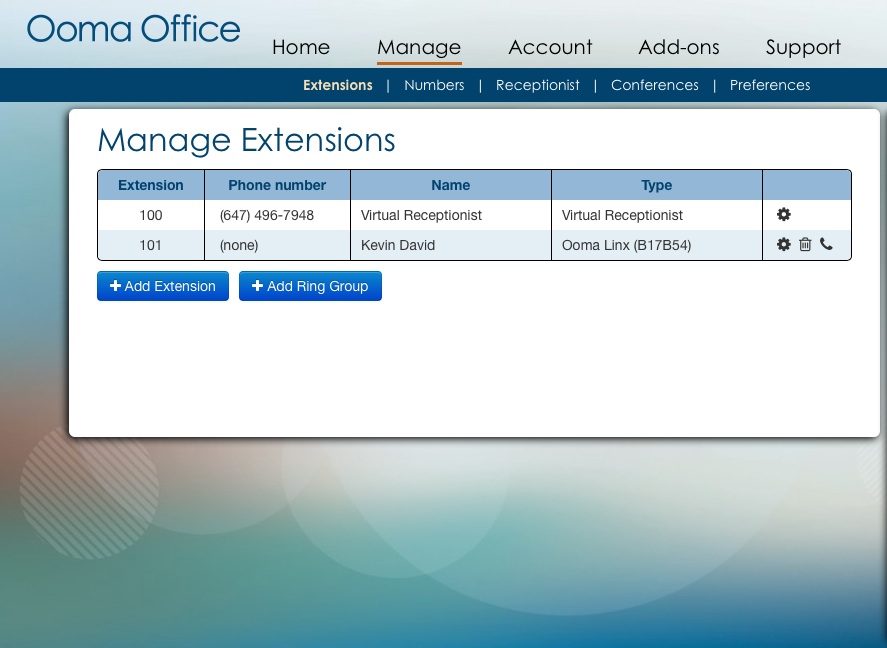
This is the Ooma Office Manager where I can change the greetings, assign extensions (each with voice mail that can be set up forward voice mails to your e-mail which is a very nice touch), or set up calling groups among other things. Using this web based portal which is accessible at http://office.ooma.com anywhere that you have Internet access, I was able to make extension 101 (all the extensions are three digit ones by the way) the Ooma Linx instead of the base station. One thing to note, that change wasn’t instant. It took about 10 minutes before I could make calls using that extension. I’m guessing that there has to be some communication between Ooma and the base station to make this change happen. That’s not the biggest deal in the world, but you should keep that in mind. I should also note that you can set up virtual extensions for remote workers and even have a virtual fax. The system expands to 5 phone extensions and 15 virtual extensions in total.
Since I was in Ooma Office Manager anyway, I took the opportunity to set up a virtual receptionist and a call routing tree to allow people to “press 1 for sales, press 2 for service” as well as set up hours of operation as well as holiday schedules. The process is dead easy and you will never have to read the manual to do any of this. Another thing to note, if you don’t have the best voice, you can use text-to-speech and let the system read out whatever greetings you want. While the voice does sound like it is synthesized, I seriously doubt that anyone will have any issue with it. But you are free to record your own voice or upload pre-recorded MP3 or WAV files. Ooma Office has other features that sets it apart from anything else out there. It supports three-way conference calls using numeric PINs for security, placing calls on hold, music on hold, and call waiting. Not only that, you can track your usage as well. All of this is professional grade and very impressive.
So let’s look at the big there items. Call quality, cost, and support. Let’s start with call quality. My wife made a call to a friend in Maryland and spoke for an hour. She considered it to be the best VoIP solution that she has ever used from a call quality perspective. That includes anything that she’s tested for me as well as the Avaya VoIP based system that she uses at her workplace. That’s high praise since Avaya makes phone systems costing thousands of dollars. Now how about cost? Ooma Office retails for $249.99 in Canada and comes with the base station and two Linx wireless phone jacks. Additional Linx wireless phone jacks are $50 each. Unlimited calling in Canada and the U.S. is only $9.99 per month per user and $9.99 per phone number. The difference between per user and phone number is important. If you have a phone number with one extension, you will pay $19.98 per month. If you have a three person business, each with their own extension, with one phone number and a fax line, it comes in at under $50 per month. That’s affordable for any small business. International calls are billed against a prepaid account (prepayments are made in increments of $25). Tech support is available by phone 24/7. That’s important because if you need help, the best help comes from a live person that’s available when you need them.
Downsides? There are three:
First, since Ooma Office relies on your Internet connection, it means that if that goes down then so does your phone. Having said that, any VoIP product is at the mercy of your Internet connection. So this isn’t an issue that is unique to Ooma Office.
The second thing is that a power outage will leave you without phone service. I point that out because a traditional landline will work in a power outage, and some office phone systems will work for a time in the event of a power outage if they have battery backup. Again, any VoIP product would be in the same situation. So again this isn’t an issue that is unique to Ooma Office.
The last thing that I’ll point out is that I was able to leave the Ooma Office Manager open in my browser for hours. For security reasons, it should time out after 10 or 15 minutes and force you to log in again. That way it keeps some evil doer from messing up your phone system. Ooma might want to do something about that.
Ooma Office is aimed at businesses with 10 or less employees. If that’s you, then you need to seriously consider Ooma Office for your telco needs. It will make you seem very professional and you’ll save some cash on your phone bills without sacrificing call quality. Plus it’s easy to set up and easy to manage. As I said earlier in this review, Ooma has a winner here with Ooma Office. If you’re okay with the limitations with VoIP based phone systems, this is the best business class VoIP system out there. Period.
Posted in Products with tags Ooma on January 8, 2014 by itnerd
Ooma is a leader in smart home and business communication systems that I’ve written about previously. Today at CES, Ooma is announcing Ooma Office which is something that is going to change the game. Ooma Office is aimed at businesses with less than 10 employees, delivers big business features and quality of service typically found in far more expensive options. But it doesn’t require an expert at phone systems to run it. That way you can install it and get back to work.
Here’s a look at what you get out of the box:
Ooma Office consists of an advanced base station (on the left) and Ooma Linx wireless phone jacks (on the right). Simply connect the base station to their high-speed Internet connection and analog phone, and then connect the Ooma Linx wireless phone jacks to any additional extensions. It sets up in minutes and can be done by anyone. Part of the reason for the ease of setup is that Ooma has put time and effort into this:
This is the Ooma Office Manager. Its purpose is to allow you to customize Ooma Office with minimal effort. You can set change your greeting, assign extensions, or set up calling groups. Another thing to note, if you don’t have the best voice, Ooma Office supports text to speech that sounds extremely natural.
Key features of Ooma Office include:
Virtual Receptionist: automatically greets and directs incoming calls
Big Business Features: provides extension dialing, music-on-hold, ring groups, conference bridges, virtual extensions, electronic fax and call logs
Easy Expansion: capable of hosting up to five phone extensions and 15 virtual extensions
Compatibility: works with analog telephones and fax machines
Flexibility: small business owners can keep their existing phone number or select a new phone number at no extra charge
Affordability: unlimited calling in Canada and the U.S. starts at only $19.98 a month
Ooma Office is going to retail at $249.99 CAD from Amazon, Best Buy, CDW and Future Shop. Unlimited calling in Canada and the U.S. is only $9.99 CAD per month per user and $9.99 CAD per phone number. The Ooma Office platform includes a one-year limited warranty and a 30-day money back guarantee. Additionally, 24/7 live customer service will be available by phone in both English and French which is important for Canadians. Check out www.ooma.com/ca for more information. I’ve asked for one to review and I will post a review as soon as I’ve had a chance to put it through its paces.
Posted in Commentary with tags Ooma on October 17, 2012 by itnerd
I’ve written about Ooma in the past and they have a very unique VOIP service. Today they announced the all new Ooma HD2 Handset and Ooma Linx remote phone jack. First, let’s talk about the HD2 Handset:
The new cordless Ooma HD2 Handset adds smart phone features to the home phone via the Ooma cloud-enabled platform and taps the full range of features offered by Ooma’s home phone service. The HD2 Handset boasts a two-inch colour screen which allows users to see the picture of a caller in the user’s contact list when the phone rings. Pictures and contact information can be imported from Facebook, Google, Yahoo, LinkedIn, Outlook and Mac AddressBook.
The combination of the Ooma Telo and new Ooma HD2 Handset provides cutting-edge HD Voice call clarity by capturing twice the voice data to double the fidelity of standard phone calls, for richer, more natural-sounding conversations. The cordless handset offers superior security and range afforded by the latest DECT technology without interfering with home Wi-Fi networks or other home electronics. Up to four handsets can be used with each Ooma Telo.
One-touch voicemail access lets users check messages anywhere in the home and there’s an intercom to talk between handsets or transfer calls. The handset’s speakerphone and headset port keep hands free for multitasking during calls. Another useful feature is the ability to configure a handset so it can be used as a baby monitor.
The new Ooma Linx wirelessly connects phones, fax machines or other telephony devices around the home to the Ooma Telo using the latest DECT technology. It also gives users the convenience to install their main phone anywhere in the home if the Ooma Telo is installed in a remote area of the home. For Ooma Premier subscribers, the Ooma Linx provides access to a second phone line without using the Ooma Telo HD2 Handset.
I’ve written about the Ooma VoIP service before and I’ve been very intrigued by the service. Now they’ve gone off and done something that has really gotten my attention. They’ve taken a very interesting service that sends alerts to up to 3 e-mails or phone numbers when 911 is used from an Ooma phone number. If you’ve got kids at home or a senior who lives on their own, this is a great service to have. Here’s an example of what I’m talking about from their press release:
Kellie Scrogum, an Ooma customer who lives in Kennesaw, Georgia, purchased an Ooma Telo for her parents who are elderly to save money on their monthly phone bill and for the advanced features that Ooma provides. Recently when her mother called 911 because her father needed help, she instantly received a text and email informing her that a 911 call was placed from her parents’ home.
“I was able to beat the EMTs to the house, thanks to Ooma,” says Scrogum. “My father ended up being fine, but both my parents were shocked that I knew what was going on even before the EMTs had a chance to show up. Not only is Ooma’s quality of service amazing, but I gain the assurance of being immediately alerted when 911 is called from my parent’s home. My brother, parents and I all use Ooma, and we love it. What an amazingly awesome product.”
Very powerful stuff. This clearly makes Ooma a front runner in the VoIP service space. Impressive if you ask me.




Guest Post: Ooma Illustrates Five Ways The Landline Is Still Relevant
Posted in Commentary with tags Ooma on April 25, 2018 by itnerdToday is National Telephone Day and Ooma says the landline is still relevant in 2018.
1. 911 CAN’T FIND YOUR SMARTPHONE’S LOCATION
As many as 95% of cellphones can’t accurately share their location with 911 dispatchers—because 911 was designed for landline phones, meaning a VoIP phone service that offers enhanced 911 will always be able to accurately and immediately provide your location to first responders.
2. WHO’S THAT EAVESDROPPING ON MY SMARTPHONE CALLS?
There’s a backdoor built into every cell phone call allowing anyone who can hack to listen in on your private conversations—but many VoIP landline services include state-of-the-art encryption to keep hackers out.
3. DON’T GO BROKE CALLING INTERNATIONALLY
Any international call using a cell phone involves expensive roaming charges, add-on plans, and even SIM card swapping. However, VoIP services offer much lower international calling costs—making it feasible to keep up with friends and family in other countries.
4. STOP DROPPED CALLS IN THEIR TRACKS
Home phones tap directly into your phone network, while VoIP phones use a steady internet connection—dramatically increasing voice quality and reception compared to a cell phone.
5. SLASH YOUR PHONE BILLS
VoIP phone service can cost as little as $4 a month, leading to savings of more than a thousand dollars on an average phone bill over a couple of years.
Leave a comment »