Archive for November, 2012

Amazon Hunting High And Low For Talent… Including Canada

Posted in Commentary with tags on November 20, 2012 by itnerd

Amazon is on a hiring binge as of late. The e-commerce pioneers have a number of projects on the go including Streaming Video, Amazon Lockers, Amazon Fresh, and many other services. Thus they’re making the rounds all over the US to find this talent. They’re also coming to Canada in the first week of December which is uncommon for an American company. Not only that, they’re using blogs and other social media to get the word out. Unorthodox? Sure, but it could prove effective in terms of finding the right talent as they’re far more proactive than most companies who are looking for talent.

So what’s the job that they’re looking to fill? Here it is:

As an SDE in this team, you will be completely responsible for the design, engineering, testing, release, and support of your tools. You will own the UI, services, algorithms, and data storage associated with these areas. You will grow, and you will have the independent ability to make a difference in this space for the thousands of representatives who use our tool and the millions of customers they support.

If you’re interested or know anyone who might be interested – go to the link and download the doc form to fill out:

http://www.scribd.com/doc/112736353/SW-Dev-Matrix-Toronto

Email the completed form and resume to Dakotta Alex of Amazon – dakottaa@amazon.com

Let them know if you are/have been working with another recruiter at Amazon

You should hear back from Dakotta in about 72 hours. If you’re in a location other than Toronto, e-mail Dakotta and get your CV in front of him. Either way, you might be on your way to a great career.

Windows Phone: Users Report Random Reboots And Poor Battery Life

Posted in Commentary with tags , on November 19, 2012 by itnerd

Microsoft is trying to get back into the smartphone game, but postings like this won’t help:

Hi, just to have a separate thread. I bought here in Prague where I am coming from black 8X on the launch day (1st of November) and so far within 3 days of use I had 2 random reboots. Device just suddenly reboots itself ending in PIN screen. Quite annoying, but not sure whether go for service or is it a software issue. Can you share if you have same experience. So far both reboots happened when in car connected to bluetooth.

Nor this:

Hi,

 I have my Nokia Lumia 920 three days now and it already became unresponsible twice. I could not start the phone or anything. Only a hard reset (all three buttons at once) started the phone again. Should I turn back the phone for a replacement?

Or this:

I’ve had my 8X for a couple of days, and it’s been having multiple reboots. Lots of people over on WPCentral seem to be having the same problem (http://forums.wpcentral.com/8x/200872.htm)

Pretty sure it’s a software problem as have seen people complaining of the Lumia 920 doing the same thing.

Seems like Microsoft rushed WP8 a bit. 

Any idea if there is a fix in the works? It needs to come quick, because these reboots are getting on my nerves.

Also, my 8X has serious problems picking up audio. Whether it’s through a call or when recording video, the device is almost unable to pickup my voice. I have to put the mic right next to my mouth and speak much louder than usual to get it to recognise me.

Anyone else with this problem?

Sounds like Windows Phone was released a bit too early. No official word from Microsoft on this front, but this is not a good start for their return to the smarphone space.

Android 4.2: Buggy, Buggy, Buggy

Posted in Commentary with tags , on November 19, 2012 by itnerd

If you’re an Android user and you haven’t upgraded to Android 4.2 (AKA: Jelly Bean), I would suggest that you don’t. If you already have, I pity you. According to many including Android Police, it’s incredibly bug ridden:

We all love Android, and we also love when Google releases a new iteration of our favorite mobile OS. Sometimes, though, even Google screws up a bit, and Android 4.2 is looking to be one of the most bug-ridden releases since Honeycomb. And, let’s be honest: 4.2 isn’t exactly the leap that 2.3 to 3.0 was, either. Chances are, if you’re on Android 4.2, you’ve experienced at least one of the issues here. Some aren’t that bad, but some can just ruin your day, and we’re a little shocked Google missed them.

That doesn’t sound good. What kind of bugs am I talking about? Here’s a list:

  • Auto-Brightness Bugs
  • Bluetooth Is Basically Broken
  • Random Reboots / Major Instability
  • Extreme Battery Drain / Slow Charging
  • Lockscreen Widgets / Camera App
  • December Is Missing (seriously, Google forgot to include the month of December)

Read the article for details, but it really doesn’t look good. It it couldn’t have come at a worse time for Google when they’re trying to keep pace with Apple and fend off Microsoft in the smartphone market.

Inside The Tesla Dealership And The Microsoft Store At Yorkdale Mall

Posted in Commentary with tags , on November 19, 2012 by itnerd

While we did go to Yorkdale Mall to get my wife a new Mac Mini, we also got to take a look at a new addition to the mall which contained two stores that caught our eyes.

The first was the new Microsoft Store. The reason for Microsoft opening their own retail stores is similar to what Apple did over a decade ago. That is to get their products into high traffic areas and share the wisdom of using Microsoft products in an environment that allows you the customer to play with them and become comfortable with them. Here’s the outside of the store:

Hmmm…. That’s a familiar look. It looks like an Apple store with the Apple logo replaced by a Microsoft logo. How about the inside of the store? Two things are different. First, it had a wall made up of TVs:

And though I didn’t grab a picture of it, there’s an enclosed glass area at the back of the store where seminars take place. I like that as I’ve often heard complaints that the Apple Store needs something like this for people who are getting tips and instruction on how to use their Mac or iDevice. Now take a look at one of the displays:

Again, it’s really similar to what you would find in an Apple Store. My wife summed up the Microsoft Store this way: It looks like an Apple Store, feels like an Apple Store, and is as busy as an Apple Store. The only difference is that besides the glass enclosed seminar area, nobody is walking out with big purchases like in the Apple Store where you see people walking out with MacBooks, iMacs, and other computers all the time. Not to mention that so many people want to buy stuff that the store staff can’t take their credit cards fast enough and they have to have an app to help with that. Her other comment was that it was disappointing that Microsoft couldn’t come up with a retail concept that was more original. I can’t say that I disagree. One thing to note. The Apple Store in Yorkdale mall appears to be about to open a larger location just down the hall from the Microsoft Store. Let the games begin.

Now over to the Tesla Dealership. Tesla Motors is in the news for becoming the first non-gas powered car to win Motor Trend’s Car Of The Year Award. They’re also in the news for opening their first dealership in Canada. Here’s the outside of the dealership:

It doesn’t look that big from the outside, and it isn’t. But the space is well used. Though I didn’t photograph it, one of the cool things that you can do is customize your car using some computers on the sides of the store and display the result on a massive TV at the back of the dealership. You can also look and touch the interior trimmings as well as see other options such as wheels as well.

But you’re really here to see the Model S which is the sedan that won Motor Trend’s Car Of The Year:

It looks really hot, and it’s actually practical. Take a look at the trunk:

Inside is a huge touchscreen that allows you to control things like the HVAC system, surf the net and use as a navigation system:

I picked up some info on the vehicle and I was impressed with the Model S on paper. I’ve reached out to Tesla to see if I can get a more in depth look at the Model S and the dealership. Two questions pop to mind: How do you do a test drive (I’m guessing they’ve got a few vehicles parked someplace) and where do you get the car serviced? Also, why open a dealership in a shopping mall?

So, have you been to a Tesla Dealership or a Microsoft Store? If so, what did you think of them? Post a comment below.

iMessage And Face Time Down…. Fanbois Weep [UPDATED X2]

Posted in Commentary with tags on November 18, 2012 by itnerd

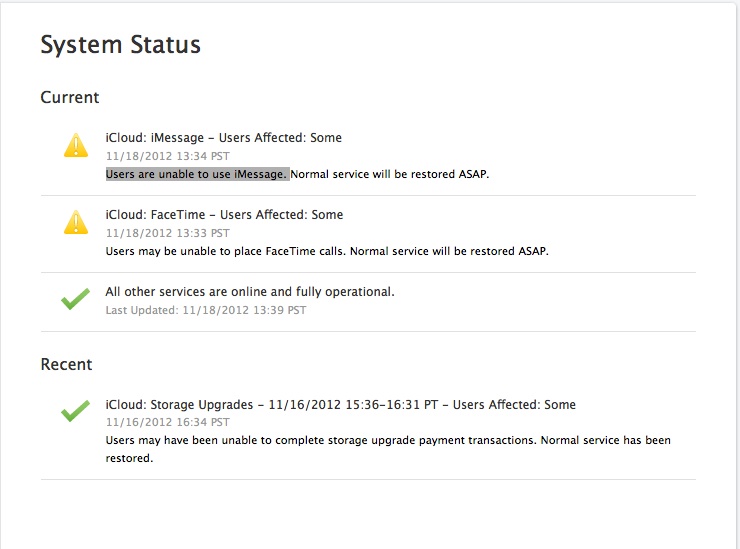
Apple users worldwide are having to deal with a global outage of iMessage and Face Time. As of 1:33 PM PDT today, users are having issues sending and receiving iMessages and having Face Time conversations. This is confirmed by checking the iCloud System Status Page:

As of now, there’s no ETA for a resolution. But you can imagine with each passing moment that this isn’t resolved, how much angrier Apple Fanbois are getting.

UPDATE: A reader e-maiiled me to point out that this is the third outage for iMessage in recent weeks. Outages in September And October had Fanbois doing what they’re doing today. Taking to Twitter to vent.

UPDATE X2: This was posted at 4:32 PM PDT on the iCloud System Status Page: Users were unable to use iMessage. Normal service has been restored.

I’m Shocked! My Wife Actually Made The Move To Mac!

Posted in Commentary with tags , on November 18, 2012 by itnerd

Okay. I have to admit that I am shocked. I never thought she would make the move to Mac. I even put that in writing. But yesterday afternoon, we went to the Apple Store in Yorkdale Mall in the suburbs of Toronto and after taking a look at the new Microsoft Store and Tesla Motors dealership, she walked out of the mall with a new Mac Mini. I guess her experience with the iPhone 5 has been so positive that she decided to make the switch. Somewhere above us, Steve Jobs cracking a smile and someplace near Redmond WA, Steve Ballmer is about to throw a chair.

Here’s the configuration she got:

  • 2.5GHz dual-core Intel Core i5
  • 8GB memory
  • 500GB hard drive
  • Intel HD Graphics 4000
  • OS X Mountain Lion

Basically, she took the base model and upgraded the RAM to 8GB as 4GB isn’t enough RAM as far as I am concerned for a Mac or a PC. She also got a Mini DisplayPort to DVI adapter so that she could hook up her widescreen monitor, along with Apple Care as I always recommend Apple Care for any Apple product. Since she was moving from a PC with PS/2 ports, she also needed a mouse and keyboard. I am lending her my full size Apple USB keyboard and Logitech V270 Bluetooth mouse until she decides if she wants a Magic Mouse or Trackpad. Finally, she wanted to have the ability to use CDs and DVDs. Since this Mac Mini doesn’t come with a built in drive, she went with an external SuperDrive.

Now it was my job to move her stuff from her antiquated PC and set it up. To do that I leveraged the fact that I had a Apple Airport Extreme network and I plugged the Mac Mini into my HDTV via the HDMI port in the back. That way I didn’t have to pull a spare monitor out of storage. Then I turned it on. It booted but sat at the spinning wheel screen for a very long time. As in 30 minutes. While I didn’t like doing this, I decided to power it down and try again. This time, a progress bar appeared at the bottom of the screen and after five minutes, the Mac turned itself off. I powered it back on and then it did what I expected it to do which was go through the set-up wizard.

Weird.

After creating an account, I tried to update the software. Two problems emerged. First, iPhoto would not update because the Mac Mini had OS X 10.8.1 on it and it required OS X 10.8.2. That’s when the second problem emerged. I could not install OS X 10.8.2. After doing some Google searches, I discovered that I was not alone. This thread on the Apple Discussion Forums shows others with the same issue. This problem also affects the new MacBook Pro 13″ with the Retina Display. There is currently no fix. The net result of this is that besides not being to update to the latest version of iPhoto, I could not add my wife’s iCloud e-mail account to Apple mail and syncing of notes via iCloud to her iPhone won’t work. Hopefully Apple fixes this issue quickly as it seems pretty dumb to me that the latest bug and security fixes are not available to owners of the latest and greatest from Apple.

Now onto the stuff that did work. I installed all the applications that she used like Microsoft Office 2011, Skype, and eWallet and made sure those were up to date. I also tossed in FireFox for web browsing and VLC for media content playback. From there, I had to migrate her data.

First, I was able to move her contacts, calendar items, and to-do items. via iCloud. I simply had to enable syncing via iCloud on her iPhone for all her items. They then simply appeared in the Contacts, Calendar, and Reminders. Next was her existing e-mail. That took a bit of work seeing as she was using Outlook 2003. Here’s what I had to do:

  1. Install Thunderbird. On first launch, I told it to import from Outlook (not Outlook Express).
  2. Copy the Thunderbird profile (XP: C:\Documents and Settings\<your userid>\Application Data\Thunderbird\Profiles\<your profile>.default, Vista/7: C:\Users\<your userid>\AppData\Roaming\Thunderbird\Profiles\<your profile>.default) to the Mac.
  3. Start the Mail application and go to File > Import.
  4. Select Thunderbird and I pointed it to the profile folder that I copied to the Mac. The imported mail was under “On My Mac”.
  5. To be safe, I went to “Mailbox > Rebuild” inside Mail to make sure there was no corruption resulting from the import.

This worked and it cost me nothing which was good. Then I went about copying all her files across. Over 802.11N, it took 3 hours to copy 35GB of data across. I didn’t feel like relocating things to plug it into Gigabit Ethernet, so that was fine with me. Plus I could go do other things while it copied.

When it was done, I could then move her files to where they should be. For example her Word and Power Point files went to the Documents folder. Movies went to the Movies folder. Photos got imported into iPhoto. When it came to her music, I had to import it into iTunes and somehow preserve her playlists. Here’s how I did it:

  1. I located her music in Documents and Settings\yourusername\My Documents\My Music\iTunes and used the network to move it to the Mac Mini
  2. I then made sure I had an up to date copy iTunes installed on the Mac Mini (strangely I didn’t even though iTunes 10.7 came out in September and this computer has only been out for a few weeks) and I opened it. I then went to the Music folder on the Mac and confirmed that there was an iTunes folder in it.
  3. After closing iTunes, I copied the iTunes folder from the PC into the Music folder and opened iTunes again. All her music and playlists appeared.

I then did a sync of the iPhone and made sure that that worked. Along the way I had to authorize the Mac Mini to use the content that she had purchased from the iTunes and App Stores. But it all worked fine.

With that out of the way, I could set up eWallet on her computer and made sure that synced with her iPhone. I also moved her Firefox Bookmarks across and most importantly, I set up SuperDuper to back up her computer automatically. With all of that done. I unplugged her PC and put the Mac Mini in its place.

Now all that’s left is to teach her how to use it. That should be fun.

Google Gets Mapping App For iOS Ready…. Will Apple Accept It?

Posted in Commentary with tags , on November 15, 2012 by itnerd

The Wall Street Journal is reporting that Google is testing a mapping app that will give iOS users a working mapping app with turn by turn navigation:

A Google spokesman said, “We believe Google Maps are the most comprehensive, accurate and easy-to-use maps in the world. Our goal is to make Google Maps available to everyone who wants to use it, regardless of device, browser, or operating system.”

Google’s new mapping app for Apple devices is the latest in a maps-software fracas between the companies, which are increasingly competing in everything from mobile devices to digital-media sales. Maps are considered one of the most important elements in the future of computing because they will power the next-generation mobile apps that help people find places to visit and where to shop, among other things.

Now the big question is, will Apple allow this app to be put into the App Store seeing as Apple is working to fix their own Maps application which isn’t all that good:

Apple has continued to work to fix the bugs in its mapping software. The maps team is now under senior vice president for Internet software and services, Eddy Cue, who also oversees products like iTunes and iCloud. Mr. Cue has been hands-on with the maps team and participates in regular meetings to fix the product, according to a person familiar with the matter.

We’ll have to see what happens when Google submits to the app to Apple. It should be interesting to watch.

Survey Finds That Consumers Don’t Want Windows 8….. Sucks To Be Microsoft

Posted in Commentary with tags , on November 15, 2012 by itnerd

According to USA Today, PC security firm Avast recently polled 350,000 users of its PC antivirus software. Among other things, only 9% of U.S. respondents are interested in upgrading to Windows 8:

The survey results underscore lukewarm response to Windows 8, which introduces a radical new PC user interface involving use of a touch screen in addition to a keyboard and mouse.

If that’s not enough, there’s more:

Reports of software applications designed for earlier versions of Windows not working well on Windows 8 haven’t helped, says George Otte, CEO of Geeks on Site, a repair service. “Windows 7 works just fine,” Otte says. “It’s not a major priority to make a change, especially if there might be apprehensions about bugs.”

I have to admit that I’m not in a huge rush to upgrade to Windows 8 as I have no practical need for it as this time. In the meantime, I’d take a look at the full article as it is very revealing. It’s also not very good news for Microsoft.

Spam Is Down, But New Threats Exist: Symantec

Posted in Commentary with tags on November 15, 2012 by itnerd

One of the things that I love bringing to you is the Symantec Intelligence Report as it gives you a heads up on what you have to look out for when you surf the Internet.

The the first thing that the report mentions is that there has been a more than 10% drop in the global spam rate (down from 75% of email traffic in September, down to 64.8% in October), and it examines some of the possible reasons for the sudden drop. I have to admit that if spam is down, I haven’t seen that drop in my spam filter.

🙂

The next thing it looks at is a new social networking scam that leverages Instagram to gather personal details and get users to sign up for premium-rate mobile services, among other things. This is something that can cost you a pile of cash so this is something that you need to be aware of. Finally it looks at the evolution of Ransomware. Again, something you need to be aware of.

The full report is here [Warning: PDF] for your review.

Nokia Launches Free Maps App with Offline Mode and Transit Directions for iOS

Posted in Commentary with tags , on November 14, 2012 by itnerd

If you have an iPhone 5 and you think that Maps sucks like my wife does, you have an new alternative. Nokia has launched a mapping service called HERE:

“People want great maps, and with HERE we can bring together Nokia’s location offering to deliver people a better way to explore, discover and share their world,” said Nokia President and CEO Stephen Elop. “Additionally, with HERE we can extend our 20 years of location expertise to new devices and operating systems that reach beyond Nokia. As a result, we believe that more people benefit from and contribute to our leading mapping and location service.”

To further extend its location services, Nokia is launching a maps application for iOS under the HERE brand. Based on HTML5, it will include offline capabilities, voice-guided walk navigation, and public transport directions. The application is scheduled to be available for free download from Apple’s App Store in the coming weeks.

Okay. So it has turn by turn navigation, but only on foot. Well, that’s something. There’s other partnerships that are part of this announcement. Partnerships with Mozilla for mapping in Firefox OS, a reference app for Android developers, an acquisition of California company earthmine to help with 3D mapping, and new LiveSight 3D mapping technology were announced as well.

Hopefully this is the start of improved mapping for iOS. God knows that iOS users really need good mapping on their iPhones.