Archive for Starbucks

Starbucks Canada launches with DoorDash. Expanding delivery to 50 new markets

Posted in Commentary with tags , on March 14, 2023 by itnerd

Starbucks Canada and DoorDash Canada announced a new partnership to offer on-demand delivery of Starbucks at participating locations. Beginning today, DoorDash customers will be able to enjoy fast and convenient delivery of Starbucks favourites from more than 500 stores.

The new partnership also expands Starbucks Delivers to nearly 50 new communities for the first time including Saint John, New Brunswick, Squamish, British Columbia and the province of Prince Edward Island. As one of Canada’s leading last-mile delivery platforms, DoorDash will provide customers with a quick and convenient way to have Starbucks delivered right to their doorstep, all with the click of a button.

To celebrate the launch of Starbucks on DoorDash, customers can get $5 off their next 3 Starbucks orders of $20 or more from March 20 to April 2, 2023.

Convenience for Customers  

In Canada, customers will be able to access Starbucks Delivers via DoorDash on iOS and Android devices, in addition to DoorDash.com. Key features of the delivery program include: 

Prompt Delivery: Orders placed through the DoorDash platform will be delivered by an extensive network of Dashers, designed for expedient and secure delivery so customers can enjoy their Starbucks beverage and food promptly. Customers can track their orders through DoorDash from preparation to drop-off. 

Delivered Fresh: Starbucks has developed packaging solutions to help ensure the quality of hot and cold menu items including stickers for beverages to avoid spilling, tamper-evident packaging, and delivery-specific cup holders, including a two-cup tray exclusively for Starbucks Delivers to serve as a barrier between hot and cold beverages.

CustomizationStarbucks will offer approximately 95% of its core menu items on DoorDash. Customers can customize their orders within the DoorDash app, including the ability to choose the amount of syrup, type of milk and espresso roasts.    

DashPass, DoorDash’s monthly subscription program, provides customers ordering from Starbucks on DoorDash with $0 delivery fees. Other fees apply. Customers can check the delivery locator to see if delivery with DoorDash is available in their area.

Starbucks and TD Canada Expand Partnership

Posted in Commentary with tags , on March 1, 2022 by itnerd

Starbucks Canada and TD are revolutionizing rewards in Canada. Building on the partnership announced in 2020, Starbucks and TD are enabling millions of TD cardholders to earn accelerated Stars and TD Rewards or Aeroplan points with purchases made through the Starbucks® app, when they link their Starbucks Rewards account to an eligible TD debit or credit card.  In addition, once customers have linked their Starbucks Rewards to a TD debit or credit card, they have the ability to convert TD points into Starbucks Stars in real-time to use toward free food or beverages at Starbucks – an industry first in Canada.

The announcement is an evolution of Starbucks and TD’s first-of-its-kind partnership, which gave TD Aeroplan Visa cardholders the ability to earn accelerated Aeroplan points at Starbucks stores. Now, the program has been expanded to include millions of TD card holders, making rewards more accessible than ever.

Reaping the Rewards

A Loyalty Trends report revealed that 47 per cent of consumers believe reward incentives are more important now than they were pre-pandemic, with Gen Z and young millennials  valuing loyalty programs the most. As consumers continue to lean into loyalty programs, Starbucks and TD are making it even more rewarding for customers to purchase through the Starbucks app. 

By linking a Starbucks Rewards account to an eligible TD Access Card with Visa Debit or Credit Card, customers will:

  • Earn 50% more Stars on purchases or card re-loads made through the Starbucks® app.
  • TD Rewards or TD Aeroplan card holders can also earn 50% more TD Rewards or Aeroplan points on purchases through the Starbucks® app.
  • TD Rewards cardholders can convert TD Rewards points to Stars in real-time to use toward free food or beverages at Starbucks.

Some restrictions apply.  See terms and conditions

In addition to earning Stars and the perks that come with being a Starbucks Rewards member – like the ability to mobile order; earn and redeem Stars for free food and beverages; a free birthday beverage; and more – now TD customers can also earn TD Rewards and easily convert them to Starbucks Stars in real-time through the new TD Rewards Hub.

Through Blockchain and other innovative technologies, Starbucks is exploring how to tokenize Starbucks Stars, creating the ability for other merchants to connect their loyalty programs to Starbucks Rewards. This will enable customers to exchange value across brands, engage in more personalized experiences, enhance digital services, and exchange other loyalty points for Stars at Starbucks.

This approach will serve as a foundation for a more aspirational concept for new, modern payment rails that align payment expenses with the value received by customers and merchants. Starbucks intends to be at the forefront of this disruptive innovation, which will unfold over the next few years.

In Depth: Starbucks Mobile Order And Pay

Posted in Commentary with tags on October 14, 2015 by itnerd

If you’ve followed this blog for a while, you’ll know that I have a Starbucks addiction habit. Just look at part three of any car review that I’ve done as proof of that. I’ve been a user of the Starbucks app for years on my iPhone. Even though sometimes their app has had some well documented issues that have given me reason to pause. But I digress. I’m not here to bash Starbucks, but to talk about a new feature that has been rolled out to Starbucks locations in the Greater Toronto Area in the last day or so. Dubbed Starbucks Mobile Order And Pay, this feature allows you to order your favorite food and beverages using the Starbucks app on your smartphone and simply walk into the restaurant and pick it up. It promises to be a huge time saver. That’s a bold statement as Starbucks locations can be insanely busy places at times. So I decided to put it to the test by ordering and picking up my usual morning drink at 7:30 AM.

IMG_1701

Step 1: Open the Starbucks app and choose Order and then choose Place An Order. This requires you to have the latest version of the Starbucks app. Thus if you don’t see the order option, you should go to the app store of your choice and update to the latest version of the Starbucks app.

IMG_1702

Step 2: Choose a store. This is the part that might annoy you. Not all Starbucks stores have this feature. For example, I was at a client’s location that had a Starbucks location a kilometer away, but the only one that supported this feature was 3 kilometers in the other direction. Hopefully that changes.

IMG_1703

Step 3: Pick the items that you want to order. In my case I am choosing an Americano coffee. You can choose the size and you have the ability to customize your order. One thing that I have to point out is that the full Starbucks menu is not present. Thus there might be something that you want that you can’t order using this method.

IMG_1704

Step 4: Confirm and pay for your order. It uses money on the virtual Starbucks card that’s on your phone to pay for the order.

IMG_1705

Step 5: At this point, you can then head to the Starbucks location and pick it up. All you need to do is walk in, walk up to the barista, ask for your order, receive it, and walk out while those in line look on in envy.

The process works as described the two times that I tested it. Though the fact that not all stores support ordering via the app, and the complete menu not being available may impact your decision to use Mobile Order And Pay. But to be fair, this has only been available for a couple of days in the Greater Toronto Area. Thus I will cut them some slack. My advice is if you’re a Starbucks addict patron like I am, give it a try and see how well it works for you. I have to admit that I will be using this frequently as it is a time saver for me.

Starbucks Gets Mad At Security Researcher Who Exposed Vulnerability

Posted in Commentary with tags , on May 25, 2015 by itnerd

In a case of “don’t shoot the messenger” a security researcher is under fire from Starbucks because he found a vulnerability and brought it to their attention. Here’s what the BBC had to say on this:

Egor Homakov found a flaw that let him duplicate funds on a gift card, which he spent in a store to test his theory.

He told Starbucks so they could fix the flaw, but said that the company had then called his actions “malicious”.

“The unpleasant part is a guy from Starbucks calling me with nothing like “thanks” but mentioning “fraud” and “malicious actions” instead,” he wrote.

Now keep in mind that Starbucks and IT security have been mutually exclusive terms for a while now seeing as their iOS app had to be fixed because of the way that passwords were stored on it. But this only happened after their handling of the issue turned into a bit of a gong show. And more recently users were having their accounts drained and Starbucks blamed the users for their own misfortunes. So the fact that Starbucks basically shot the messenger when it comes to this latest issue doesn’t surprise me. If I were Starbucks, I’d want people like Mr. Homankov to come forward and point out flaws like this. That way I could make the customer experience better by having a more secure environment. But clearly Starbucks doesn’t feel that way. That’s very disappointing.

Starbucks really needs to change their thinking when it comes to the security of their payment systems. If they don’t, they will find that people will continue to find holes and not all of them will be as altruistic as Mr. Homakov. That will ultimately drive people away from buying coffee at Starbucks because they aren’t secure and everyone will know about it.

So how about it Starbucks?

Starbucks App Vulnerable To Being Hacked?

Posted in Commentary with tags , on May 14, 2015 by itnerd

Frequent readers of this blog will know that I am a Starbucks addict. I need a venti sized drink to start the day or bad things will happen. But the news that Starbucks customers are having their accounts hacked and hackers are siphoning off money from their bank accounts, credit cards, and PayPal accounts are making me rethink using the app…. Again. More on the again part in a second. Let me start with linking to this story and showing you how this hack works:

Consumers in several areas of the U.S. have reported getting several emails from Starbucks in the space of five minutes that tell them their Starbucks gift card had been successfully loaded. It took only a short time for thieves to siphon hundreds of dollars from their accounts.

Although the repeated emails alerted consumers that something was wrong, they were unable to stop the transfers.

Now Starbucks in a statement did the “blame the user” thing by saying that it was weak passwords and the recycling of passwords that were the cause and the apps were fine. But while you should be using different passwords for all your accounts, I really don’t think that this is the root cause. The fact is that Starbucks apps have been found to be insecure before and after blowing that off, fixes appeared because of the bad press. Thus it’s not a stretch that someone could have found yet another hole in their software. Or they could be leveraging some sort of vulnerability in their point of sale system to get access to users information. Either is plausible. But the fact that Starbucks has decided to blame the user is disappointing.

My advice. Change your Starbucks password and use a complex one. Here’s an article on how to do that. It’s a prudent thing to do. Though I will admit that the source of this issue is not password related and at some point I will be proven right. When that happens, I’ll likely be be taking my coffee habit elsewhere.

Starbucks Pledges To Fix Their Insecure iOS App [UPDATED x2]

Posted in Commentary with tags , , on January 16, 2014 by itnerd

Earlier today, I reported that Starbucks iOS app was horrifically insecure and put users of the app at risk in a number of ways. I guess that the negative press was enough that Starbucks via their CIO Curt Garner has come out with a statement saying they’re going to update the app in question:

Your security is incredibly important to us. This week a research report identified theoretical vulnerabilities associated with the Starbucks Mobile App for iOS in the event a customer’s iPhone were to be physically stolen and hacked.

We’d like to be clear: there is no indication that any customer has been impacted by this or that any information has been compromised. Regardless, we take these types of concerns seriously and have added several safeguards to protect the information you share with us. To protect the integrity of these added measures, we are unable to share technical details but can assure you that they sufficiently address the concerns raised in the research report.

Out of an abundance of caution, we are also working to accelerate the deployment of an update for the app that will add extra layers of protection. We expect this update to be ready soon and will share our progress here.  While we are working on the update, we would like to emphasize that your information is protected and that you should continue to feel confident about the integrity of our iOS app.

We appreciate your business and believe it is our job to earn your trust as a customer. We also know that constant vigilance is the best way to protect you and the information you share with us. If you think your information may have been compromised for any reason, please contact our Customer Care team at 1-800-23-LATTE or at www.starbucks.com/customer.

You’ll note that the only timetable is “soon” and that the company continues to insist that they “have added several safeguards to protect the information you share” with Starbucks. Seeing as the security problem exists on the phone, I don’t see how its possible to make changes that would make any difference on anywhere else other than the phone itself. Thus I consider this statement to be dubious at best. As for the timetable of “soon”, a security issue like this requires an immediate response so that you show that you as a company take security seriously. So if soon means a week or two, that’s likely fine. If it’s a month or to, it’s a #fail.

Starbucks should take note. iOS users of its app will be watching carefully to see how the company delivers. Plus you can sure the new app will be tested by security researchers and hackers everywhere. Thus they only have one chance to get this right. It would be in their best interests not to screw it up.

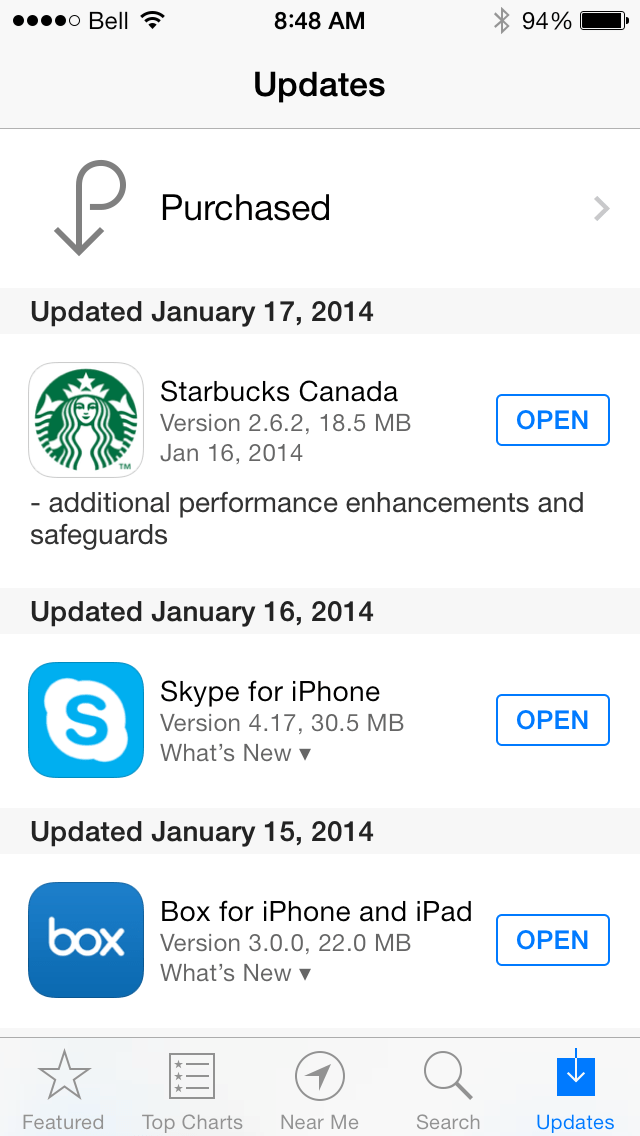
UPDATE: I looked at my iPhone this morning and found one update available. When I went into the app store I saw this:

photo

As you can see, Starbucks has updated it’s app with “additional performance enhancements and safeguards.” Whatever that means. I’m sure we’ll find out soon enough if it addresses the serious security issues that have generated the company so much bad press. I also have to say that if this does solve this issue, kudos to Starbucks for getting out so quick after not really caring about their customers security for who knows how long.

UPDATE #2: Computerworld is reporting that Daniel Wood who found this issue says he is “almost 100% certain” that the clear-text password problem is gone. He also is  now a “security consultant” for Starbucks in an unpaid role.

Starbucks App For iOS Stores Passwords In Clear Text… Yikes!

Posted in Commentary with tags , on January 16, 2014 by itnerd

I am a Starbucks addict to the point that I have the Starbucks app for iOS installed on my iPhone 5. But I may have to wean myself off my Starbucks addiction because of this Computerworld article:

The Starbucks mobile app, the most used mobile-payment app in the U.S., has been storing usernames, email addresses and passwords in clear text, Starbucks executives confirmed late on Tuesday (Jan. 14). The credentials were stored in such a way that anyone with access to the phone can see the passwords and usernames by connecting the phone to a PC. No jailbreaking of the phone is necessary. And that clear text also displays an extensive list of geolocation tracking points (latitude, longitude), a treasure trove of security and privacy gems for anyone who steals the phone.

So let’s recap:

  • Passwords are stored in clear text meaning that they are not encrypted in any way. This is bad software design and completely unacceptable.
  • Usernames are equally accessible.
  • There’s a list of places that you’ve visited in the app.
  • It doesn’t take whole lot of effort for a evil doer to get access to this info. They could also use your Starbucks account to run up a very big bill.
  • Because people tend to reuse passwords and usernames, if someone gets the info related to your Starbucks account, they can get access to other accounts such as banking, Facebook, e-mail, etc.

This can be summed up in one word: #Fail.

If that’s not bad enough, it gets worse:

Two executives — Starbucks CIO Curt Garner and Starbucks Chief Digital Officer Adam Brotman — said in a telephone interview that they have known for an unspecified period of time that the credentials were being stored in clear text. “We were aware,” Brotman said. “That was not something that was news to us.”

The easy visibility of passwords was first discovered by security researcher Daniel Wood, who said he tried contacting Starbucks in mid-November. After repeatedly being transferred to customer service in the course of almost two months, he published some of his research for the security community on Monday (Jan. 13).

So, Starbucks knew about this and didn’t take the security of it’s customers seriously enough to do anything about it. #Epicfail.

Now Starbucks claims that “it has made (vague and unspecified) changes that alleviate the problem.” But Mr. Wood who discovered this issue re-ran his tests and found zero difference. That implies that Starbucks is not being completely honest as the only way I can see them fixing this is by releasing an updated version of their iOS app. Something that they have not done in quite a while.

So, how do you protect yourself? If you have the Starbucks app on your iPhone, someone would need physical access to it for about half an hour to pull this off. Thus keep an eye on your phone. Make sure your phone has a passcode (though the author notes that the passcode can be bypassed) and perhaps add one to the Starbucks app as well. Other than that, there’s not a whole lot you can do.

Meanwhile, I’ll be re-evaluating my use of this app as well as my relationship with Starbucks as their total disregard of common application security practices is just unacceptable.

Starbucks Lets Canadians Tweet Someone A Coffee

Posted in Commentary with tags , on January 9, 2014 by itnerd

I’m a serious Starbucks addict. I have the app installed on my iPhone 5 which not only allows me to find Starbucks locations, but I can use my passbook card to pay for coffee and the app keeps track of my rewards (the latter being important seeing as I am at the gold level of Starbucks rewards). So when this press release hit the wires this AM, it got my attention. Starbucks is now giving Canadian coffee lovers the ability to Tweet someone a coffee:

The Tweet-a-Coffee program is a key next step as Starbucks innovates its social digital gifting offering. Beginning today, registered Starbucks account customers across Canada can now send a $5.00 Starbucks Card eGift through Twitter by following a few simple steps:

  • Visit www.starbucks.ca/tweetacoffee to get started and to link your Starbucks account and your Twitter account
  • Follow the instructions to send a Tweet to @tweetacoffee and to the gift recipient’s Twitter handle
  • The recipient will receive a link on Twitter with details on how to claim their $5 eGift.
  • You can send more eGifts directly on Twitter by sending a Tweet using @tweetacoffee

Customers can redeem the $5 Starbucks Card eGift at participating Starbucks stores in Canada either by printing out the eGift, showing it directly on their mobile device, or by loading it to their Starbucks mobile app.  Customers inCanada can also send eGifts via email online at www.starbucks.ca/card.

To get a better idea of how it works, here’s a video:

Now if someone wants to Tweet me a coffee, feel free to do so at @The_IT_Nerd.

🙂


Use WiFi For Free In North American Starbucks Locations…. Here’s How.

Posted in Commentary with tags , on August 10, 2009 by itnerd

If you want to use WiFi at your local Starbucks, you usually have to pay to do it. Bell who provides WiFi services for Starbucks in Canada and AT&T in the US don’t exactly make it affordable to do so though. But now there is a way to use it for free.

For Americans, this is what you need to do:

  1. Get A Starbucks card.
  2. Sign up for a Starbucks.com account here and register your Starbucks card.
  3. Sign up for a AT&T account here.  You have to agree to receive spam e-mail from AT&T four times a year.
  4. Make sure that you refill your Starbucks card every 30 days or less or use it every 30 days or less to buy something.

Once you’ve done all of that simply take your laptop to Starbucks, open your browser and use your AT&T username and password to get on line. At this point, you’re good for two hours of free surfing every day. Remember, refill your Starbucks card every 30 days or less or use it every 30 days or less to buy something so that you can keep getting 2 free hours a day.

Now for Canada, the process is a bit more straightforward:

  1. Sign up for a Starbucks.com account here.

Once you’ve done all of that simply take your laptop to Starbucks, open your browser and use your Starbucks.com username and password to get on line. At this point, you’re good for two hours of free surfing every day.

There is a second option for Canadians. If you’re a Bell Internet customer, you can log in with your “My Bell self serve profile.” Don’t know what that is? Click here for more info. That will score you free surfing as well for 2 hours a day as well. You can get more details here.

I’ve been doing this for the last month or so in quite a few Starbucks here in Canada and it works quite well. So if you travel with your laptop and you need a place to work while sipping a tall Caffè Americano, Starbucks is now your place.