Archive for Bell

Review: The Bell Fibe TV App

Posted in Products with tags on August 4, 2022 by itnerd

If you’ve been keeping tabs on yours truly dumping Rogers, you’ll recall that as part of my move to Bell, they snuck in the Fibe TV app along with six months free of Crave TV which is Bell’s streaming service. I use the word “snuck” because if you read my post on that, they literally gave me a price for Internet and home phone, didn’t speak to the Fibe TV app until I got an email saying that I was paying $10 a month for the Fibe TV app with a basic TV package. But the price I was quoted on the phone was the price that was in the email.

That’s pretty sneaky.

You may also recall that at the time I got my Bell Internet and home phone installed, Fibe TV wasn’t working because they had yet to create an account number for me. That I found to be weird but whatever. But that changed on Monday where Bell sent me an email asking me to create a MyBell account. The thing was that I had done this last week. However something was messed up with it so I had to delete it and recreate it. When I did, I had a Bell account number and I was able to get Fibe TV working. Now the Fibe TV is available to you in three ways:

  • You can log in here on the web via a web browser.
  • You can download the Fibe TV app for iOS and Android
  • You can use an Apple TV 4K, Amazon Fire TV Stick, An Android TV, or a Google Chromecast. Strangely, Roku isn’t on that list.

Since Roku isn’t on that list, I went the route of using the iOS app for the majority of my testing. Downloading it and setting it up now that I had a working MyBell profile. Using the credentials for that I was able to log in and get up and running. Here’s the first thing that I saw:

Here you can see the programming that is currently live or “trending” according to Bell. Plus you can see their suggestions for both normal TV and Crave TV.

If scrolling to see what’s on right now by channel is your thing, this screen allows you to do that.

If however you want to pick a channel and see what shows are available on demand on that channel, then this screen will allow you to do that.

For example if I check CTV, here’s a sample on what’s available on demand.

You can create a watchlist of the series or movies that you want to see, as well as download episodes to your phone or tablet for data free viewing. By default the ability to watch and download on cellular networks is turned off. But if you have a better data plan than most of us, you can turn that functionality on and watch TV anywhere.

The bottom line is all of this is easy to navigate and easily find the content that you’re looking for.

Now, because of the lack of a Roku TV app, was I was prepared to criticize that. But this feature made me rethink that:

This app supports AirPlay and Casting which is a welcome addition to make up for the fact that Fibe TV doesn’t support the biggest streaming TV platform on the planet.

So how does this app work? It works very well as I had no issues streaming content to my TV via AirPlay. So from a technical standpoint, this app works fine. Ditto for watching TV via the website. That method allowed me to stream content on both my PC and Mac via a browser.

The Fibe TV app with what Bell calls their “Standard” package is $14.95 a month. Though I am getting a $4.95 credit as I am with Bell for Internet. Making this $10 a month. That gives you local TV and a few other channels which is fine as my wife and I don’t watch TV a whole lot. But if you want to watch anything interesting, you’re going to have to pay. For example, Crave TV is an extra $20 a month. But I am getting a $20 credit until the new year which makes it free until then. Crave TV gives me access to some movies and HBO shows among other things. I guess that would be cool for some people. But with the exception of a handful of movies, the things that my wife and I want to watch are exclusively available on other streaming services. Thus this will be cancelled when we’re done watching the shows and movies that Crave TV offers.

Speaking of which, Bell has a very interesting strategy at work here. I want to find out what some of their channels cost. But instead of displaying a price, I got this:

You’ll note that instead of displaying a price, it tells you to go to mybell.ca or phone them. I don’t like speaking to Bell humans because of how aggressive they are, so I went to mybell.ca and found that regular broadcast channels are $4-$5 a month each, sports channels are roughly $10 a month. Plus there are packages available that bundle together a bunch of channels for one place.

So, what do I think of the Fibe TV app? I think it’s fine for people like my wife and I who don’t watch a whole lot of broadcast TV. As I mentioned earlier, we’ll be nuking the Crave TV subscription once we finished streaming all the things and keep the app for the few times we need to watch local TV. But if I could give Bell once piece of advice, they should really do a Roku app given the size of that streaming platform in Canada.

Bell Announces An 8Gbps Internet Offering And WiFi 6E… Rogers Must Be Freaking

Posted in Commentary with tags on August 2, 2022 by itnerd

I guess Bell is taking the attitude that Rogers is in very deep trouble and they have the opportunity to take them out once and for all. I say that because Bell just dropped a press release in the last few minutes that must have Rogers execs quaking in their boots:

Today, Bell announced that it is set to deliver the fastest Internet speeds in North America of any major provider. As announced previously this year, Bell is already the fastest of any major provider in the country with 3Gbps and is now introducing even faster symmetrical speeds of up to 8Gbps, the fastest of any speeds offered today by any major provider. With these speeds, and in select areas of Toronto, Bell pure fibre Internet will have download speeds five times faster than cable technology and upload speeds 250 times faster than cable technology. Bell also will bring Wi-Fi 6E in the home, the fastest Wi-Fi technology available, and when coupled with North America’s fastest Internet speeds, is set to transform the at-home experience.

And:

Bell will roll out North America’s fastest Internet speeds and Wi-Fi technology of any major provider to customers starting in September. 8Gbps speeds will be available starting in select Toronto areas, with more regions across the country to follow. The new Giga Hub enabling Wi-Fi 6E will be available for customers in Ontario and Québec starting this Fall and later expanding to other provinces. New and existing customers can call Bell for more details or visit Bell.ca/fastertotalspeed.

This is clearly a response to Rogers who is rolling out 8Gbps in “select communities”. But the thing is, I am not aware of anywhere that actually has this service. Thus giving the impression that this is vapourware. Though someone from Rogers, as I know that they read my posts, is free to correct me on that. Contrast that with Bell who based on their previous history typically has rapid availability on what they announce in a press release. So if they say that 8Gbps will be available in September, I believe them.

Another thing that is different than what Rogers is offering is that Bell is also offering up their equipment with WiFi 6E. While I advise against using an ISP’s gear because of the fact that it’s a means to lock you into using their services, the move to WiFi 6E is sure to entice some toward Bell as that will fully leverage the speeds that they are offering. Now I am sure that Rogers will do the same thing eventually, but Bell was first and yet again has the technological high ground.

It will be interesting to see how or if Rogers responds to this as they have other issues to deal with at the moment. For example, dealing with the fallout from the nationwide outage in July, and the clear and present danger of the merger with Shaw Communications failing.

How To Configure PPPoE Bypass On The Bell HH4000 Hardware

Posted in Tips with tags on July 31, 2022 by itnerd

Since I got Bell Fibe 1.5 Gbps service installed, I’ve got a few questions about how I set up PPPoE bypass so that I can use my own router. I planned on doing a write up about that after I work out the speed issues that I had with my ASUS hardware, but since enough people asked about this I am doing this today.

First, let me explain why I want to use my own router rather the Bell HH4000 router, which stands for “Whole Home 4000”. I never, ever use the ISP supplied gear as that’s a way for the ISP to lock you in as it makes it difficult to switch providers. Because doing so would require you to basically tear down your network and rebuild it every time you switch. On top of that, ISP’s don’t have the best track record in terms of making their gear secure. Meanwhile most router companies spend more time and effort to make their gear secure. As long as you choose your vendor carefully, using a third party router is better from a security standpoint. Plus if you change ISP’s, at best it’s unplug one cable from the ISP’s hardware and plug the new ISP’s hardware in if you switch. At worst you have to do that and a bit of configuration on both the ISP’s hardware and your hardware. In the case of Bell, it’s the latter.

Now Bell’s HH4000 comes with the ability to do what’s called PPPoE bypass. In short, you type your PPPoE credentials into your router, and it passes them to the HH4000. Then assuming that they are correct, the HH4000 gives the router an external IP address and you’re good to go. It’s clean and simple and mostly works. I’ll explain the mostly part in a moment. But here’s all I had to do. Starting with the cabling:

  • Connect A CAT 5e or CAT 6 cable from HH4000 10Gbps Port which is the silver one on the right hand side on the back of the HH4000 to the WAN Port on the router

On the HH4000 side, I had to log into it and do some setup there:

  • Go to 192.168.2.1 and be prepared to type in your HH4000 password
  • Go to ‘Manage my Wi-Fi’ and do the following:
    • Change “Whole Home Wi-Fi” to OFF.
    • Under “Primary Wi-Fi network” click on “Advanced settings”.
    • Uncheck “Keep a common network name (SSID) and password for both 2.4 and 5 Ghz bands.”
    • Turn OFF the 2.4GHz network but leave the 5.0GHz on so that you can get back into the HH4000 if you need to.
    • Turn off Guest Network
    • Click “Save”
  • Click on “Advanced Tools and Settings”
  • Turn off UPnP, DLN and SIP ALG
  • Click “Save”

Next you have to log into your router and in the WAN section, set it up for PPPoE. How to do that varies by brand. But I will use my ASUS router as an example:

As you can see here, under “WAN Connection Type”, I have PPPoE selected. And under “Account Settings” I have my PPPoE username which starts with “b1” and password. Those have been redacted for security reasons. If you don’t have your “b1” PPPoE username and password, you can either get them from the Bell technician who does your install, or from the MyBell portal. You should also set up your PPPoE connection to connect automatically (in my case that’s the “Disconnect after time of inactivity” option) and make sure that PPP authentication is set to “auto”.

Once you do that, you should be able to connect to Bell’s network. If you get an WAN address that isn’t 192.168.2.xxx, then you’re good to go.

Here’s where I explain the “mostly” part. One thing that I noticed right away is that my upstream speed is way lower than the 1.06 Gbps that my connection is capable of. At the moment I am getting just over half that speed. And that’s likely because of how ASUS implements PPPoE. I say that because if I use DHCP to connect to the router, I get all the speed that I am paying for. Now some of you will say why don’t I use DHCP? That creates what’s called a double NAT which can play havoc with applications. If you really want to get into the weeds, you can read this but here’s what you need to know:

In a typical home network, you are allotted a single public IP address by your ISP, and this address gets issued to your router when you plug it into the ISP-provided gateway device (e.g. a cable or DSL modem). The router’s Wide Area Network (WAN) port gets the public IP address, and PCs and other devices that are connected to LAN ports (or via Wi-Fi) become part of a private network, usually in the 192.168.x.x address range. NAT manages the connectivity between the public Internet and your private network, and either UPnP or manual port forwarding ensures that incoming connections from the Internet (i.e. remote access requests) find their way through NAT to the appropriate private network PC or other device.

By contrast, when NAT is being performed not just on your router but also on another device that’s connected in front of it, you’ve got double NAT. In this case, the public/private network boundary doesn’t exist on your router — it’s on the other device, which means that both the WAN and LAN sides of your router are private networks. The upshot of this is that any UPnP and/or port forwarding you enable on your router is for naught, because incoming remote access requests never make it that far — they arrive at the public IP address on the other device, where they’re promptly discarded.

Thus a double NAT is not optimal. Now to be fair to ASUS, they are likely not the only ones with a poor PPPoE implementation in their routers. I am just pointing the finger at ASUS as that’s the router that I have and I have clearly proven that it is at fault. Which is why I have opened a support ticket with ASUS to get them to address this as in the age of 1 Gbps or faster Internet connections, having a router do what I am describing isn’t acceptable. Thus the vendor of said router should be held accountable.

Now some of you will point out that another option other than to use PPPoE passthrough is to use Bell’s “Advanced DMZ” function along with DHCP. From what I can tell from experimenting with it, it moves your router into the HH4000’s DMZ or demilitarized zone where it can give the the device, in this case my router an external IP address. And this does work as it gives my router the full speed the I am paying for. But based on my research, Bell doesn’t implement this very well as many have reported that a router that sits in the DMZ can often lose Internet connectivity every day or two which is not good to say the least. Thus this option is likely one that you should avoid. Though I may try it for giggles just to find out if the instability of this option that has been noted by others is something that I see.

Now what would be better is if Bell much like Rogers implemented a proper bridge mode. That’s a mode where the device shuts off all routing functions and basically becomes a modem that served up an external IP address to the router. But Bell wants you using their gear for everything and I guess that by not having a proper bridge mode, they force the less technical down that path and lock them into using their service.

If you have any questions about any of this, please let me know in the comments. Or if you have a 100% reliable method to bypass the HH4000, I would love to hear from you as well.

UPDATE: I did some more experimentation with the “Advanced DMZ” functionality built into the HH4000. My conclusion is that it isn’t very stable based on the fact that it broke HomeKit support and VPN connections from my network to another network would not work at all or very well. Thus I would avoid this option entirely.

UPDATE #2: There is an alternate way of doing this that appears to be stable for me and might work for you. Details are available here.

The Move From Rogers To Bell Is Almost Complete…. Here’s What Happened

Posted in Commentary with tags on July 30, 2022 by itnerd

Readers of this blog will recall that since the nationwide Rogers outage in early July and one additional outage after that, my wife and I lost all faith in Rogers ability to provide a reliable Internet product. Thus we decided to make the move to Bell. Which to be frank isn’t a company that has the best customer service, but as I’ve said previously, they have an Internet offering that destroys anything that Rogers currently offers. On top of that, they appear to be far more reliable than Rogers at the moment. Thus my wife and I made the switch. And just to get you up to speed, you can read about the ordering process which was a bit of a mess here and here.

Now on Tuesday which was two days before the install, I got a call from Bell claiming that Rogers would not port my number across to Bell. I found that difficult to believe as by law if they get a number porting request, they have to honour it. And when I pointed that out the Bell rep, the rep assured me that she would resubmit the request and get it done. Though the rep also said that I would have to call into Rogers to cancel Internet and TV as Bell couldn’t do that for me. I was fine with that and ended the call.

Total time invested: 2 Minutes.

Ninety minutes later Bell calls again. This time they wanted to explain to me that if I wanted my home phone service to stay working in the event of a blackout, I needed to buy a UPS. I told the agent that I was aware of that as I had read this article on the Bell website. That’s when the Bell rep pivoted to trying to upsell me to TV, mobile phone service, and home monitoring. And the rep was hyper aggressive. I blew the rep off and ended the call.

Total time invested: 6 Minutes.

This illustrates how aggressive Bell are in terms of getting all your services. Thus you have to survive that if you want their services. It also means that you will get more of this upselling the longer you are with Bell.

In any case, we fast forward to Thursday which was install day. My wife and I spent the day before clearing out the area next to the place where the fiber cable enters my condo. Here’s a picture of it:

This outlet is next to the door to my balcony, and this is where Bell ran the fiber cable about 5 or 6 years ago when they put fiber runs into every unit in the building as the were rolling out Fibe Internet. Bell ran individual fibre cables up the side of the building and into each unit. But they didn’t terminate the cable. I am guessing that they just wanted the cables in every unit so that all a tech had to do is light it up if you wanted Bell services. You can also see the Rogers cable jack next to it.

The install window was scheduled for 8AM to noon and everything should take two hours. The tech arrived at 9AM and was done by 10AM. And the first thing that he had to do is to terminate the cable.

The tech ran the cable from the box to this box. Then the tech plugged in a fiber patch cable into this box. I would have liked to see the Bell tech have everything self contained in the box that was in the previous picture.

Now the fiber patch cable went to this:

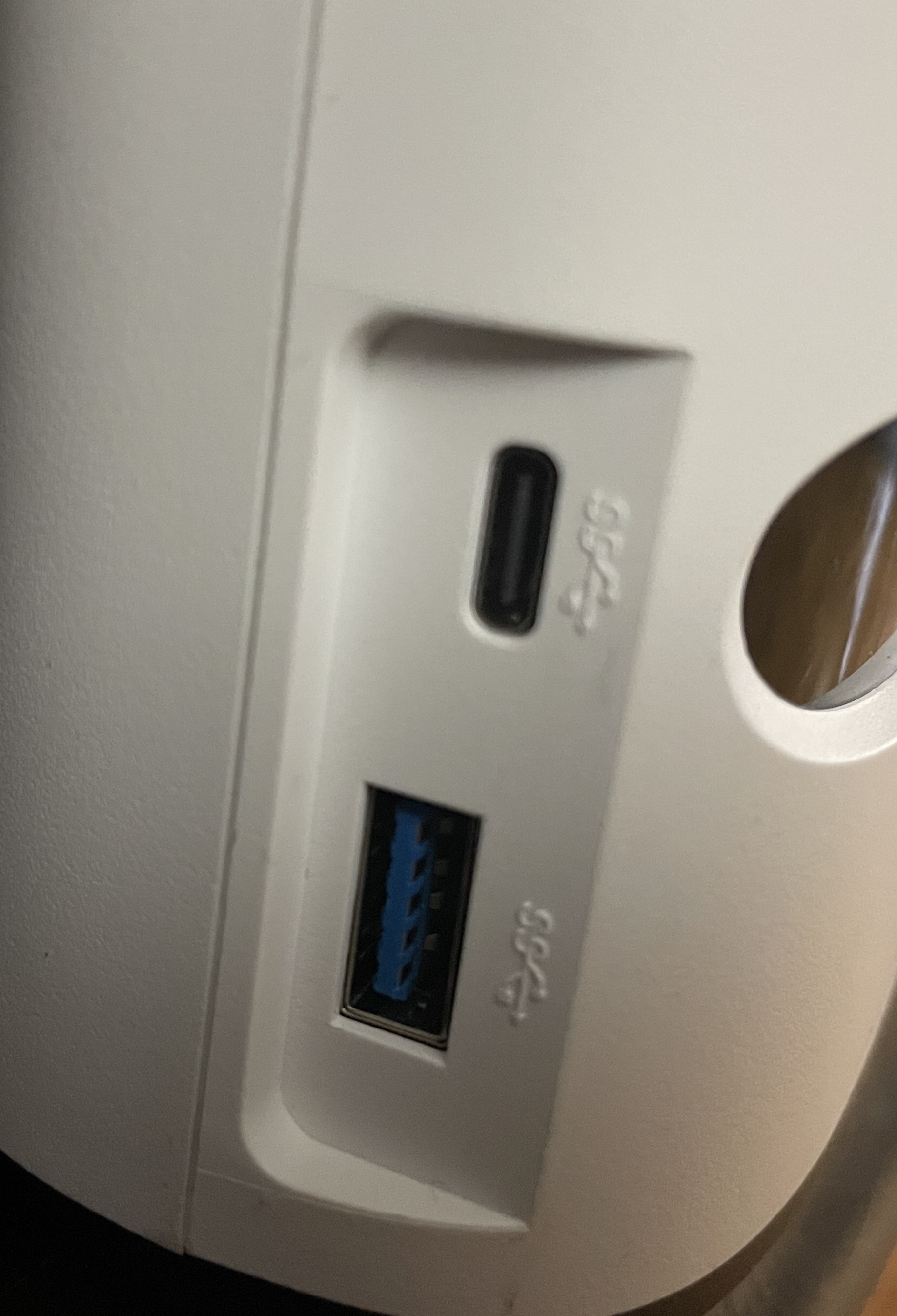
This is Bell’s new Whole Home 4000. This is the piece of gear that drives your telephone service, provides WiFi and TV. On the back it has a 10Gbps Ethernet port so that you can get fast speeds from Bell’s services. My plan was to use PPPoE passthrough to connect to this via my ASUS ZenWiFi AX XT8 mesh router as I never, ever use my ISP’s gear to power my home network. What PPPoE passthrough means that I use my PPPoE credentials on the ASUS mesh router to connect to the Bell network. Essentially passing through the Bell hardware to connect to the Bell network. I am doing this because unlike Rogers modems, Bell modems do not have a proper bridge mode which sucks for those of us who want to use our own gear. This requires you to get your PPPoE login information from the Bell tech, which he was all too happy to hand over. But if you can’t get it from your installer, you can get it via your MyBell account. If you’re interested in the technical details about how I set this up, I’ll be covering that in a separate article.

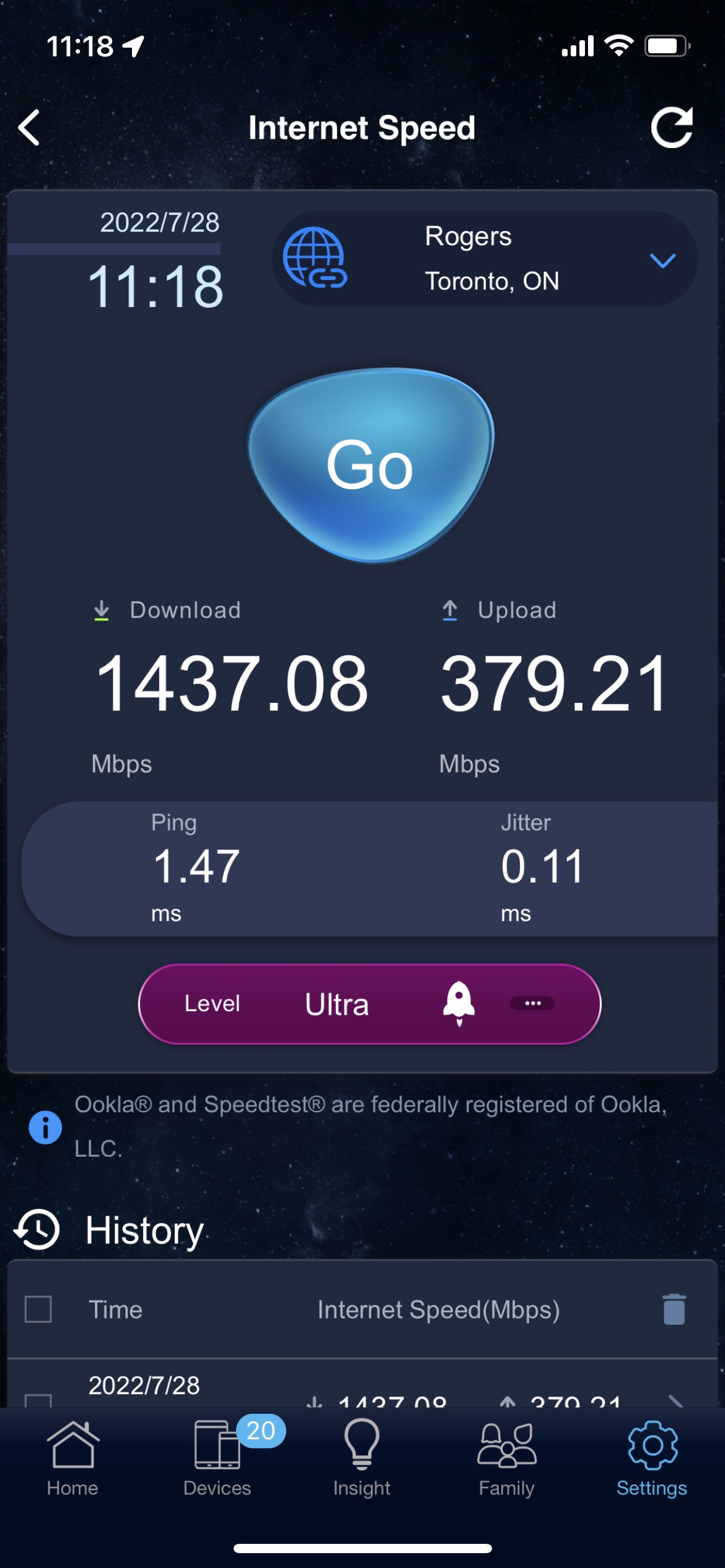
Once I did that, this is the speed I was getting from the Bell hardware:

Since I was paying for 1.5 Gbps down and 940 Mbps up, I was getting more than I pay for. However, this wasn’t what I getting from the ASUS XT8:

Now PPPoE does have some overhead, thus I was aware I would lose some speed by using PPPoE passthrough as a lot of consumer routers don’t do a good job of handling high speed PPPoE connections. But only getting just under 400 Mbps was pretty bad. I did some checking inside my router settings and found that I had QoS turned on. That can seriously mess with the speeds that you get. I turned that off and I got this:

This is better, but the upstream isn’t where I want it to be. I did some Internet searches and discovered that this seems to be an issue with ASUS routers where they can’t go much above 500 Mbps when using PPPoE. So I reported this to ASUS and provided my router configuration and logs to them so that they can investigate and tell me what if anything I can do to fix this. Or ASUS just fixes this in the form of a firmware update. But even with these speeds, the upstream speed is about 16 times faster than what I was getting with Rogers. So it is still a win. But I want more. One thing that I will point out are the ping times and the jitter. The ping time is insanely low. It’s one fifth of what I was getting with Rogers. That means that for gaming, Zoom or Teams calls, my wife and I will get great performance. In terms of jitter, which is a measurement of the variation or inconsistency of your ping speed, or put another way how consistent your ping speed is, it’s insanely low as well. Far lower than what I was getting with Rogers. Which again means great performance for gaming, Zoom, or Teams calls.

The only downer on this whole experience was the fact that I can’t use the FibeTV app which if you look at my story about the ordering process was slipped in. Apparently I have to wait until I get a Bell account number to activate that according to the two Bell reps that I spoke to. And that may take until late next week to happen. That really seems dumb and Bell really should do something about that. But I will report back on that when I get that working.

The last thing that I will cover is cancelling Rogers. To my surprise, they didn’t put up much of a fight. And they sent us a Canada Post return label to allow us to return our Rogers hardware. It was all very civilized and a total non-event.

I’ll continue to keep you posted in terms of my progress with Bell including getting my first bill to see if they do anything shady, and getting the FibeTV app working. Stay tuned for that.

A Quick Update About My Efforts To Dump Rogers For Bell

Posted in Commentary with tags , on July 20, 2022 by itnerd

This update centres around this comment I made in my last update:

The person who I got on the line tried to modify my order, but couldn’t do that. Thus he claims he was forced to create a new order. But what sucks about this is that he also couldn’t cancel the order that I put in online, and I would have to call back in tomorrow or later tonight to cancel the order. I question why Bell doesn’t have a way to nuke the order themselves and force the customer to do it. In any case, I’ll be calling them tomorrow and I will let you know how that goes.

So I called into Bell this morning, and according to the rep that I spoke to, apparently the order “isn’t being recognized by the system. So It will be automatically deleted.”

So why am I calling in precisely? And why doesn’t the rep that I spoke to yesterday know that? Assuming that what was told to me was accurate.

But it gets better. The rep that I spoke to said “When orders are entered online, there’s a high chance that they won’t go anywhere. Thus customers will wait for an install that will never happen.”

Assuming that the above statement is correct, it sounds really dumb. Why have the ability to order online if it doesn’t work a lot of the time? That to me makes no sense. To me it seems that either Bell’s systems are broken, or this is another way to get you to call in so that they can upsell you to death, or both. But the good news is that I took the opportunity to confirm that my install for next Thursday is still on. At least as I type this. My wife is expecting something to go sideways on that front because it’s Bell and she has no confidence in them. But what gives me a small amount of hope is that later in the morning, I got an automated call from Bell confirming that install was still on track.

Normally I would be holding my advice for Bell till I got through this process. But here’s one piece of advice for them in the here and now. They need to ensure that their customers can place orders via multiple channels in a friction free way. If they want to speak to a human (and get upsold till the cows come home), they should be able to do that. If they don’t want to speak to any humans at all and order online, they should be able to do that. And regardless of the channel that they choose, it has to work 100% of the time. That alone would improve how customers perceive them. Especially these days where I am guessing that they are getting customers from Rogers at a tremendous rate.

You might want to get on that Bell.

A Follow Up To Yours Truly Dumping Rogers

Posted in Commentary with tags , on July 19, 2022 by itnerd

After my latest Rogers outage combined with the nationwide outage that they had, my wife and I had had enough of dealing with Rogers. The reason is that my wife and I work from home and reliable Internet and telco services is a must for us. So far, not counting the nationwide outage, we’ve lost Rogers services four times this year. Sometimes for as long as half a day. That doesn’t meet the bar when it comes to reliability. Thus we made the call to go to Bell. Now I will admit that we did have a very negative experience trying to move to Bell recently. But at this point, I was going to try again because staying on Rogers is no longer an option. And I say “I” because this was now my problem to solve as my wife doesn’t want to deal with Bell because what happened the last time.

Now I started out with ordering online again. I chose Internet and home phone as that is all we need, and we’re taking this opportunity to dump TV as we don’t watch TV via Ignite TV anymore. The package would have cost us $167 a month which is a savings from the $220 that we’re currently paying with Rogers. So I put the order in after picking an install date which ended up being this Friday. When I got the email, I noticed two things right away. The first is that the contact number which I typed in was converted to 999-999-9999. Now I know that I didn’t type that in as I screen recorded everything that I did. So clearly the Bell system changed that. The second thing was that they issued a new number for the home phone. That’s a #fail as I wanted my existing number ported from Rogers. Thus I was forced to call into Bell.

Now I am convinced that Bell does this so that you are forced to call in so that they can upsell you to death. So my plan was to get them to focus on sorting out the issue with the order out first, and then deal with the upselling later. That plan worked for the most part. Let me give you a play by play:

  • The person who I got on the line tried to modify my order, but couldn’t do that. Thus he claims he was forced to create a new order. But what sucks about this is that he also couldn’t cancel the order that I put in online, and I would have to call back in tomorrow or later tonight to cancel the order. I question why Bell doesn’t have a way to nuke the order themselves and force the customer to do it. In any case, I’ll be calling them tomorrow and I will let you know how that goes.
  • So once he sorted out the order which included porting my existing home phone number from Rogers, and putting in proper contact info for the installer, the upselling began. He tried to get me to add on TV as well as move our cell phones from Telus to Bell under the guise of the more services that I had with Bell, the more money I would save. Or put another way, they want to get you to spend more of your money and you “save” money. I wasn’t interested in either of those options as we won’t have all our telco services with one provider as I outlined here. What however he did offer was a bump to 1.5 Gbps down/940 Mbps up Internet service for $49.95 a month for 24 months. After that the price goes up to 84.95 a month. This is down from their list price of $134.95 which is the list price on the Bell website. I also went for a better home phone package with North American calling and services like call waiting and caller ID for $56.56 a month.
  • My install date was moved to next Thursday morning.

Total time invested: 44 minutes on the phone call. 10 minutes on the web.

Now there were some sneaky things that Bell did. The first one is that they added on the Bell FibeTV app to the deal. Now you’re likely saying “didn’t you just say that you didn’t want TV service?” I did. But they slip it in as almost a “oh by the way” sort of thing that they are hoping that you won’t notice. But when you look at the email that they send over confirming the order, you’ll notice this:

So the Fibe TV app with Crave TV which is Bell’s streaming service is $30 a month. But you get a $20 credit for six months, and a $4.95 credit for having two Bell services, which means that it drops the price to $10 a month. Why is this important? Let’s look at what I’m being charged for the home phone:

If you look at the two discounts, you’ll see that they mention that these are discounts for having three Bell services. As in TV, Internet, and home phone. So basically they’re forcing you into using the Bell TV app so that you get some “savings”. I guess it helps to boost their TV and Crave TV subscriber numbers and make them a couple of extra bucks. Especially after the six month promo for Crave TV expires. I’ll be nuking the Bell TV app before the new year after I’ve binge watched a bunch of things and I’ll eat the $20.49 in “savings” that I am getting now.

Let’s get to the final price. With all of the “savings” accounted for I am paying $116.51 a month. This is way less than the $222 a month that I was paying with Rogers. But that Rogers price includes TV as I am not “officially” getting TV with Bell. And the price will go up in 2 years time. But at that time I will call in and go through their retentions department to get a better deal.

Here’s a free pro tip: Everyone should call their telco to cut a better deal with them every year or two and be prepared to move telcos if they don’t as that’s the only way to save money on your telco bill.

My take on this is that some of what you see above falls under the category of being sketchy. I say that because the agent that I spoke to is clearly trained to focus me on the price of the package that you get and not look too closely on the details. And if you question anything, they refocus you back on to the price of the package. While I will admit that the price that this guy quoted to me on the phone is what is on the email, the way he got to that price doesn’t sit too well with me. And this is another thing that doesn’t sit well with me is this:

So Bell has the right to increase your price with 30 days notice. Maybe as that part of the above paragraph says “if required”. Thus the way I read this is that Bell will increase your bill at some point. Another reason for me to be ready to call in to cut a new deal if required.

As mentioned above, my install is set for next Thursday and I will update you on how that goes. Along with how detailing how I tie in Bell’s services into my network because there’s zero chance I will use Bell’s hardware to power my home network. At the same time, I have a feeling that Rogers will be giving us a call as we’re porting our home phone number away from them which will trigger them to perhaps call and figure out how to retain us as customers. I’ll update you if that happens as well.

Bell introduces 5G+

Posted in Commentary with tags on June 15, 2022 by itnerd

Bell today announced the network readiness of 5G+, to be deployed across the country on Canada’s fastest and most awarded 5G wireless network, and offering unprecedented mobile data speeds.

In 2021, Bell secured prime 3500 MHz spectrum in urban and rural markets across the country, adding high-capacity airwaves critical to the evolution of Bell 5G on its network. Bell is now poised to deploy 3500 MHz wireless spectrum and unleash the next phase of 5G advancement. Bell plans to continue its network leadership position and deliver to customers the fastest 5G+ network in Canada, with its world-class network technology strategy and prime spectrum position.

Optimized for demanding apps and services, 5G+ is the fastest mobile technology yet in Canada. From gaming to streaming, to video conferencing, everything is expected to be faster and more responsive with peak theoretical download speeds of up to 3Gbps in select areas.

Bell 5G customers with compatible devices will soon have access to 5G+ capabilities, starting with those in Toronto. For all other 5G customers, until 5G+ is available in their area, they can continue to enjoy 4G, LTE and 5G on Canada’s best network. Bell will work towards offering 5G+ coverage to approximately 40% of the Canadian population by the end of 2022.

Bell Expands Their Fibre Rollout To London Ontario

Posted in Commentary with tags on June 10, 2022 by itnerd

Bell continues to aggressively expand their fibre network rollout by announcing that they will bring all-fibre broadband access to approximately 160,000 additional locations in London by 2026. This expansion will bring speeds of up to 1.5 Gbps and access to Bell services such as Fibe TV to those customers. 

I have to say that both Bell and Telus have really been pushing the accelerator on their fibre rollouts. That in my mind will put them in the position of being the leaders in Internet access in Canada as they will simply have the fastest networks out there, which will attract customers to them and away from the competition such as Rogers. I say that because while Rogers has made some recent announcements, Bell and Telus both have quite the head start. Thus I have difficulty seeing how Rogers can catch up to them in a rapid manner.

Microsoft Discovers Security Flaws In Android Apps Provided By Canadian Telcos Among Other Telcos

Posted in Commentary with tags , , , , , on May 30, 2022 by itnerd

This isn’t a good look for Rogers, Bell, Freedom Mobile, TELUS and a few other telcos. According to BleepingComputer, Microsoft has found some serious vulnerabilities in Android apps that they distribute:

The researchers found these vulnerabilities (tracked as CVE-2021-42598CVE-2021-42599CVE-2021-42600, and CVE-2021-42601) in a mobile framework owned by mce Systems exposing users to command injection and privilege escalation attacks.

The vulnerable apps have millions of downloads on Google’s Play Store and come pre-installed as system applications on devices bought from affected telecommunications operators, including AT&T, TELUSRogers CommunicationsBell Canada, and Freedom Mobile.

“The apps were embedded in the devices’ system image, suggesting that they were default applications installed by phone providers,” according to security researchers Jonathan Bar Or, Sang Shin Jung, Michael Peck, Joe Mansour, and Apurva Kumar of the Microsoft 365 Defender Research Team.

“All of the apps are available on the Google Play Store where they go through Google Play Protect’s automatic safety checks, but these checks previously did not scan for these types of issues.

“As it is with many of pre-installed or default applications that most Android devices come with these days, some of the affected apps cannot be fully uninstalled or disabled without gaining root access to the device.”

Well, that’s not good. But these apps have been fixed. Sort of. Microsoft reached out to the relevant parties and these vulnerabilities were fixed. But the at-risk framework is likely used by numerous other service providers who may still have apps out there that aren’t fixed. Which means that threat actors can still launch attacks.

To protect yourself, search for the package name com.mce.mceiotraceagent on you Android device. If you find it, delete it ASAP if you can. I say that because you might need root access to delete it.

Bell and Amazon Web Services bring 5G Edge Compute to Canada

Posted in Commentary with tags on April 26, 2022 by itnerd

Bell today announced the launch of the first public multi-access edge computing (MEC) with AWS Wavelength in Canada. Building on Bell’s agreement with AWS, announced last year, together the two companies are deploying AWS Wavelength Zones throughout the country at the edge of Bell’s 5G network starting in Toronto.

Bell Public MEC with AWS Wavelength embeds AWS compute and storage services at the edge of the Bell 5G network, closer to mobile and connected devices where data is generated and consumed. This enables software developers and businesses to take full advantage of the high speed and low latency of Bell’s 5G network and the cloud with AWS to build innovative, low- latency solutions that leverage real-time visual data processing, augmented/virtual reality (AR/VR), artificial intelligence and machine learning (AI/ML), advanced robotics, and much more.

Network infrastructure is the backbone for Canadian businesses today as they innovate and advance in the digital age. Organizations across retail, transportation, manufacturing, media & entertainment and more can unlock new growth opportunities with 5G and MEC to be more agile, drive efficiency, and transform customer experiences.

Optimized for MEC applications, AWS Wavelength deployed on service providers’ 5G networks provides seamless access to cloud services running in AWS Regions. By doing so, AWS Wavelength minimizes the latency and network hops required to connect from a 5G device to an application hosted on AWS. AWS Wavelength is now available in Canada, the United States, the United Kingdom, Germany, South Korea, and Japan in partnership with global communications service providers.

Creating an immersive shopping experience with Bell 5G

Increasingly, retailers want to offer omni-channel shopping experiences so that consumers can access products, offers, and support services on the channels, platforms, and devices they prefer. For instance, there’s a growing appetite for online shopping to replicate the in store experience – particularly for apparel retailers. These kinds of experiences require seamless connectivity so that customers can easily and immediately pick up on a channel after they leave another channel to continue the experience. These experiences also must be optimized for high- quality viewing and interactivity.

Rudsak worked with Bell and AWS to deploy Summit Tech’s immersive shopping platform, Odience, to offer its customers an immersive and seamless virtual shopping experience with live sales associates and the ability to see merchandise up close. With 360-degree cameras at its pop-up locations and launch events, Rudsak customers can browse the racks and view a new product line via their smartphones or VR headsets from either the comfort of their own home or while on the go.

Bell Public MEC with AWS Wavelength is now available in the Toronto area, with additional Wavelength Zones to be deployed in the future.