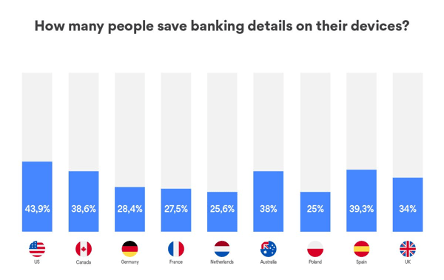
The latest survey by NordVPN has shown that 38.6% of Canadians save banking details on their devices to use them on shopping apps and websites later. While many customers go for this option out of convenience, cybersecurity experts warn to be careful, especially during the shopping season, as not all methods are equally safe.
People spend billions of dollars during Black Friday, Cyber Monday, and pre-Christmas time, trying to grab the best deals online and save a buck. In 2020, during Cyber Monday, customers in the US spent a whopping $10.8 billion dollars. 23.2% of annual sales in Canada fall on the Black Friday and Cyber Monday week. No wonder that hackers and scammers want to have their share by stealing customers’ banking details.
“Hackers take advantage of users who use unsecure ways to store banking information on their devices. A person who saves his credit card details in an Apple Pay mobile wallet is much safer than one who keeps a photo of his credit card in the gallery or notes on his phone. And the difference between those options is huge,” says Daniel Markuson, cybersecurity expert at NordVPN.
The habit of saving payment details is similar around the world
38.6% of Canadians save their banking information on their devices. The habits are pretty similar around the world. NordVPN’s research has shown that almost half of Americans (43.9%) store their banking information on their personal devices, followed by Spaniards (39.3%), and Australians (38%). While the Polish (25%) and Dutch (25.6%) care about their credit card safety the most among the surveyed countries, the percentage of people risking their security is still high.
Ways to save banking details on your device and their weaknesses
There are several ways people can save payment card details on their devices:
- Notepads or photos
Some people choose to store their payment details for shopping online by just taking a photo of their payment card or writing down the payment card and CVV numbers in the notes application.
Weaknesses: While this option is easy and doesn’t require any technical skills, it is the riskiest when it comes to the security of users’ banking details. The research shows that 25% of Canadians don’t lock their phones. This means that even a random stranger could access their photos, notes, emails, and contacts without any additional effort if they got to an unprotected device.
“Moreover, the device’s data can be compromised even without the device being stolen. Countless number of apps can access your photos and notes, some of them may be malicious,” adds cybersecurity expert Daniel Markuson.
- Browser
One of the most popular ways to store payment information locally is in an internet browser (e.g. Google Chrome, Mozilla Firefox, etc.), as this allows users to autofill banking details while shopping online.
Weaknesses: This option may be safer than just taking a picture of your credit card and may help to save some time, but experts say it is often targeted by cybercriminals.
“The biggest issue is that criminals can create malware which will steal all the autofill information you save in your browser, including your credit card details. One nameless malware like that was analyzed by NordLocker at the beginning of this year. The analyzed Trojan-type malware infiltrated over 3 million computers and stole 1.2 TB of personal information, including around 28 million credentials stolen from various internet browsers,” Daniel Markuson explains.
- Mobile wallets
Mobile wallets (such as Apple Pay, Samsung Pay, Android Pay) may be the safest way to keep your banking details on your device. Those applications usually have strong encryption and ensure the safety of their users.
Weaknesses: There are a lot of mobile wallets and other financial encryption tools out there, but it is important to pay attention to their security standards. Make sure you choose the safest option by researching it before putting in your payment details.
How to shop online safely
“In general, when it comes to shopping online, make sure you trust the security standards of the company that you are giving your credit or debit card details to. Because once the details are given, the chance of them being leaked or misused is greater,” says Daniel Markuson from NordVPN.
- Research retailers online. Never rush to make a purchase without doing proper research on the retailer. Check the reviews on various platforms and only then start spending money. Make sure there’s a lock symbol next to the URL, indicating that the website is secure.
- Use strong passwords. Protect your accounts with complex passwords that contain upper-case and lower-case letters along with numbers and special characters.
- Don’t click on suspicious links. Closely inspect every email you receive and never click on any links. Hackers can impersonate online shops and redirect you to malicious websites.
- Avoid storing your payment information on browser. Even though this is not a bulletproof tip, it’s safer to type your credit card information manually.
- Use virtual cards. Some banks also offer temporary virtual cards you can use in order to shop online without any risks.
- Use a VPN. A virtual private network encrypts your traffic and hides your IP address, improving your online security and privacy. If you make purchases on public Wi-Fi, using a VPN is a must. Hackers can create a fake hotspot, infect your device with malware, and steal your credit card details.
2021: Year In Review
Posted in Commentary on December 31, 2021 by itnerdAt this time of year I like to look back over the past 365 days and pick out the stories that really got my attention. This year has been only marginally better than 2020, which is another way of saying that the focus on the entire planet was understandably elsewhere. Having said that, here’s what happened in tech this year:
Log4j: This popped up at the end of the year and sent the entire planet scrambling to patch everything. Seeing as threat actors are taking advantage of this, you can fully expect that this will still be a story well into 2022. In the meantime, make sure that you’ve patched all the things so that you don’t get pwned.
Speaking of Getting Pwned, The Pwnage This Year Was Beyond Epic: It almost seemed that not a day went by without some company being pwned by hackers. Be it ransomware gangs or other threat actors wanting to cause havoc, make a buck, steal data, or sometimes all of the above. And nobody was immune. Even an Apple contract manufacturer got pwned with data leaked, specifically the schematics of what turned out to be the new MacBook Pros. This will continue into 2022. Mark my words.
Apple’s Continued Fall From Grace: Whether it was the lack of quality of their software, inability to deliver features on time, their employee issues, threats in terms of anti-trust on multiple fronts, lawsuits, AirTags being used for evil purposes, Apple’s horrific misadventures in India, and their issues with attempting to crack down on CSAM, Apple had a multitude of problems to deal with. And it is unlikely to end in 2022 unless they really get their act together.
Speaking About Apple, How About Those New M1 Pro And M1 Max Processors?: While Apple did have its issues this past year, putting out processors that blew people’s minds wasn’t one of them. The new M1 Pro and M1 Max processors that popped up in the new MacBook Pros blew the doors off of anything made by Intel. And while Intel has new Alder Lake processors which are starting to ship, one has to wonder if they will come anywhere close to the power to watt ratio that Apple’s processors currently do? That will be something to watch in 2022.
Speaking Of New Processors, How About That Tensor Processor?: Google released the Pixel 6 phones with a in house designed Tensor processor which is actually quite good and allowed the Pixels to do things that no other Android phone can do. In short, they are trying to do what Apple has being doing with their A series of processors for years. It’s an interesting strategy, and if I am Qualcomm, I’d be a wee bit worried.
Facebook Becomes Meta: Facebook is getting hit from all sides with all manners of bad press. So I guess that Zuckerberg and company thought a name change was in order. Thus they are now known as Meta as they want to expand into the metaverse. Which I guess is the next logical place to go as in the real world they are the most hated company around.
Tile Sells Itself To A Company With Less Than Honourable Intentions: I guess that AirTags finally was the last straw that made Tile sell itself to a company called Life360. This is a company who sells all sorts of location and other data to anyone who will buy it and seemingly makes no apologies for doing so. Which means that if you’re a Tile user, you’re data will be sold to anyone who wants it. Which means by extension, you have a decision to make. Are you okay with that or should you dump all your Tile trackers and spring for AirTags or perhaps take a look at Chipolo trackers? It will be interesting to see what happens on that front in 2022.
The Rogers Family Drama: The Rogers family fought it out in public for all to see over who would control Rogers Communications. It was kind of like the HBO show “Succession” except that the family patriarch is already dead. I have to admit that it wasn’t a good look for Rogers Communications or the family. And I can’t imagine how much morale suffered if you’re a Rogers employee who had to see this play out. But in the end, Edward Rogers got his way and was able to fire Joe Natale as CEO and install the people he wanted to run the company. Now let’s see in 2022 if all this turmoil allows them to buy Shaw Communications and allow Rogers to be competitive with Bell and Telus, which at the moment, they are not competitive with either.
Speaking Of Telcos, Boy Does Bell Canada Customer Service Suck: My wife and I tried to dump Rogers this summer when we wanted to lower our telco bill. But when Bell Canada, who I freely admit have world class Internet products that totally destroys anything that Rogers has to offer, absolutely made a mess of us moving to them because of their absolutely shambolic customer service, my wife and I stayed with Rogers and upgraded to Rogers Ignite instead. And that upgrade went shockingly well and saved us a few bucks too. And this was on top of hearing from lots of my clients, both business and residential that Bell’s customer service is the worst. This is a problem if you’re Bell as if Rogers ever gets their act together and starts offering products that are competitive with Bell, then Bell will be in deep trouble.
And now for some stats. The top ten countries that visited my blog in 2020 are:
In all almost 1.2 million page views were served up this year. Given the year that we all had, that’s pretty good.
And in terms of the top ten stories that were viewed this year:
The top three items are related to scams, which seemed to be something that was a bit of a theme this year as I spent a lot of time writing about scams in 2021. It also highlights that you really need to be careful out there as there are people who are trying to separate you from your identity or money or both. TELUS made some news at spots four and five that unlike fellow telco Rogers was positive. Speaking of Rogers, clearly the fact that a story about moving your email and contacts off their platform is still resonating years after I published that story says something about how the market see Rogers. And I am kind of surprised that a story about Rogers modems from years ago still gets clicks seeing as Rogers is trying migrate people to their new Ignite platform as fast as possible. I can likely say the same thing about my story about Android Auto and Apple CarPlay on my Hyundai Tucson from years ago as honestly, with pretty much every car coming with either or both, we shouldn’t be talking about this anymore. But having said that, my guess is that there are still Hyundai owners who want this functionality in their cars. If that is you, there’s a cheap to free option for Hyundai Canada owners that I wrote about here. My story about Bell having the upper hand against Rogers entering spot number nine illustrates the sort of trouble that Rogers is an and how much work they will have to be competitive in 2022. And finally the SSD swap issues of the M1 from earlier this year illustrates the software quality issues that Apple really, really needs to address ASAP.
Now if you have something that you think that should be on this list, leave a comment with your thoughts. Happy new year (hopefully)!
Leave a comment »